7. Your WordPress Site Got Hacked. Here's What Static Architecture Changes About That.

A few weeks ago, some clients reached out asking for help. Their WordPress sites had been compromised during a wave of attacks tied to a recently discovered vulnerability in WordPress core. We helped with detection, cleanup, and hardening. It was a familiar process, and not a pleasant one.
What struck us wasn't the technical side of the cleanup. It was the question that kept coming up after everything was supposedly fixed: "Are we sure we got it all?" There's no clean answer to that. And that uncertainty is not a failure of process. It's a feature of the architecture.
That's what we want to talk about here.
What Actually Gets Hacked

The conversation around CMS security almost always drifts toward the same conclusions: update your plugins, install a security plugin, enable two-factor auth on the admin panel. That advice is not wrong, but it treats the symptom rather than the condition.
When a WordPress site gets compromised, what's actually being exploited is not the site as a collection of pages. It's the machinery running underneath it: executable server-side code that assembles each page on demand, a database that feeds content into that code, an admin panel accessible from anywhere on the internet, and a collection of plugins and themes from third-party authors running with full server privileges.
Any one of those components can be the entry point. And here's the thing that doesn't get enough attention: the vast majority of WordPress breaches don't come through core. Core is maintained relatively carefully and updated with some discipline. The real risk surface is the set of 20 or 30 plugins installed over the life of the site, each written by a different author, each with its own update cadence, and some of them quietly abandoned. That's not 20 components. That's 20 independent sources of risk that grow as the site gets older.
This produces a maintenance mode that anyone running a CMS-based site knows well. You have to update urgently because the vulnerability is already public. You're afraid to update because something might break. Not updating isn't an option. There's no good move.
What a Static Site Simply Doesn't Have
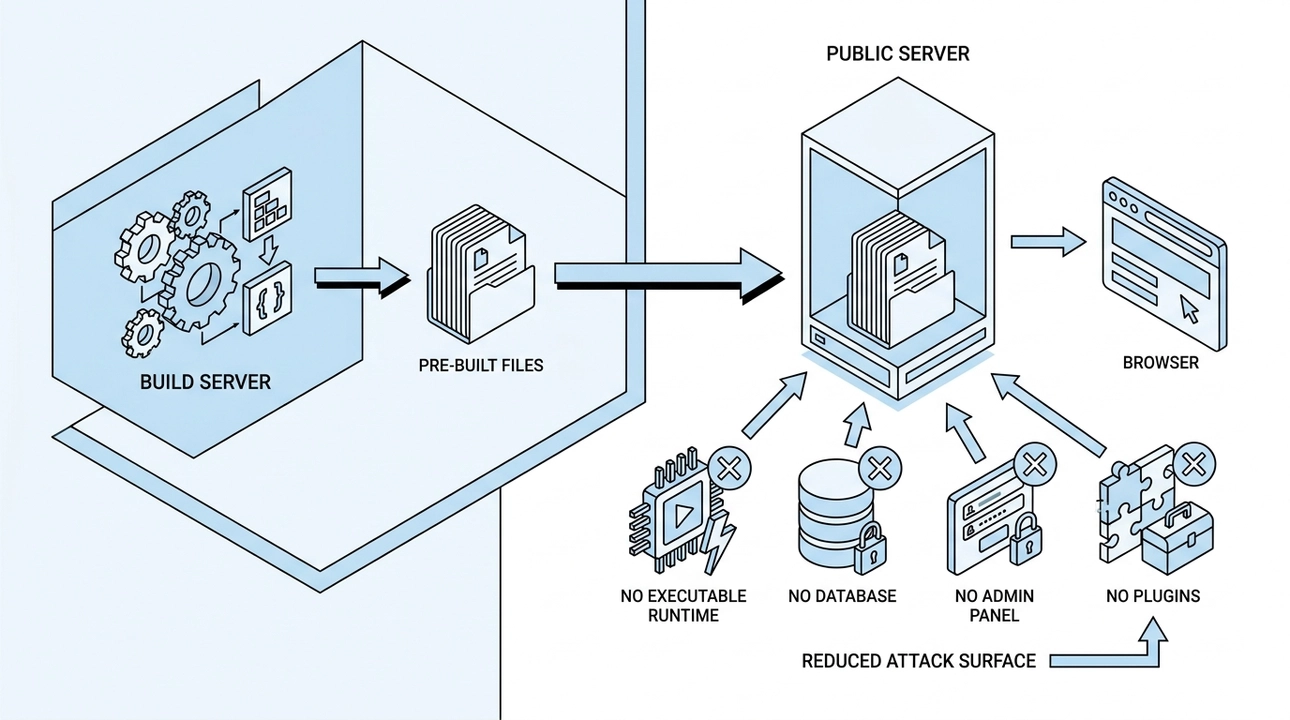
Our architecture works differently, and the security difference isn't a matter of configuration. It's structural.
All pages are assembled once, at build time, before anything reaches a public server. What lives on that server is a set of pre-built files, ready to be delivered to a browser. Nothing is assembled on request. No code executes in response to a visitor.
What this removes from the attack surface is significant:
- There is no executable runtime on the public server. There is nothing to exploit, and nowhere to inject a script that will actually run.
- There is no database. SQL injection, content manipulation through the database, spam links mixed into page content: none of that applies when there is no database to target.
- There is no admin panel exposed to the internet. Nobody is brute-forcing login credentials at 3am because there is no login endpoint to hit.
- There is no plugin ecosystem. No stream of third-party code arriving on your server with full execution rights, no update treadmill, no abandoned plugins accumulating quietly.
We want to be precise about what this means. We are not saying a static site is immune to attack. We are saying that the most common attack scenarios, the ones that hit those clients last month, are not applicable when the target doesn't exist. The attack surface doesn't disappear. It becomes smaller and much easier to understand.
What Recovery Looks Like

The second difference becomes visible after something goes wrong, and it changes the economics of an incident significantly.
A static site's published files are the output of a build process, generated from source code stored in version control. Every deployment overwrites the server entirely from that source. There is no persistent state on the server for an attacker to hide code in across deployments.
If something does go wrong, restoring the site means publishing a known-good version from the repository. That's it. The question "did we get everything?" has a concrete answer because you're not hunting through a server for hidden files. You're redeploying from a source you control and can inspect.
Version control also means the full history of what changed and when is always available. You can see exactly what's different between any two versions. That transparency is not something you configure into a static site. It comes from the way the system is built.
Compare that to the recovery process for a compromised CMS: scanning the server, checking the database, looking for backdoors, restoring from backup and hoping the backup was clean, then sitting with that lingering doubt. The cost isn't just the cleanup hours. It's the uncertainty that follows.
The Part Nobody Is Talking About Yet

There's a relatively new dimension to site security that almost never comes up in these conversations, and we think it matters.
When a site gets compromised and spam links or redirects are quietly injected into page content, the immediate damage is to search rankings and user trust. Search engines see spam on your domain. Browsers start showing warnings to visitors. Positions built over years can drop in weeks, and they recover much more slowly than the site itself gets cleaned.
That's the established story. Here's what's newer: AI systems, the same ones powering the chat interfaces that more and more people use to learn about businesses, read websites too. They index content. They draw on what they find when someone asks about your company or your services.
If your site was compromised for any meaningful period, you have no control over what those systems read during that window, or what they retained. Cleaning up your server doesn't retroactively clean up what an AI system already processed. A single deployment doesn't undo that.
We're not raising this to be alarmist. We're raising it because most site owners aren't thinking about it yet, and it adds a new layer to the cost calculation of a security incident.
What Remains to Protect

Being honest about what a static architecture doesn't solve is part of the point.
The access layer still matters. The hosting account, the domain registrar, the repository, and the deployment credentials are the critical things to protect. Two-factor authentication, limited access rights, and careful control over who can publish changes are all still necessary.
Third-party scripts in the browser are the main remaining way external code ends up on your pages. Analytics, support chat, advertising pixels: these run client-side and are outside the static architecture's control. That's not a reason to avoid them, but it is a reason to add them with intention rather than by default.
External services for forms, search, or comments delegate some responsibility to those providers. Their security is their responsibility, but the important point is that a problem with a form service stays contained to that service. It doesn't become a problem for the entire site.
The difference between this list and the plugin vulnerability list is that this one is short, stable, and doesn't grow on its own. You can manage it. A list of 20 plugins from 20 authors grows by itself and is never fully yours to control.
The Architectural Question Worth Asking
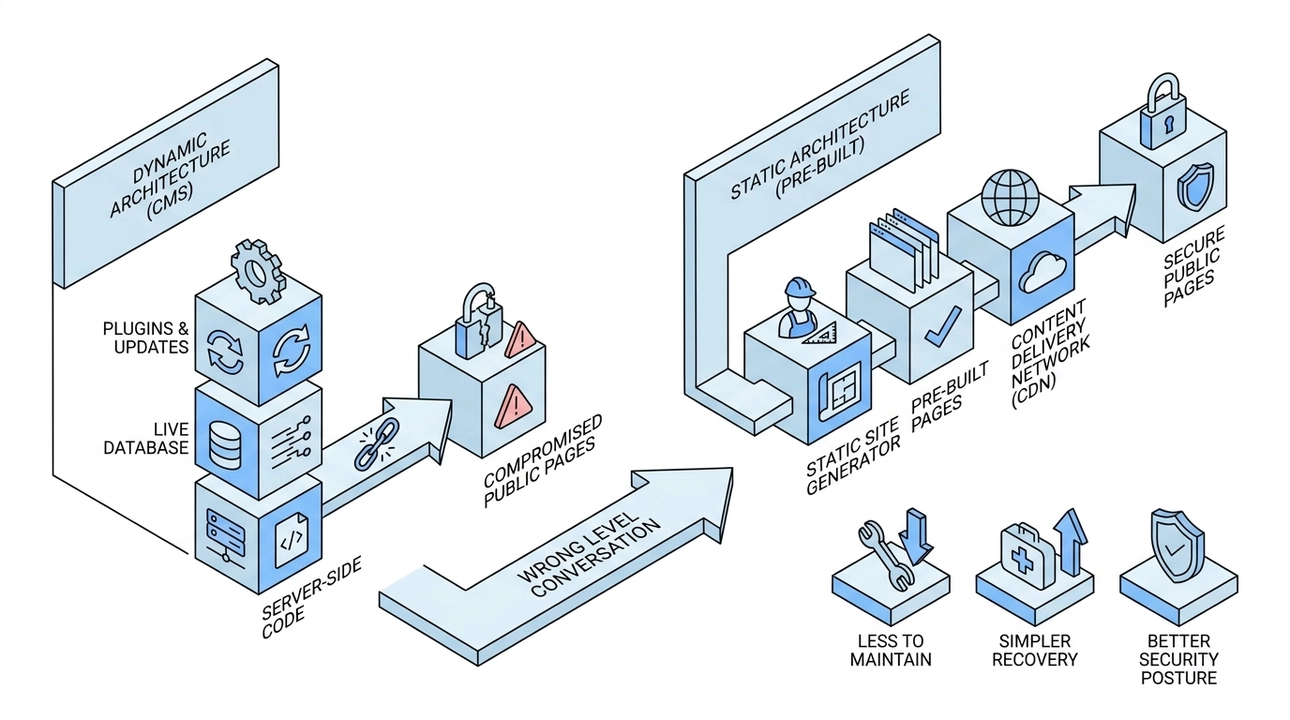
Security plugins and update discipline are not bad advice. They're just the wrong level of the conversation.
If you're running several sites on a CMS and at least one of them has already been compromised, the useful question isn't which security plugin to add next. It's whether the architecture is the right fit for what the site actually needs to do.
A public-facing content site doesn't need a live database assembling pages on demand. It doesn't need server-side code executing for every visitor. Those are choices made years ago because they were the default, and they carry costs that weren't fully visible then.
Removing that machinery from under your public pages doesn't mean giving anything up. For most content sites, it means less to maintain, simpler recovery when something goes wrong, and a security posture that doesn't depend on staying ahead of an endless stream of third-party updates.
That's not a configuration change. It's an architectural one, and it's worth taking seriously.