Moonion
Professional Software Development Team
social
1. Why Your Website Needs to Be AI Ready: What We Learned Rebuilding Moonion From the Ground Up

Your website is no longer just a place people visit. It is a document that machines read, interpret, and quote. And most websites are not built for that.
Not long ago, a business website had one job: look good in a browser and rank reasonably well on Google. Then mobile changed things. Then voice search. Now people are typing questions into ChatGPT, Claude, Gemini, and Perplexity and getting answers without ever clicking a link. Your website is either part of that answer, or it is invisible.
We saw this shift happening and decided to stop talking about it in the abstract. We rebuilt Moonion's own website first, measured what changed, and now we are publishing what we found. This is the first in a series. Every claim in it comes from something we actually did.
The Site Now Has Three Readers, Not One

When we talk about who visits a website, most people picture a person sitting at a desk or scrolling on a phone. That picture is incomplete now. A modern website has three distinct readers: a human, a search engine crawler, and an AI system. Each one reads differently, and each one needs something slightly different from your content.
A person needs speed, clarity, and trust signals. A search engine needs structure, proper metadata, and a clean sitemap. An AI assistant needs clear, readable HTML with content that is actually in the page, not hidden behind JavaScript that executes later or locked inside a database that nothing external can see.
Most sites are optimized for one of these readers, sometimes two. Very few are built for all three at once. That gap is what we call the AI Ready problem, and it is only going to widen as more people route their information-seeking through AI systems rather than traditional search.
We use the term AI Ready to describe a site that serves all three readers well, not just humans or bots, but all three, simultaneously, from the same content.
What We Actually Did at Moonion

Before the rebuild, Moonion's website ran on Next.js with a Parse server, Apollo, GraphQL, and a separate admin interface. It was a reasonable stack for its time. It worked. But it came with real costs: infrastructure complexity, maintenance overhead, multiple moving parts that could each fail independently, and content locked behind a system that required developer involvement to change.
We moved to a static architecture where content lives in plain text files, versioned directly in the project repository. No separate database. No admin application. No GraphQL layer. The content behind our projects, partners, technology stack, team, and 15 years of key project highlights is stored in structured files that can be read by anyone and anything.
The performance numbers tell part of the story clearly. Our Lighthouse score on desktop went from 89 to 100. On mobile, it went from 59 to 100. That is not a marginal improvement. A mobile score of 59 means users on slower connections are waiting. A score of 100 means the page loads fast regardless of network conditions. Speed is not just a technical metric; it is a trust signal. It affects whether someone stays or leaves before they even read a word.
Beyond speed, we removed three infrastructure dependencies entirely. The Parse server, Apollo, and the admin application are gone. Fewer moving parts means fewer failure points, lower hosting costs, and simpler maintenance. The support burden dropped because there is simply less to support.
What AI Ready Actually Means

We want to be specific about this because the term gets used loosely. An AI Ready site is not a site where someone used ChatGPT to write the copy. That is a different thing entirely, and honestly not the point.
Here is what we mean when we say AI Ready:
- The site loads quickly on both mobile and desktop.
- It serves understandable HTML directly. Content is not hidden behind JavaScript that needs to execute before anything appears.
- Content is stored in a structured, consistent way, not scattered or formatted arbitrarily.
- It has proper titles, descriptions, canonical links, and a sitemap.
- AI systems can read the pages and any associated files cleanly, without parsing around obstructions.
- The team or client can update content without creating chaos or requiring a developer for every small change.
- AI is used to configure, develop, check, and populate the product, not to replace the people responsible for the facts and decisions.
That last point matters a lot to us. We use AI assistants in our workflow, tools like Claude Code, Codex, and others. They read the project rules, apply constraints, help fill and check content, and run automated quality checks, locally and in CI. But they work within described rules, under human control. The facts stay with the people. The expertise stays with the people. The AI helps us move faster and more accurately, but it does not replace the developer or the domain expert.
One thing we are deliberate about: we are not tied to a specific model. The model can be replaced. What stays constant is the structure of the rules and the checks. That is where the real value lives.
Why This Matters for Business, Not Just Technical Teams

The argument for an AI Ready site is not purely technical. It is a business argument.
Visibility is the first issue. If an AI assistant is answering questions about companies in your space and your site cannot be read cleanly by that system, you are not in the conversation. You are not quoted, referenced, or surfaced. That absence compounds over time as more of the discovery process moves through AI interfaces.
Content management is the second issue. When content lives in structured files in a versioned repository, updating it is fast, auditable, and does not require a developer to touch a CMS or a database. Our team can make changes that go through the same automated quality checks as code changes. Nothing falls through the cracks. Nothing breaks silently.
The third issue is cost. Infrastructure that does not exist cannot fail or require maintenance. Removing three dependencies from our stack did not just simplify things technically; it reduced real ongoing costs. For a business running multiple projects, that arithmetic matters.
What Is Coming Next in This Series

This post is the opening of a series. We built this out methodically and we are going to document it the same way.
Upcoming pieces will go deeper on each of the elements we have introduced here. We will cover why static architecture delivers speed and why it costs less to run over time. We will show how a client or non-technical team member can manage content without depending on a developer for every update. We will explain how the same content can serve a human reader, a search crawler, and an AI assistant simultaneously without duplication or compromise.
We will also get into the SEO and LLM layer specifically: how structure and metadata help AI systems not just find your content but cite it accurately. And we will look at how this approach extends to more complex product types, including online stores with product catalogs, categories, and transactional content.
Each piece will follow the same rule this one does: no promises without evidence, no architecture without real results.
The Shift Has Already Happened
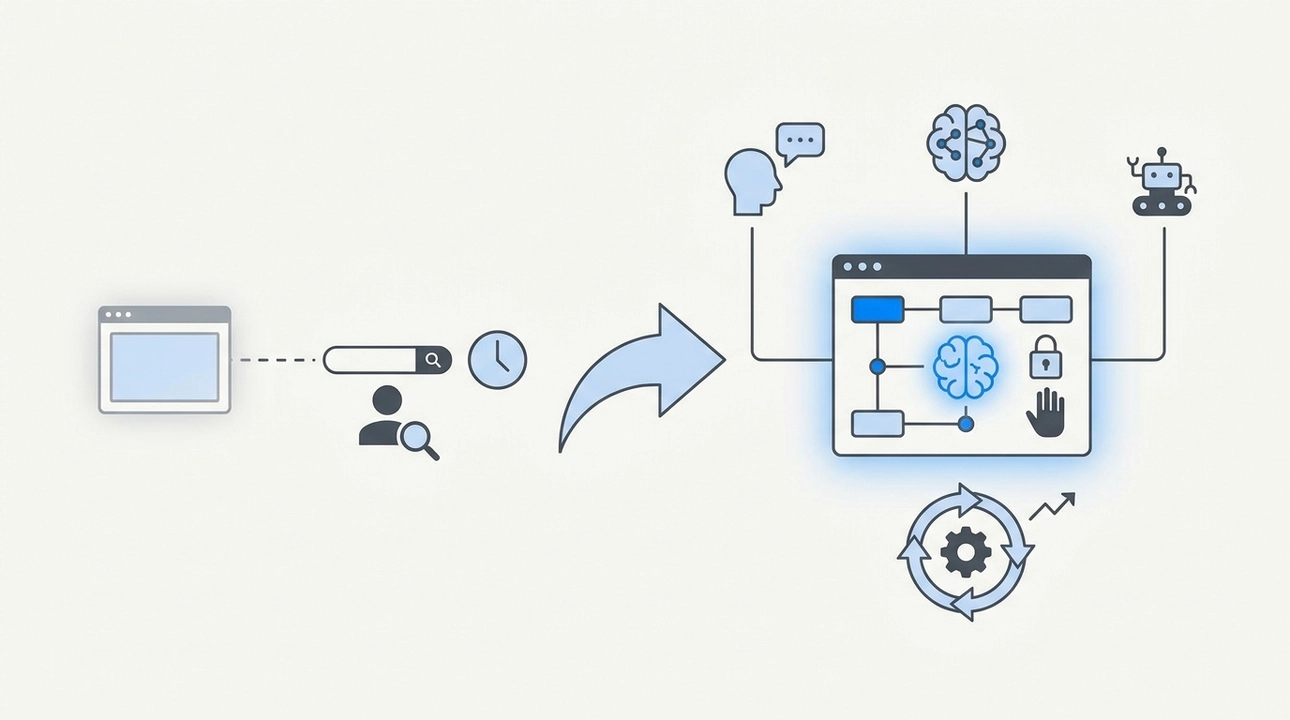
The way people find information has changed, and it changed faster than most websites were updated to reflect it. Search is no longer the only entry point. AI assistants are a primary surface now, and they read the web differently than a human or a traditional crawler does.
An AI Ready site is not a trend to chase. It is a structural investment in being legible and visible across all three of the audiences that matter right now. We know it works because we did it to our own site first, measured every part of it, and built the workflow around it from the inside.
The facts and the decisions stay with the people. The architecture just makes sure both machines and humans can find them.
2. What an AI Ready Product Actually Is (And What It Definitely Is Not)

There is a lot of noise around AI right now. Every product team is adding something, shipping something, calling something AI-powered. And in the middle of all that noise, it gets very easy to confuse activity with discipline. So before we get into what an AI Ready Product is, let us be clear about what it is not.
It is not a product where someone dropped a ChatGPT chat widget onto a page. It is not a site where all the copy was generated by a model and called done. It is not a promise that AI now handles everything while humans step back and watch. Those things are easy to build. They are also easy to break, hard to maintain, and nearly impossible to trust at scale.
An AI Ready Product is about discipline, not magic. That distinction matters more than most teams realize until something quietly goes wrong.
What "AI Ready" Actually Means
The core idea is straightforward: a product designed so that AI can safely assist in development, configuration, content management, and optimization, while humans remain responsible for facts and decisions. That last part is not a disclaimer. It is the architecture.
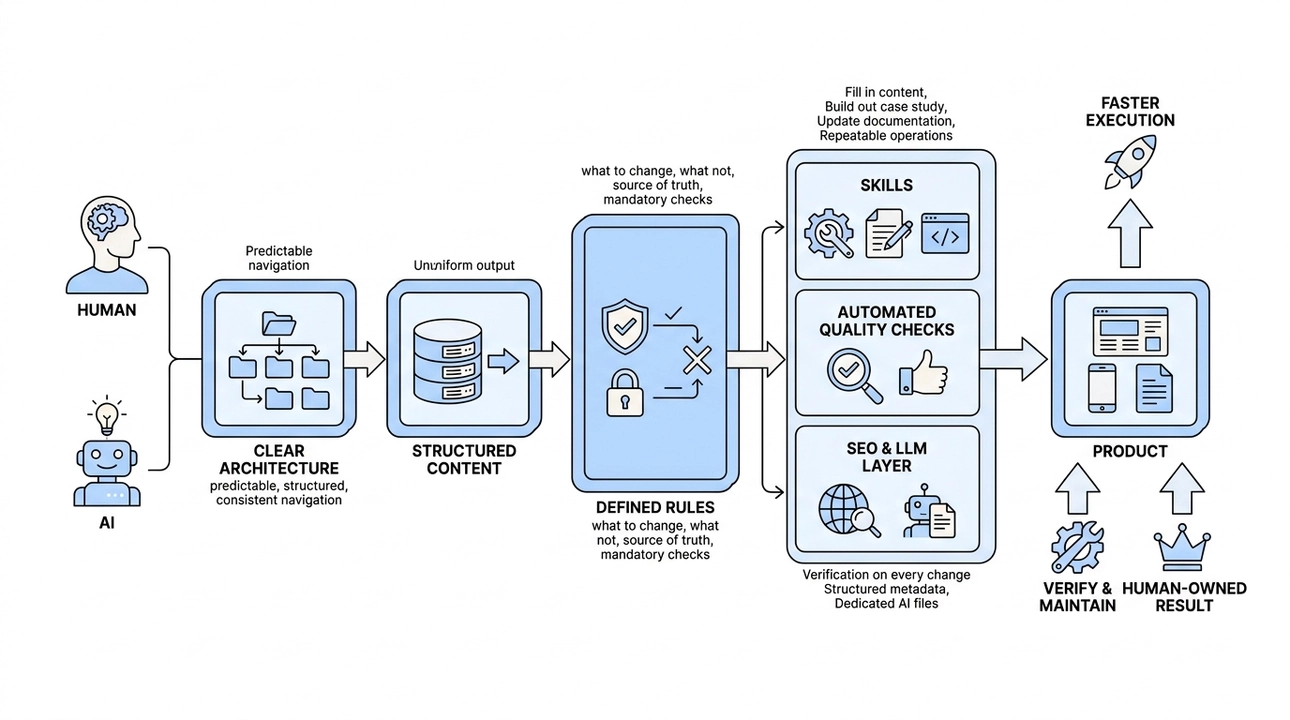
When we talk about AI Ready, we mean a product where the structure itself enforces quality. Where AI is not a shortcut around good process, but a tool that operates within it.
There are several layers to how that works in practice.
The first is clear architecture. The file structure is predictable and consistent, something both a developer and an AI agent can navigate without guessing. When structure is ambiguous, AI makes assumptions. Assumptions compound. Clear architecture removes that risk at the foundation.
The second is structured content. Data lives in a consistent format, not scattered across different systems in different shapes. When content is structured, it is much harder to accidentally break. When it is not, even a small AI-assisted edit can quietly corrupt something three layers deep.
The third is defined rules for AI agents. This is where most products stop short. They give AI access but no boundaries: what it can change, what it cannot, where the source of truth lives, which checks are mandatory before anything ships. Without these rules, AI is just a fast way to make confident mistakes.
Beyond those three, there are skills, which are essentially instructions scoped to common tasks. Fill in content. Build out a case study. Update documentation. These are repeatable, low-ambiguity operations that AI handles well when it has a clear playbook. There are also automated quality checks, the same verification a developer would run, triggered on every single change. And there is the SEO and LLM layer: metadata structured for traditional search alongside dedicated files formatted for AI systems to read cleanly.
The process that ties it all together is simple: humans own the facts, AI helps execute, format, verify, and maintain the result faster than any team could do alone.
One more thing worth saying: none of this is locked to a specific model. Claude, Codex, or whatever comes next, they are interchangeable within this system. The layers hold quality regardless of which tool you are using today. That is intentional. Model dependency is its own kind of technical debt.
How We Built This at Moonion
When we rebuilt Moonion's site, we did not just migrate pages from the old version. We rethought what the product needed to be in order to work reliably with AI assistance over time.
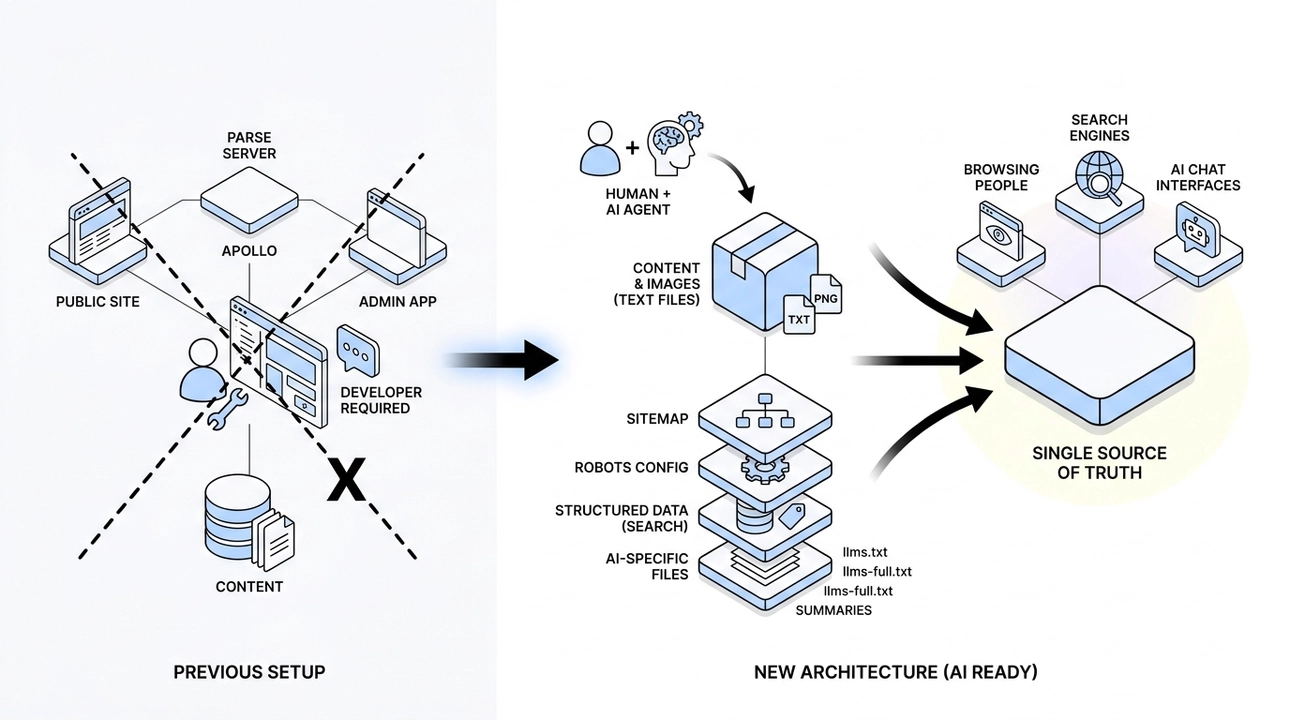
The previous setup had the public site dependent on Parse Server, Apollo, and a separate admin application. Editing content required a developer, or at minimum, someone navigating a custom admin interface. That is a fragile chain. We removed it.
Instead, all content moved into simple text files. Images sit alongside them in the repository. No separate content management layer, no runtime dependencies between content and the tools used to edit it. The combination of a human and an AI agent now handles what the admin application used to handle, with more consistency and fewer moving parts.
On top of that structure, we added the layers that make it AI Ready: a sitemap, robots configuration, structured data for search, and public-facing files built specifically for AI systems. That includes llms.txt, llms-full.txt, and individual summary files for each project and partner.
What that means in practice is that an AI assistant can read the project rules, understand the structure, edit content without inventing facts, and run through the same automated checks a developer would. The same material serves people browsing the site, traditional search engines, and AI-powered chat interfaces, all from a single source of truth.
That last sentence is worth pausing on. In most products, these are three separate concerns managed in three separate ways. In an AI Ready Product, they converge. One well-structured source, readable by everyone and everything that needs it.
What This Gives a Business
The business case for an AI Ready Product is not about moving faster, though you do move faster. It is about predictability.
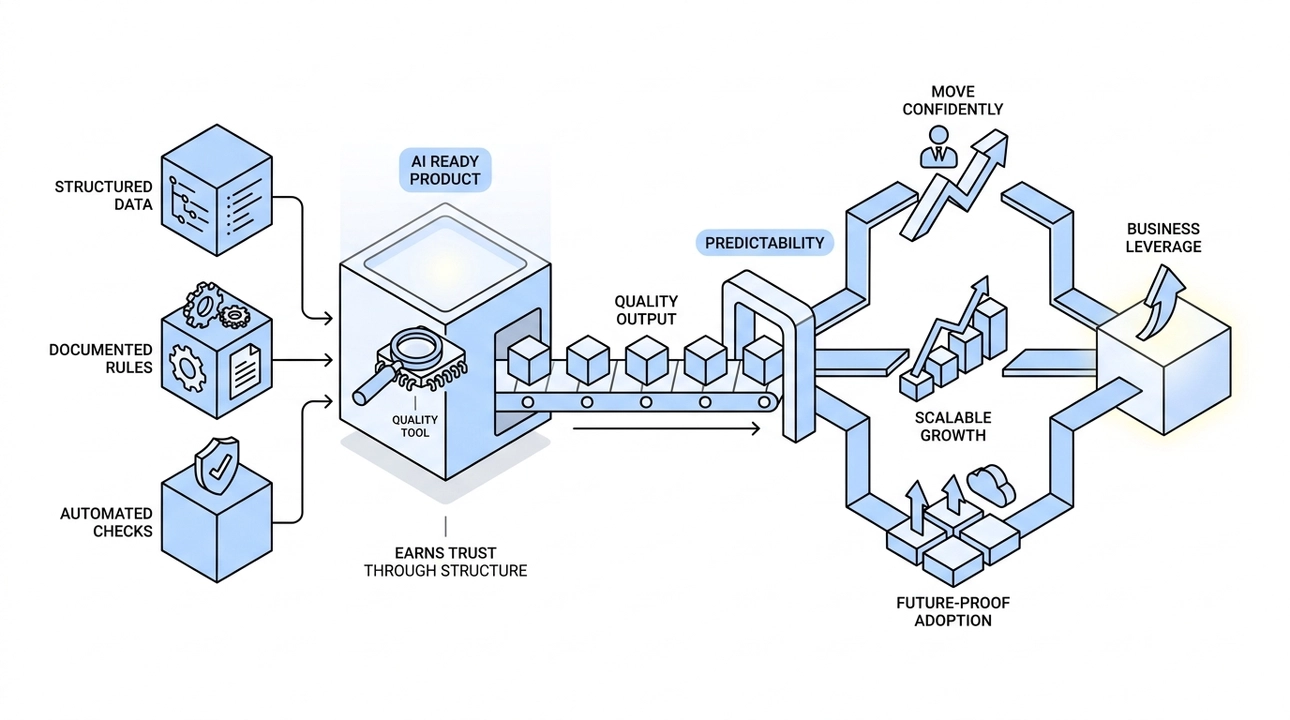
When data is structured, rules are documented, and checks run automatically, you know what you are shipping. AI becomes a quality tool operating inside a defined process, not a generator producing output you then have to manually audit for accuracy. That difference changes the economics of the whole operation.
Teams can update content, build out new cases, and iterate on documentation without worrying that an AI-assisted change will silently break something downstream. The architecture makes that category of error structurally hard to make.
For a business, predictability is leverage. It means you can move confidently, not just quickly. It means the product can grow without the maintenance cost growing at the same rate. And it means that when better AI tools arrive, you can adopt them without rebuilding the foundation they run on.
That is the point of AI Ready. Not to hand control to AI, but to design a system where AI earns trust through structure, not through promises.
We are still building toward that standard ourselves. But every layer we add makes the next one faster to get right. That compounding effect is what discipline actually looks like in a product.
3. We Rebuilt Moonion's Own Site Before Pitching the Approach to Anyone Else

It is easy to promise clients a modern, AI-ready website. It is a lot harder to actually build one and live with the results. So before we brought this approach to anyone else, we ran the experiment on ourselves. Moonion's own site became the case study, and what we learned in the process shaped everything we now offer.
The Stack We Outgrew
The old Moonion site was technically competent. It ran on Next.js, used Apollo GraphQL for data fetching, connected to a backend server, and came with a separate admin interface so non-technical team members could manage content without touching code.
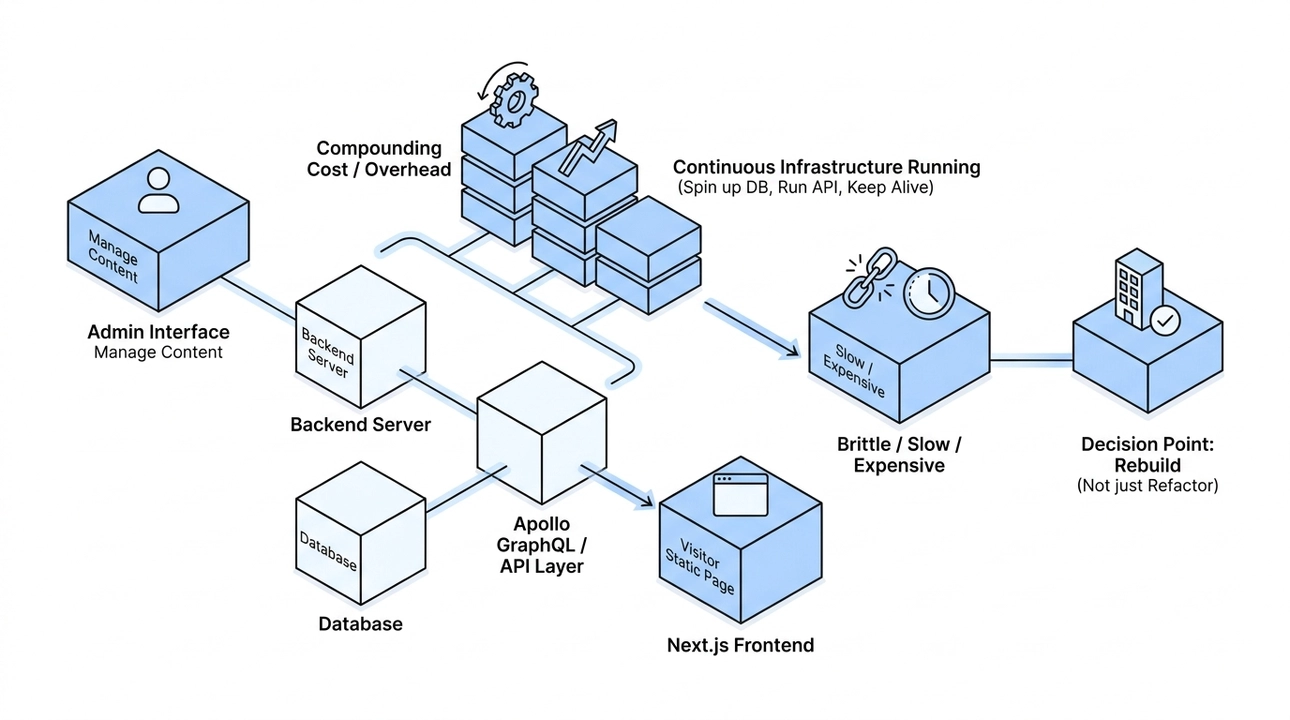
That last part mattered. Not everyone on the team writes code, and they should not have to. When someone needs to add a new project, update a partner description, or swap out a logo, they need a way to do that themselves. The admin interface existed precisely for that reason, and it did its job.
But the cost of that convenience kept compounding. To show a visitor a static page describing a project, the system had to spin up a database, run an API layer, and keep a separate application alive just to serve that content. The full infrastructure was there, running continuously, for what was essentially a content site. Over time, that architecture became slow, expensive to maintain, and brittle in ways that were hard to justify.
Eventually, we realized the architecture no longer reflected the purpose of the site. Instead of maintaining a dynamic platform for mostly static content, we rebuilt it as a static-first website focused on speed, simplicity, and making every page easy for both people and AI systems to understand.
What the New Architecture Is Actually For
The new version of the site was built around a different set of priorities: be fast, be static, be readable by search engines, and be readable by AI systems. Those goals shaped every decision in the migration.

The public site no longer depends on a backend server, a GraphQL layer, or a separate admin application. All public content lives in simple, well-structured text files. That shift alone removed most of the infrastructure that existed purely to support content editing. The site loads faster, costs less to run, and has significantly fewer moving parts that can break.
We also paid close attention to what happens when AI systems try to understand the site. Search engine optimization was only part of it. We added structured data about the organization, wrote clear meta descriptions for each page, kept the sitemap up to date with accurate modification dates, and published LLM-readable summaries for each project and partner. Tools like ChatGPT, Claude, and Perplexity crawl and interpret sites differently than traditional search engines do, and we built with both audiences in mind.
One thing we were deliberate about: we did not rewrite the visible content during the migration. People coming to the site should see the same Moonion they recognized, just faster and better structured underneath. The work was architectural, not cosmetic.
Why the Admin Interface Became Unnecessary
This is the part of the story that surprised us most, and it is also the part most relevant to what we now offer clients.
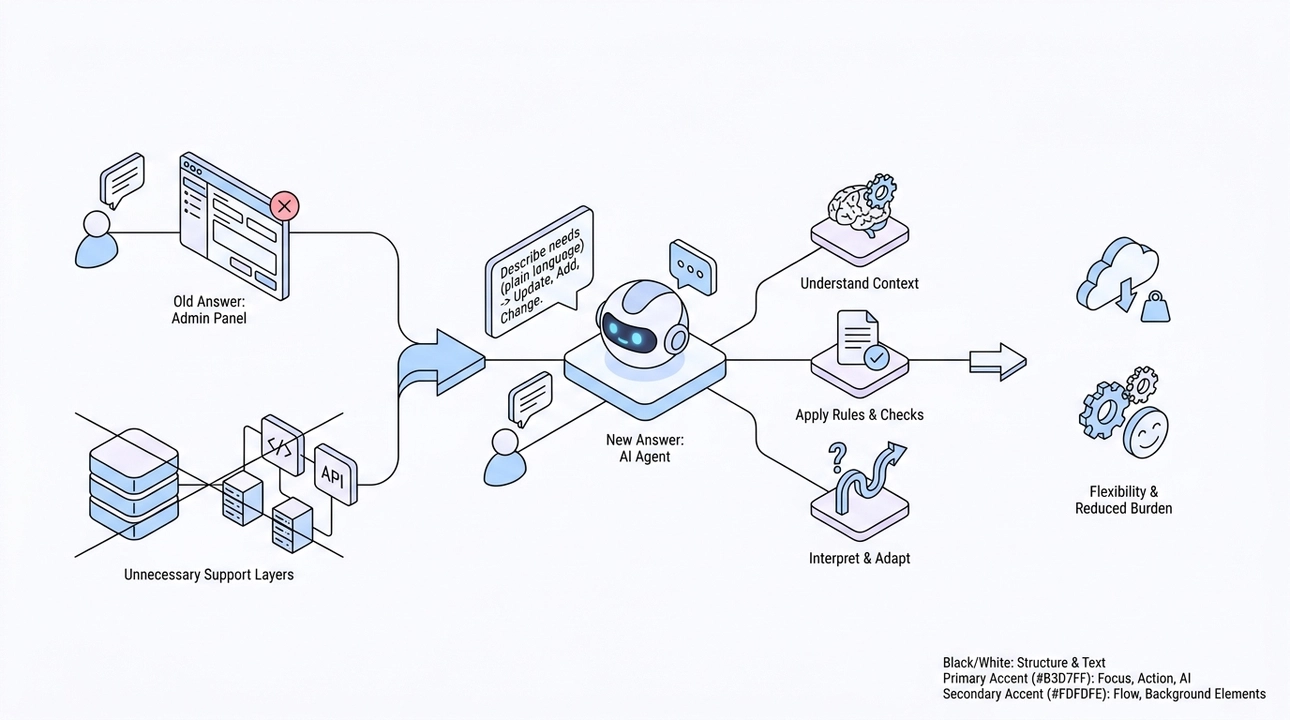
When we decided to remove the admin application, the obvious question was: what happens to the people on the team who are not developers? How do they update content without a dedicated interface to click through?
The old answer was: give them an admin panel. The new answer is: give them an AI agent.
A non-programmer on the team can now describe what they need in plain language. Add a new project. Here are the links and the description. Update the text on the partner page. The AI agent takes that instruction, understands the context of the project, applies the relevant content rules, and runs the necessary checks. It does not need a pre-built form with fixed fields. It understands what is being asked and acts accordingly.
The combination of a person and an AI agent handles the same job the admin interface used to handle, and it handles it with more flexibility. A form can only accept what it was designed to accept. An agent can interpret, adapt, and ask clarifying questions when something is ambiguous. The role did not disappear; the tool that fills it changed.
With the admin application gone, the database and API layer that existed primarily to support it also became unnecessary. The infrastructure shrank, the maintenance burden dropped, and the team's ability to update content did not diminish at all.
A Living Product, Not a One-Time Rebuild
The migration itself was one phase. What came after it is equally important.
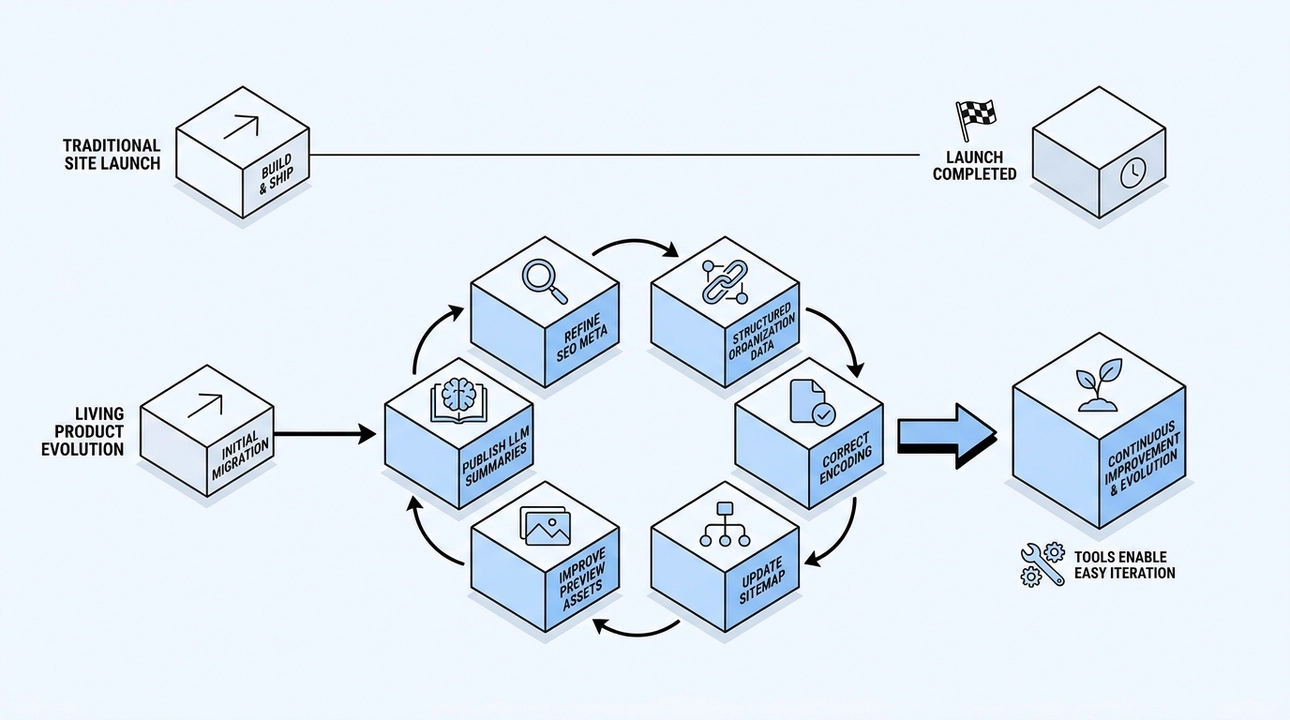
Once the new architecture was in place, a separate wave of improvements followed. Meta descriptions were refined across pages. Structured organization data was added. LLM summaries were published for individual projects and partners. Text file encoding was corrected. Preview logos were improved. The sitemap was kept current.
None of that would have happened if this had been treated as a web project with a finish line. The reason it did happen is that the architecture makes it easy. When content, SEO, the LLM layer, and quality checks are all part of the same coherent system, improving one does not break another. The site evolves continuously because the process is designed to support that.
This is the distinction we care about: the difference between shipping a site and building a product. A site gets launched. A product keeps getting better because someone is responsible for it and the tools exist to make improvement straightforward.
What This Means If You Are Thinking About Your Own Site
Moonion's rebuilt site is not a slide deck or a proposal. It is a working demonstration of the approach we are now bringing to clients.
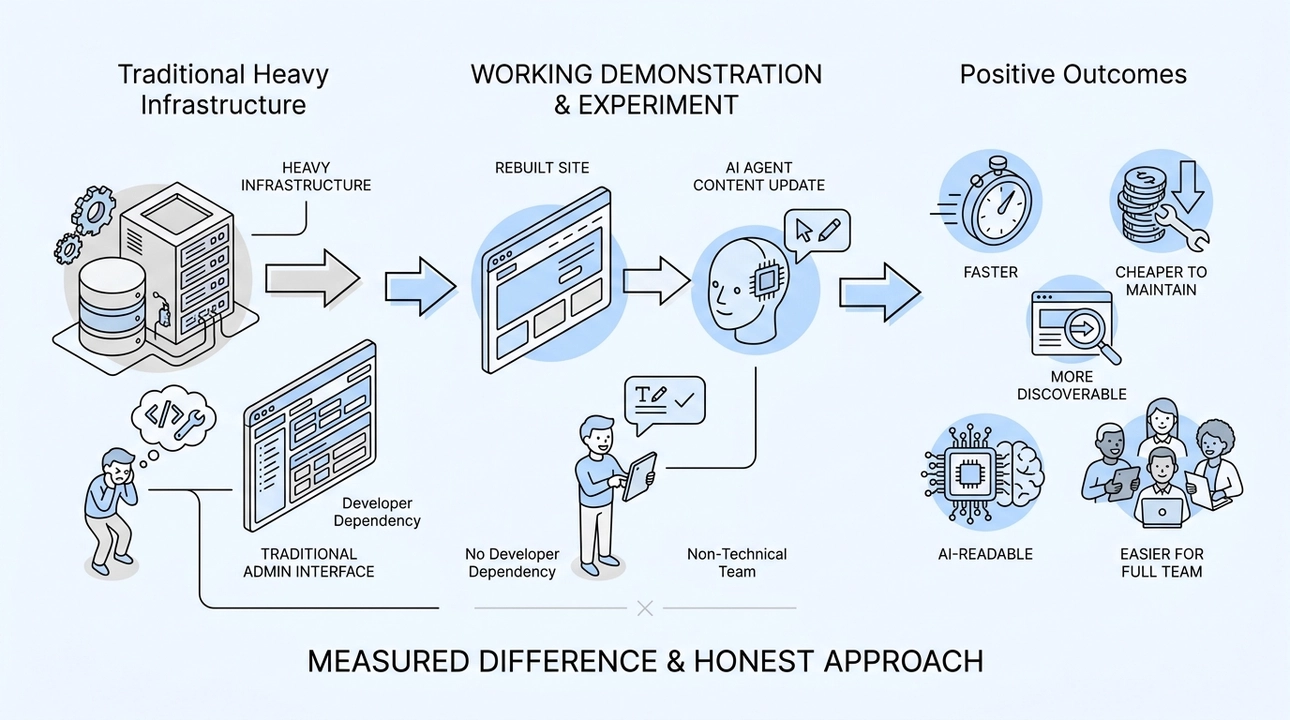
When we talk about removing heavy infrastructure, we are not theorizing. We did it and we measured the difference. When we say an AI agent can replace a traditional admin interface for non-technical team members, we are not speculating. That is how our own team updates content today.
The outcome is a site that is faster, cheaper to maintain, more discoverable in search, more readable by AI systems, and genuinely easier for the full team to work with, not just the developers.
We built this on ourselves first because that felt like the only honest way to offer it. If we were not willing to run the experiment on Moonion, we had no business recommending it to anyone else. The fact that it worked, and that we kept improving it long after the initial migration, is what made it worth writing about.
The same path is available. The infrastructure does not have to be this heavy, and the team does not have to depend on a developer every time something needs to change.
4. From 59 to 100: Why Website Speed Is a Conversion Problem, Not a Technical One

When we rebuilt our site, the number that surprised people most was not the new design or the content structure. It was the score. Our old site sat at around 89 on desktop and 59 on mobile in Google PageSpeed. After the rebuild, both landed at 100. People asked what trick we used, what plugin we installed, what optimization pass we ran at the end. The honest answer is that there was no trick. The score was a side effect of choosing the right architecture from the start.
That distinction matters more than most people realize.
Speed is what your visitor feels before they read a single word
There is a tendency in development to treat performance metrics as internal concerns, things you report in a sprint review and then move on from. But speed is not something that lives in a dashboard. It lives in the moment a person taps a link on their phone and waits.
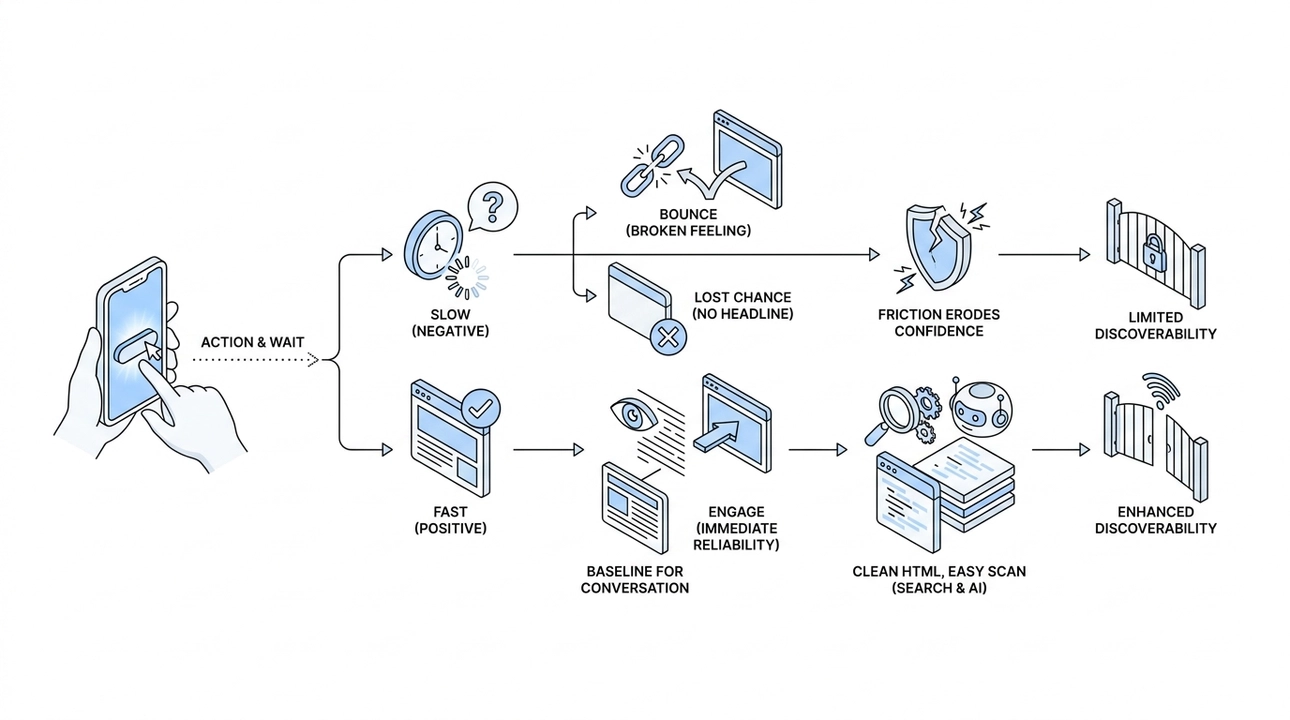
A slow site loses people before they ever see what you are offering. A significant share of visitors will leave without waiting for a page to finish loading. They do not bounce because they disliked the product. They bounce because the experience felt broken. And once they are gone, they are gone. No headline, no case study, no call to action gets a chance.
A fast site does the opposite. It creates an immediate sense of reliability. The page appears, the content is readable, and the visitor can decide whether what you are saying is worth their time. That is the baseline you need just to be in the conversation.
Speed also shapes trust in a way that is hard to separate from the product itself. If the site feels slow or clunky on mobile, that feeling attaches to the brand. People do not consciously think "this company has a poorly optimized frontend." They just feel friction, and friction erodes confidence. For an agency, a portfolio, a SaaS product, or any business where first impressions drive decisions, that friction is expensive.
There is also the search and AI layer to consider. Search engines and AI crawlers use page quality as part of how they evaluate and surface content. A fast site with clean, readable HTML is easier to scan and easier to understand correctly. The structure is transparent. The content is accessible. That matters for discoverability, and it is only going to matter more as AI-driven search continues to expand how people find information.
The architecture is where the score actually comes from
When we hit 100 on both desktop and mobile, it was not because we ran a final round of compression or fine-tuned our image loading. It was because the underlying architecture made those problems smaller to begin with.
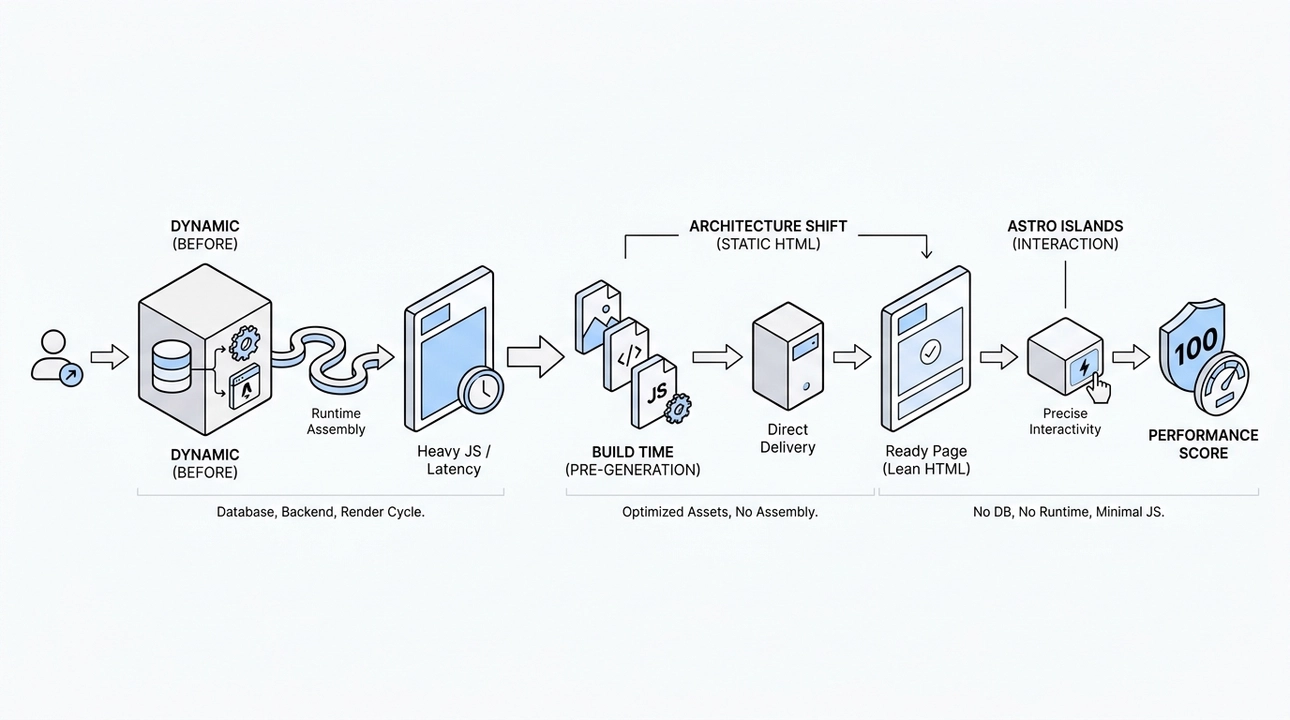
The core shift was moving to static HTML. Instead of building pages dynamically on each request, where a server assembles a response from a database, a backend application, and a framework rendering cycle, our pages are generated in advance. They exist as finished files before anyone visits. When a request comes in, the server delivers a complete, ready-to-read page. Nothing needs to be assembled on the fly.
This changes the performance profile entirely. There is no database query sitting between the visitor and the content. There is no runtime rendering step adding latency. The page is already there. The server's only job is to hand it over.
We also rethought how much code runs in the browser. A lot of modern sites ship a heavy JavaScript application to every visitor, even when the page only needs to display text and images. That code has to download, parse, and execute before the user sees anything useful. We moved away from that model. Interactive elements still exist where they genuinely serve the experience, but they are added precisely and purposefully. The default is lean, readable HTML, not a full client-side application.
Images were handled at build time rather than on demand. They are optimized before they ever reach a visitor, and they live alongside the content they belong to. No external service, no runtime processing, no additional round trips.
The result is a site where the public-facing pages have no database underneath them, no background application running to generate responses, and minimal JavaScript executing in the browser unless a specific interaction requires it. There is simply less that can slow things down, and less that can break.
We use Astro for this. It fits the model well because its default output is static HTML, and interactivity is added through what the framework calls islands: isolated components that load only where they are actually needed. The mental model aligns with how we think about the problem. Start with nothing in the browser, add only what earns its place.
Why static is a modern choice, not a step backward
The word "static" sometimes reads as old-fashioned, like something from the early web before dynamic applications existed. That framing gets it backwards. Choosing a static architecture today is a deliberate, well-reasoned decision, not a fallback for teams that cannot build something more complex.

Many sites are built like applications when they do not need to be. An agency site, a portfolio, a blog, a documentation hub, most informational pages on an e-commerce site: none of these require a dynamic rendering pipeline. They need to show content clearly, load quickly, and be easy to update. A heavyweight system under the hood does not add capability here. It adds complexity, slows delivery, and increases the cost of ongoing maintenance.
Static architecture solves this differently. Every page, every piece of metadata, the sitemap, the robots file, and any files intended for AI parsing are all generated once, at build time. What runs on the production server is a file delivery system. Fast, predictable, and with very little surface area for things to go wrong.
Content becomes part of the repository. Updates go through a clear, reviewable process. Editing a page does not trigger a cascade of moving parts. This keeps the maintenance burden low, which matters for any team that needs to move quickly without a dedicated ops function watching the infrastructure.
For our clients, the practical translation is straightforward. The site loads instantly. It is less likely to experience downtime. And the ongoing cost of keeping it running and current is lower than a dynamic system of comparable quality. Those are concrete business outcomes, not technical talking points.
What the score actually means
A score of 100 is useful as a signal, but it is not the goal in itself. What it tells us is that the architecture is doing its job. The fundamentals are right. The site is not carrying unnecessary weight, not asking visitors to wait for things they do not need, and not introducing friction before it has earned anyone's attention.
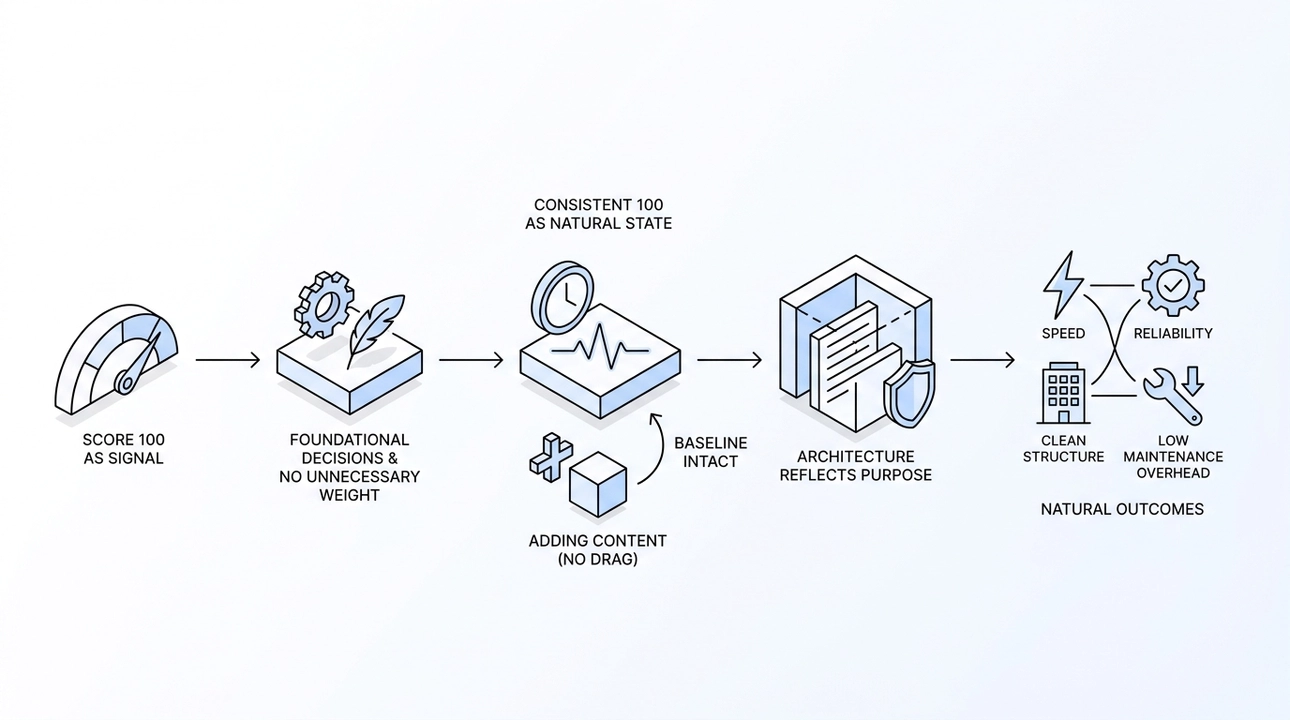
We track every piece of content through Google PageSpeed as part of our process. The aim is not to hit 100 once and move on. It is to hold 100 consistently, because the architecture makes that the natural state rather than a constant effort. When speed is built in from the beginning, maintaining it does not require heroics. Adding a new page or updating existing content does not drag in new complexity. The baseline stays intact.
Going from 59 to 100 on mobile was not a polish step at the end of the project. It was the result of making the right foundational decisions early and sticking to them throughout. The score reflects the architecture. And the architecture reflects a clear idea of what the site actually needs to do.
Speed, reliability, clean structure, and low maintenance overhead are not premium features reserved for large teams with dedicated performance engineers. They are the natural outcome of building with the right approach from the start.
5. Content Without a Developer: How AI-Ready Sites Put Clients Back in Control

There is a moment every client knows. You need to update a service description, add a new case study, or fix a product card. It is a five-minute job in your head, but in practice it means writing to a developer, waiting for them to fit it into their schedule, reviewing the change three days later, and then starting over if something is slightly off. That cycle is not a technical limitation. It is a structural one, and it is exactly what an AI-ready architecture is built to solve.
This is post five in our AI Ready Series. The earlier posts covered why speed is a conversion problem, how we rebuilt our own site before recommending the approach to anyone else, and what it actually means for a product to be AI-ready. Now we are getting into something more operational: what it looks like when a client can manage their own content, and why that does not mean handing the keys to an AI and hoping for the best.
The Problem With the Old Workflow
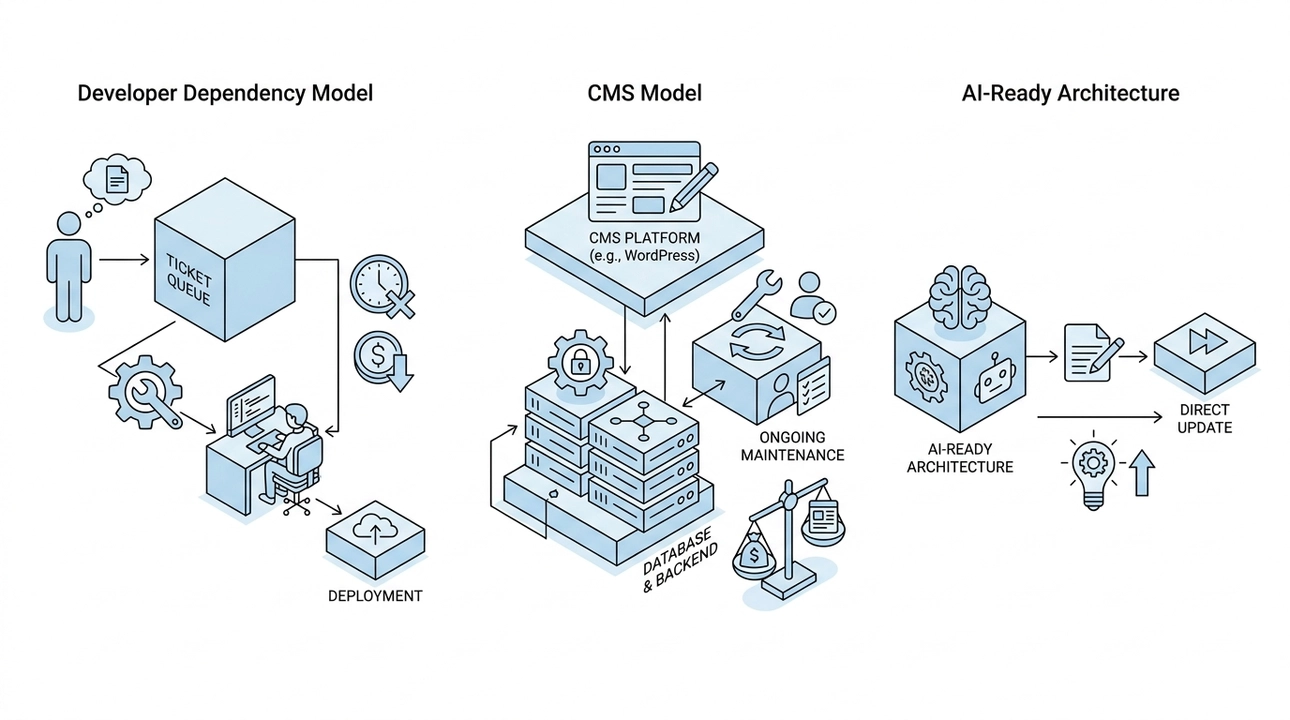
The traditional content update process has two shapes, and neither is great.
The first is the developer dependency model. Every change, no matter how small, goes through a ticket, a queue, and a deployment. This is slow, expensive for routine tasks, and frustrating for everyone involved. Developers did not get into this work to update FAQ entries.
The second is the CMS model. Platforms like WordPress or custom admin panels were built to solve exactly this problem, but they introduced a different one. They require a database underneath them, a backend to manage, user permissions to configure, and ongoing maintenance. For many projects, the infrastructure cost of a heavy CMS outweighs the content management benefit it was supposed to deliver.
An AI-ready architecture takes a different path entirely.
What AI-Assisted Content Editing Actually Looks Like

The shift is straightforward to describe, even if it took real architectural work to get right. Instead of an admin panel with forms and fields, the interface is a conversation with an AI agent.
A client sits down and writes something like: "Add a new project. Here is the name, the description, a couple of links, and two photos." Or: "Update the timeline on this case study." Or: "Pull these five questions together into a FAQ section." That is the entire input. Natural language. No panel to navigate, no fields to hunt for, no dropdowns to configure.
The AI agent takes that request and does the actual work: it finds the right files, understands the content structure of the project, makes the specific changes requested, and leaves everything else untouched. It knows where things live and what the rules are, because those rules are defined in advance as part of the project architecture.
This is not magic, and it is not autonomous publishing. It is a well-scoped tool doing a well-defined job.
Why This Is Safe: Three Layers That Protect the Output

The most common concern we hear when we describe this is predictable: what stops the AI from breaking something, or worse, publishing something wrong? It is a fair question. The answer is that safety here is not a single feature, it is a layered system.
The first layer is structure. Before any client ever touches the system, we define the content entities for that specific project. On a portfolio site, those entities might be projects, partners, technologies, and highlights. On an e-commerce site, they would be products, categories, shipping options, and FAQ entries. Each entity has defined fields and relationships, and a schema sits underneath that simply rejects anything malformed. If the data does not fit the structure, it does not go through. The AI cannot publish a project without a title, or add a technology that does not match the expected format, because the schema will not allow it.
The second layer is automated quality checks. Any change made through the AI agent runs through the same automated validation pipeline that a developer's code would pass through. These are not special content checks invented for clients. They are the same structural tests we use on every build. If something breaks the integrity of the project, the pipeline catches it before anything reaches the live site.
The third layer is the human. The AI prepares the changes, but a person reviews the facts and approves the publication. That final decision never moves to the machine. The AI is a capable editor, not an autopilot. The client sees what is going to be published, confirms it is accurate, and then it goes live. That sequence does not change.
All three layers work together. Structure prevents bad data from entering the system. Automated checks catch anything that would break the build. Human review ensures the facts are right before the content is live.
What This Replaces and What It Keeps

It is worth being precise about what this approach does and does not replace, because it is easy to misread the idea.
This does not mean clients are editing code. They are not. The underlying architecture is still managed by developers, and complex structural changes still go through us. What changes is the surface layer: the routine content work that should never have required a developer in the first place.
This also does not mean the heavy CMS disappears from every project in every context. What it means is that for projects built on a static, AI-ready architecture, you no longer need the database and backend infrastructure that a traditional CMS requires just to let a client update a product description. The content lives in structured files. The AI agent knows how to work with them. The result is the same editing experience a client used to get from a panel, but without the infrastructure weight underneath it.
What stays is everything that matters: clear content structure, defined rules for what belongs where, quality controls on every change, and a human making the final call.
What This Means for the Business

The practical impact is straightforward, and clients feel it quickly.
Routine updates that used to take days now take minutes. A new case study does not wait for a developer's sprint cycle. A product description change does not sit in a queue. An FAQ update happens the same afternoon someone realizes it needs to happen. The team stops treating small content changes as tasks that require coordination, because they no longer do.
Developers, meanwhile, get to focus on the work that actually requires their skills. Architecture decisions, performance work, new features, integrations. Not content tickets.
For the client, this creates something that is genuinely different from what most websites offer: a content system they actually own and can operate. Not a portal they were handed and never really understood. Not a CMS they are afraid to touch in case something breaks. A structured, safe, AI-assisted workflow where they know exactly what they can change, how to change it, and that nothing will go wrong without them seeing it first.
The Bigger Point

We built the AI Ready Series around a single underlying idea: that the decisions made in how a website is architected have real business consequences, not just technical ones. Speed affects conversion. Static architecture affects performance and cost. And content manageability affects how quickly a business can actually respond to what is happening in the world.
Giving clients the ability to update their own content without developer dependency is not a convenience feature. It is a structural property of a well-built site. When the content layer is designed with clear entities, enforced schemas, and an AI agent that understands the project's own rules, the result is a system that a non-technical person can operate with confidence, not because the technology is doing everything, but because the right guardrails are in place.
The last word always belongs to the human. That part does not change. What changes is how much of the friction between having an idea and publishing it has been removed.
7. Your WordPress Site Got Hacked. Here's What Static Architecture Changes About That.

A few weeks ago, some clients reached out asking for help. Their WordPress sites had been compromised during a wave of attacks tied to a recently discovered vulnerability in WordPress core. We helped with detection, cleanup, and hardening. It was a familiar process, and not a pleasant one.
What struck us wasn't the technical side of the cleanup. It was the question that kept coming up after everything was supposedly fixed: "Are we sure we got it all?" There's no clean answer to that. And that uncertainty is not a failure of process. It's a feature of the architecture.
That's what we want to talk about here.
What Actually Gets Hacked

The conversation around CMS security almost always drifts toward the same conclusions: update your plugins, install a security plugin, enable two-factor auth on the admin panel. That advice is not wrong, but it treats the symptom rather than the condition.
When a WordPress site gets compromised, what's actually being exploited is not the site as a collection of pages. It's the machinery running underneath it: executable server-side code that assembles each page on demand, a database that feeds content into that code, an admin panel accessible from anywhere on the internet, and a collection of plugins and themes from third-party authors running with full server privileges.
Any one of those components can be the entry point. And here's the thing that doesn't get enough attention: the vast majority of WordPress breaches don't come through core. Core is maintained relatively carefully and updated with some discipline. The real risk surface is the set of 20 or 30 plugins installed over the life of the site, each written by a different author, each with its own update cadence, and some of them quietly abandoned. That's not 20 components. That's 20 independent sources of risk that grow as the site gets older.
This produces a maintenance mode that anyone running a CMS-based site knows well. You have to update urgently because the vulnerability is already public. You're afraid to update because something might break. Not updating isn't an option. There's no good move.
What a Static Site Simply Doesn't Have
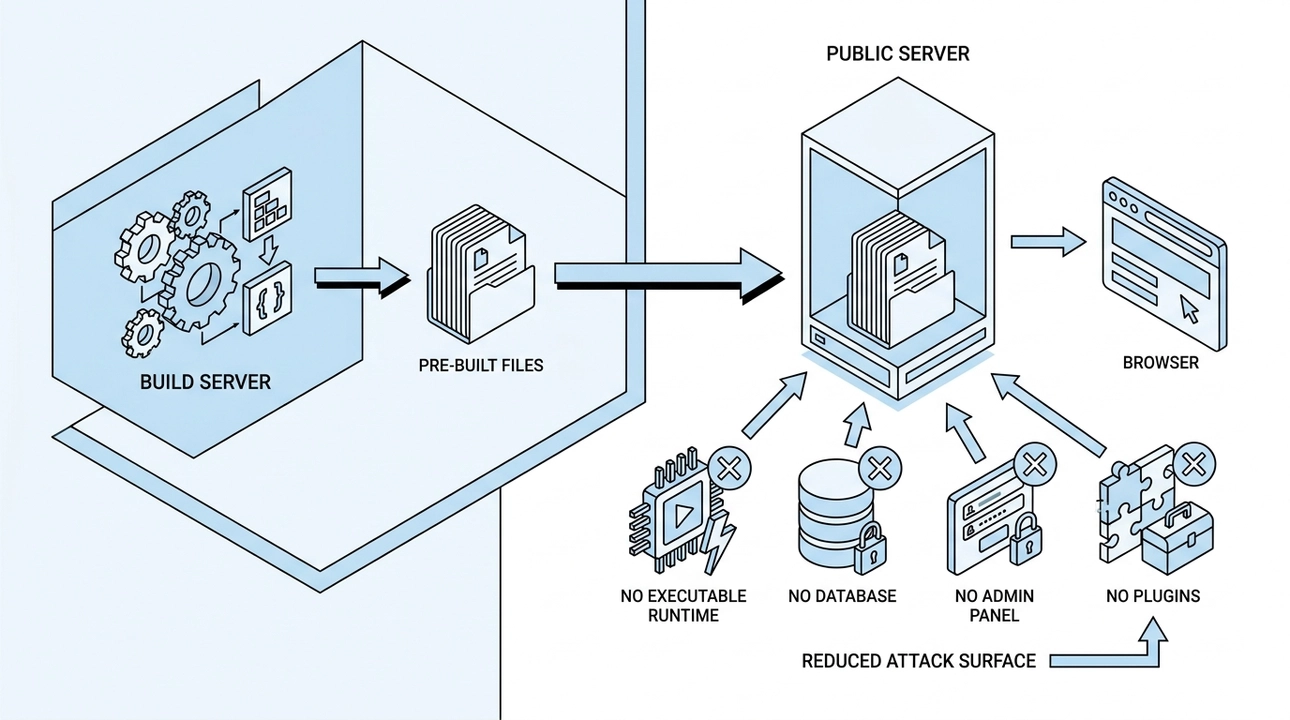
Our architecture works differently, and the security difference isn't a matter of configuration. It's structural.
All pages are assembled once, at build time, before anything reaches a public server. What lives on that server is a set of pre-built files, ready to be delivered to a browser. Nothing is assembled on request. No code executes in response to a visitor.
What this removes from the attack surface is significant:
- There is no executable runtime on the public server. There is nothing to exploit, and nowhere to inject a script that will actually run.
- There is no database. SQL injection, content manipulation through the database, spam links mixed into page content: none of that applies when there is no database to target.
- There is no admin panel exposed to the internet. Nobody is brute-forcing login credentials at 3am because there is no login endpoint to hit.
- There is no plugin ecosystem. No stream of third-party code arriving on your server with full execution rights, no update treadmill, no abandoned plugins accumulating quietly.
We want to be precise about what this means. We are not saying a static site is immune to attack. We are saying that the most common attack scenarios, the ones that hit those clients last month, are not applicable when the target doesn't exist. The attack surface doesn't disappear. It becomes smaller and much easier to understand.
What Recovery Looks Like

The second difference becomes visible after something goes wrong, and it changes the economics of an incident significantly.
A static site's published files are the output of a build process, generated from source code stored in version control. Every deployment overwrites the server entirely from that source. There is no persistent state on the server for an attacker to hide code in across deployments.
If something does go wrong, restoring the site means publishing a known-good version from the repository. That's it. The question "did we get everything?" has a concrete answer because you're not hunting through a server for hidden files. You're redeploying from a source you control and can inspect.
Version control also means the full history of what changed and when is always available. You can see exactly what's different between any two versions. That transparency is not something you configure into a static site. It comes from the way the system is built.
Compare that to the recovery process for a compromised CMS: scanning the server, checking the database, looking for backdoors, restoring from backup and hoping the backup was clean, then sitting with that lingering doubt. The cost isn't just the cleanup hours. It's the uncertainty that follows.
The Part Nobody Is Talking About Yet

There's a relatively new dimension to site security that almost never comes up in these conversations, and we think it matters.
When a site gets compromised and spam links or redirects are quietly injected into page content, the immediate damage is to search rankings and user trust. Search engines see spam on your domain. Browsers start showing warnings to visitors. Positions built over years can drop in weeks, and they recover much more slowly than the site itself gets cleaned.
That's the established story. Here's what's newer: AI systems, the same ones powering the chat interfaces that more and more people use to learn about businesses, read websites too. They index content. They draw on what they find when someone asks about your company or your services.
If your site was compromised for any meaningful period, you have no control over what those systems read during that window, or what they retained. Cleaning up your server doesn't retroactively clean up what an AI system already processed. A single deployment doesn't undo that.
We're not raising this to be alarmist. We're raising it because most site owners aren't thinking about it yet, and it adds a new layer to the cost calculation of a security incident.
What Remains to Protect

Being honest about what a static architecture doesn't solve is part of the point.
The access layer still matters. The hosting account, the domain registrar, the repository, and the deployment credentials are the critical things to protect. Two-factor authentication, limited access rights, and careful control over who can publish changes are all still necessary.
Third-party scripts in the browser are the main remaining way external code ends up on your pages. Analytics, support chat, advertising pixels: these run client-side and are outside the static architecture's control. That's not a reason to avoid them, but it is a reason to add them with intention rather than by default.
External services for forms, search, or comments delegate some responsibility to those providers. Their security is their responsibility, but the important point is that a problem with a form service stays contained to that service. It doesn't become a problem for the entire site.
The difference between this list and the plugin vulnerability list is that this one is short, stable, and doesn't grow on its own. You can manage it. A list of 20 plugins from 20 authors grows by itself and is never fully yours to control.
The Architectural Question Worth Asking
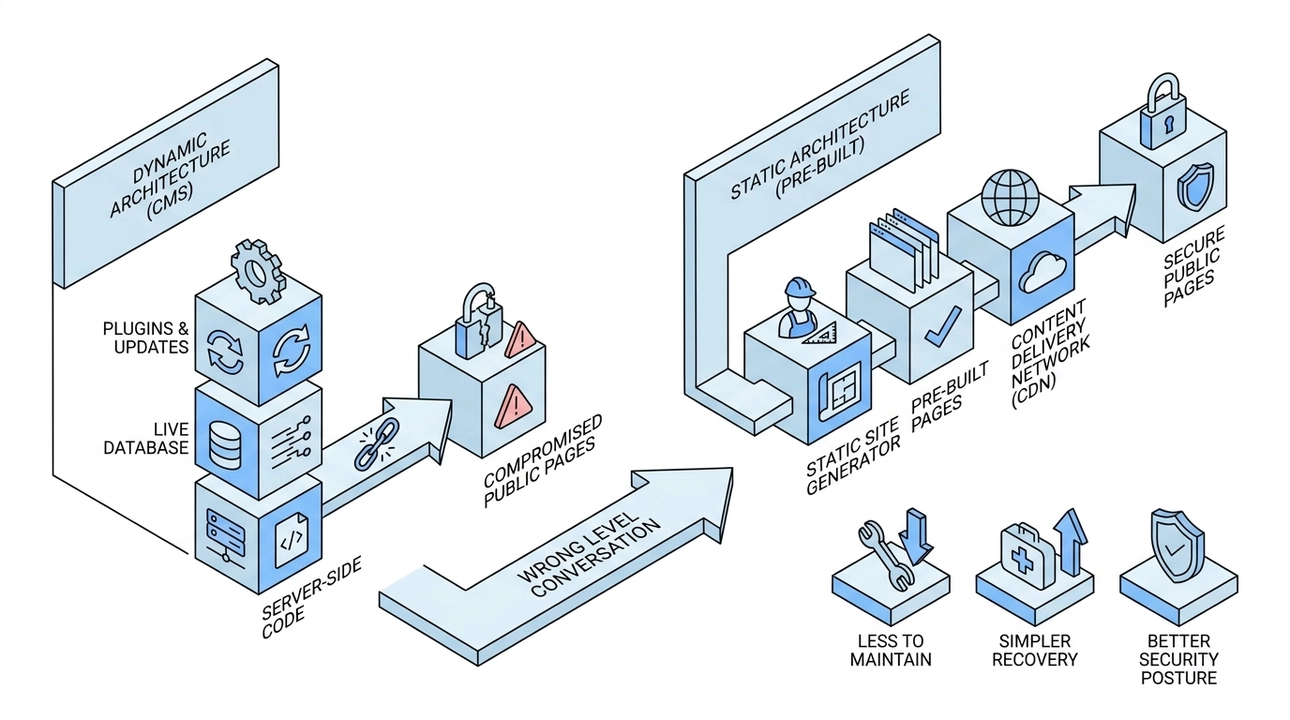
Security plugins and update discipline are not bad advice. They're just the wrong level of the conversation.
If you're running several sites on a CMS and at least one of them has already been compromised, the useful question isn't which security plugin to add next. It's whether the architecture is the right fit for what the site actually needs to do.
A public-facing content site doesn't need a live database assembling pages on demand. It doesn't need server-side code executing for every visitor. Those are choices made years ago because they were the default, and they carry costs that weren't fully visible then.
Removing that machinery from under your public pages doesn't mean giving anything up. For most content sites, it means less to maintain, simpler recovery when something goes wrong, and a security posture that doesn't depend on staying ahead of an endless stream of third-party updates.
That's not a configuration change. It's an architectural one, and it's worth taking seriously.
6. One Content Source for Humans, Search Engines, and AI Chats: Is That Actually Possible?

Your website has three readers now. Not one.
A person opens a page and takes in the text, the images, the layout. A search engine scans the headings, the meta description, the structured data, the sitemap. An AI chatbot like ChatGPT or Claude pulls the content to summarize who you are and what you do, often in a single paragraph, before a user even clicks through to your site.
Three readers, three very different ways of consuming what you publish. And in most setups, businesses have responded to this by managing content in three different places. There is the text on the page. Then there is the SEO layer: the title tag, the meta description, the canonical URL. Then there is whatever summary or briefing document someone put together for AI systems to reference. Three separate things to write, update, and keep in sync.
That is where the problem starts.
Why Does Managing Content in Three Places Break Down?

It breaks down because updates do not travel automatically. You refresh your service description on the page, but the meta description still reflects last year's positioning. You change your project list, but the summary document you once prepared for AI systems still references a project you dropped six months ago.
Over time, the three versions drift. The human visiting your site sees one story. The search engine reads a slightly different one. The AI chatbot tells its user something that is outdated, or inconsistent with what you actually do today.
This is not a hypothetical failure mode. It is what happens in practice when content is distributed across separate locations without a single source of truth. And the consequence is more serious than it might sound. When a potential client asks an AI chatbot about your company and gets a stale or contradictory answer, that is a trust problem, not a technical footnote.
What Does a Single Source of Content Actually Look Like?
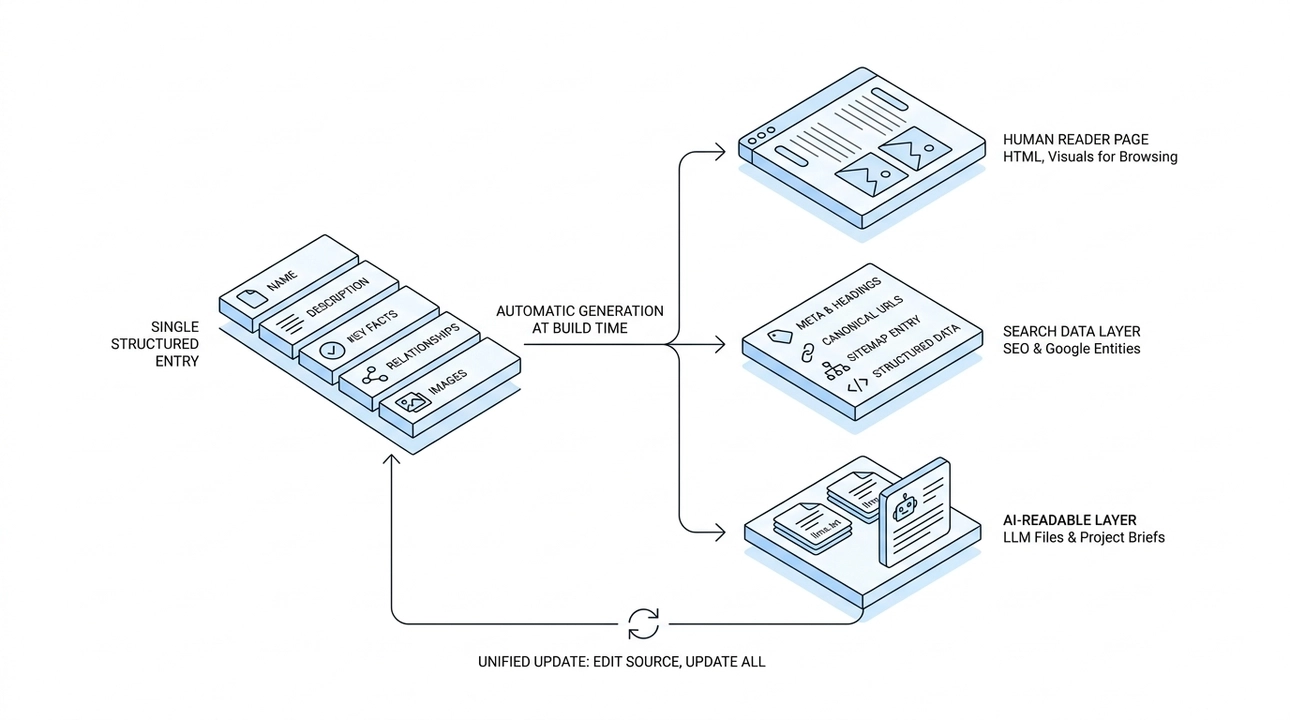
The AI-ready approach we use at Moonion is built around exactly this idea: one record, three representations.
For every project or service, there is a single structured entry. It contains the name, the description, the key facts, the relationships to other entities, the images. That is the source. Everything else is generated from it automatically at build time.
From that one record, three things are assembled without any manual duplication:
- The page for the human reader, standard HTML with text and visuals laid out for browsing.
- The search data layer, including headings, meta descriptions, canonical URLs, sitemap entries, and structured data that tells Google what kind of entity this is.
- The AI-readable layer, which on our site takes the form of llms.txt and llms_full.txt files, plus individual card-style briefs for each project, formatted so that AI systems can read and reference them cleanly.
You edit one source. All three representations update together. There is nothing to duplicate, and nothing to forget.
Why Does Structured Data Matter for Search Engines and AI Alike?

Structured data is the part of this that often gets treated as an afterthought, but it is doing real work. When we include structured data in the search layer, we are not just providing text for Google to index. We are telling Google what the content is: this is a project, this is a company, this is a technology. That kind of explicit labeling helps search engines surface the right result for the right query, rather than guessing from context.
What is interesting is that this same precision matters for AI systems too. AI chatbots increasingly rely on well-organized, clearly labeled content to produce accurate summaries. Vague or unstructured content produces vague or wrong answers. Structured content, with named fields and explicit relationships, gives AI systems the clarity they need to represent you accurately.
The principle behind both use cases is the same: clarity of source produces quality of output.
What Happens When There Is No Data to Fill a Field?

One thing worth being explicit about: the AI-readable files we generate do not invent content. If a project entry is missing a description, that block is simply omitted from the output. It does not get filled with a placeholder or a guess.
This is a deliberate design choice, and it matters. The consistency we are aiming for only has value if the content is accurate. An AI chatbot that summarizes your company based on fabricated or padded entries is not better than one working from outdated data. It might actually be worse.
The rule we follow is that the AI layer reflects exactly what is in the source, no more and no less. Which means the quality of what AI systems say about you is a direct function of the quality of what you have actually written. This is one reason why investing in clear, factual, well-structured content is not just an SEO exercise. It is an investment in how your business is represented everywhere.
Does This Approach Actually Work in Practice?
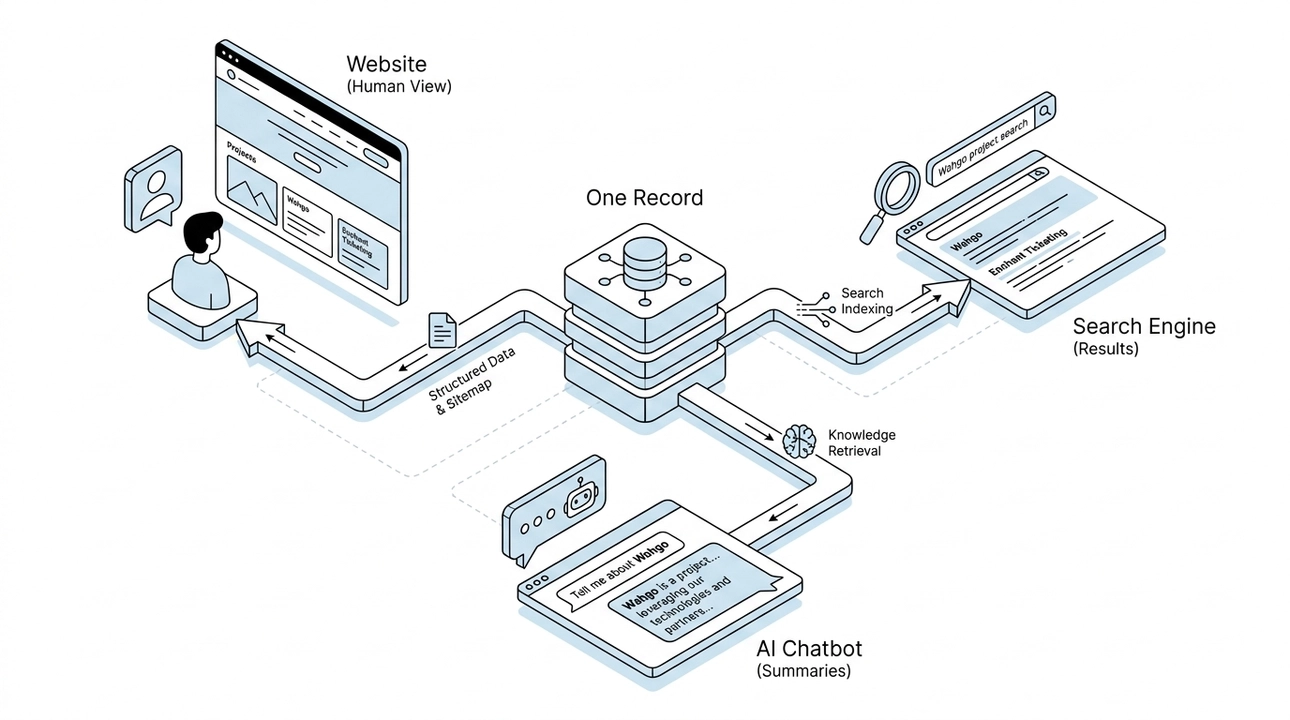
We did not pitch this to clients before we tested it on ourselves. Our own site runs on this architecture, and the consistency is visible from both sides.
For project-specific queries, like searches for Wahgo or Enchant Ticketing, the work shows up in search results because the structured data and sitemap entries are generated correctly from the source records. For broader questions about our company, AI chatbots return summaries that reference the same facts, projects, partners, and technologies that appear on our site, because they are drawing from the same source.
One record. And the human, the search engine, and the AI chat all receive a coherent version of the same story.
What Does This Mean for Your Business Day to Day?
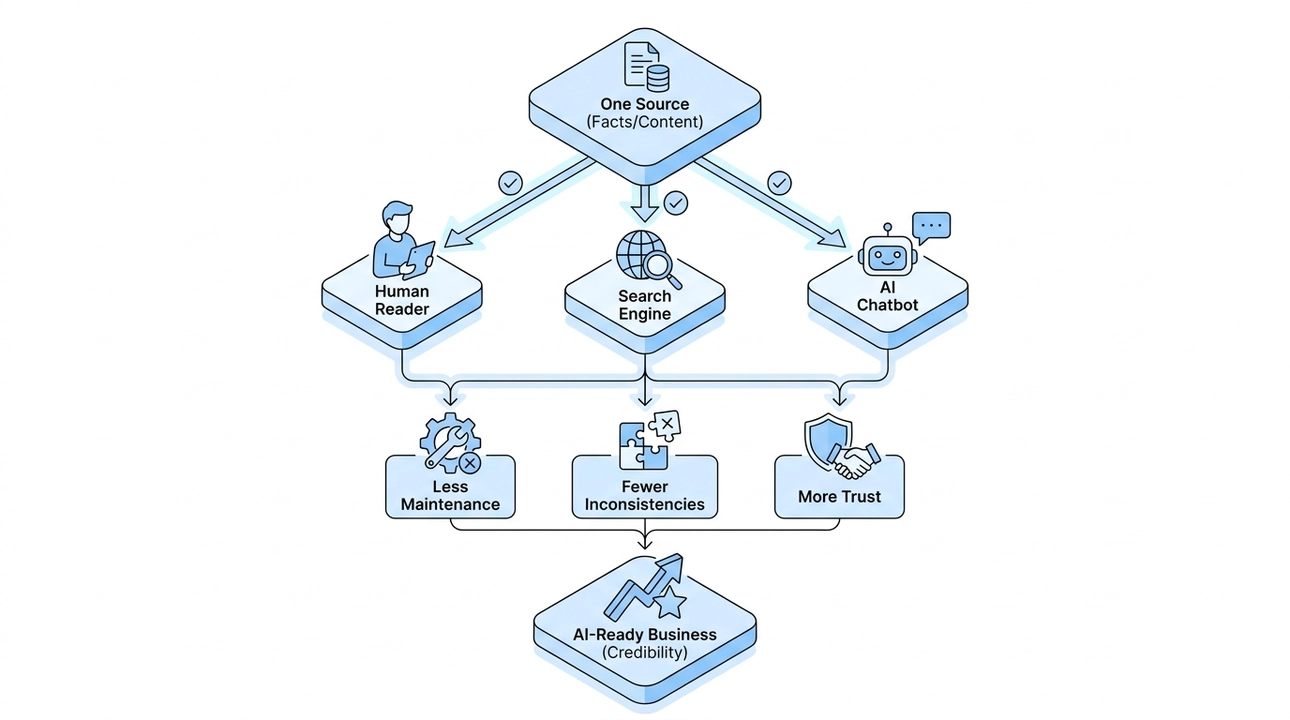
The practical benefit is simpler than it might sound. You maintain facts in one place, and those facts work consistently across all three audiences. You do not have a separate SEO task on your plate every time you update a project description. You do not need to remember to update a briefing document for AI systems. You make one edit, and it propagates.
That means less routine maintenance, fewer inconsistencies between what your site says and what an AI chatbot says about you, and more trust from everyone who encounters your business, regardless of how they find it.
There is a subtle but important point here about trust specifically. When a human reads your site, a search engine indexes it, and an AI chatbot summarizes it, and all three reflect the same honest facts, that alignment itself signals credibility. There is no version drift to catch you out. No outdated summary contradicting your current positioning. Just one consistent, accurate story told three different ways.
That is what it means to be AI-ready in terms of content. Not a special file you maintain separately. Not an AI optimization layer bolted on after the fact. One source, built right, that serves everyone who reads it.
8. Why AI Agents Need Rules, Skills, and Docs Before They Touch Your Project

Imagine you hire someone genuinely talented. First day, no briefing, no guidelines, no handoff. They seem confident, so you leave them to it. By the end of the week, something is broken, not because they were careless, but because nobody told them what the rules were.
That is exactly how most teams onboard AI agents. They write a prompt, get an output that looks reasonable, and move on. But one request per session is not enough to let an AI work safely inside a real project. The stakes are different when the agent has access to your content, your architecture, your live data. Without structure, even a capable AI will eventually do something you did not ask for.
At Moonion, we handle this with three distinct layers: rules, skills, and documentation. Each one does a specific job. Together, they turn an AI from a one-off assistant into a predictable, reliable part of the process.
Layer One: Rules Set the Boundaries
Rules are the general operating mode. They apply to everything the agent touches, across the whole project.

Translated out of technical language, our rules tell the agent things like: do not invent business logic; if something is unclear, ask rather than guess; cross-reference the project documentation before acting; make only the changes that were asked for, not a broader refactor that seemed useful; always run quality checks the same way a developer would; do not touch unfinished work belonging to someone else; do not close tasks or publish changes without an explicit instruction from a person.
The underlying idea is straightforward. An AI working on a real project should behave like a careful team member, not like a chat session that fires off a response and disappears. Rules enforce that behavior consistently, without relying on whoever happens to write the next prompt.
This is the part that tends to surprise clients. They assume the danger is a rogue AI doing something dramatic. In practice, the risk is quieter: an agent that fills in a gap by making a reasonable-sounding assumption, and nobody notices until the assumption turns out to be wrong. Rules close that gap before it opens.
Layer Two: Skills Give the Agent a Playbook for Each Task
If rules are the general code of conduct, skills go deeper. They are task-specific working instructions, closer to what you would put in a role description or a standard operating procedure.
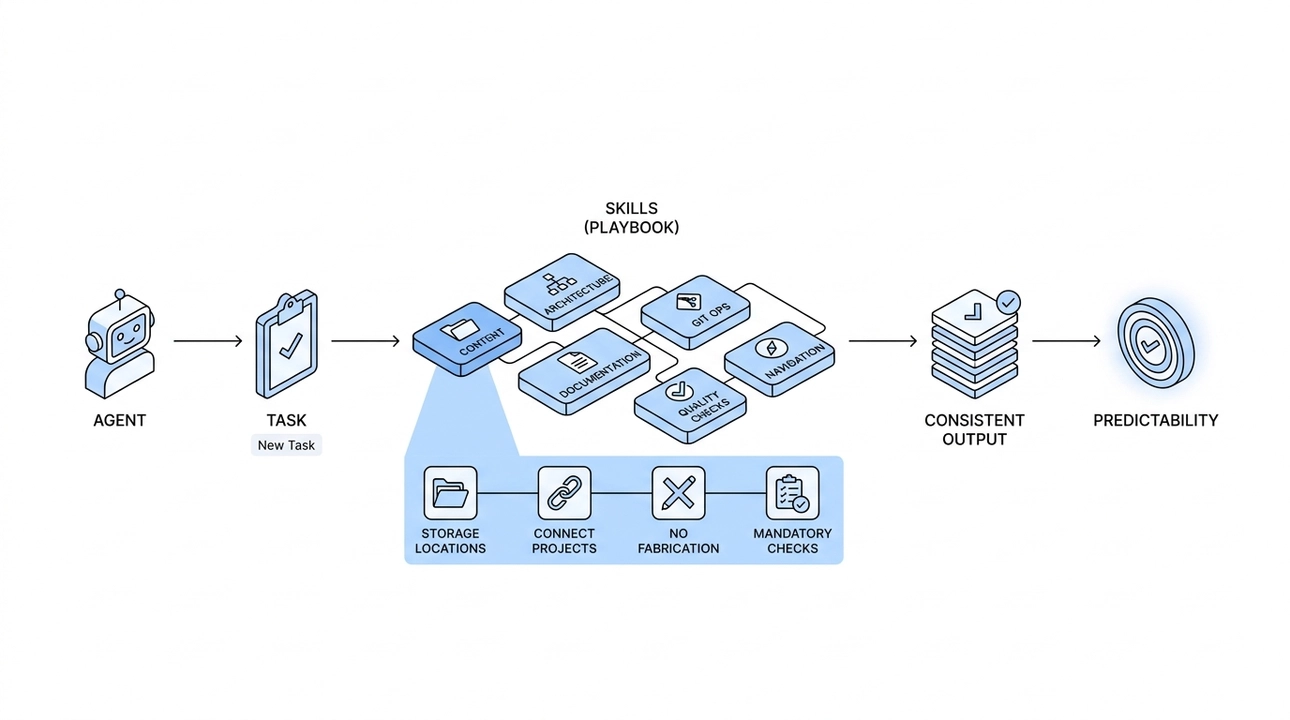
We maintain separate skills for content, architecture, documentation, Git operations, quality checks, and project navigation. When the agent picks up a task, it does not have to figure out how the project is structured from scratch. It opens the relevant skill and follows it.
A content skill, for example, explains where projects, partners, technologies, and events are stored, how to connect a project to a partner, why fabricating dates or characteristics is not acceptable, and which checks are mandatory before marking a task done. The agent is not guessing at any of that. It is reading an instruction that was written with the specific project in mind.
The practical result is repeatability. Today the agent helps add a case study. Tomorrow it updates a partner profile. The week after, it prepares product cards for an e-commerce catalog. Each task has its own skill, so the output is consistent, not a function of how well someone phrased the prompt that day.
This is what clients are really buying when they ask for AI-assisted content management. Not speed, though that follows. Predictability. The confidence that the fifth update will look as correct as the first one.
Layer Three: Documentation Is the Source of Truth
Rules tell the agent how to behave. Skills tell it how to do each task. Documentation tells it what is actually true about the project.

This is the layer that grounds everything else. Before the agent makes a change, it reads the documentation: how the architecture is structured, how content is organized, how the SEO layer works, how the LLM layer works, how everything is deployed. It acts on recorded facts, not on what seems plausible based on training data.
That matters more than it sounds. Without a documented source of truth, an AI will reconstruct its understanding of your project from context clues every single time. On a small site, the margin for error is small. On a larger product, the compounding effect of small misunderstandings becomes a real problem.
The other side of this layer is that the agent helps keep documentation current. We have a rule that any change to the architecture, content schema, or integrations must include an update to the corresponding document in the same changeset. Documentation does not drift behind the code, which is the normal failure mode on teams that grow fast.
For new people joining a project, and for AI agents picking up tasks they have not seen before, current documentation is what makes orientation fast. Instead of assembling an understanding of the system from scattered conversations and outdated wikis, they read what was recorded when the decision was made.
What This Actually Looks Like in Practice
One thing we observe constantly: when an agent works within this structure and receives new information to add to the site, it follows the skill, places the content correctly, links the relevant entities, and flags anything it cannot verify. It does not fill gaps by inventing details. The output reflects exactly what the user provided, structured the way the project expects.
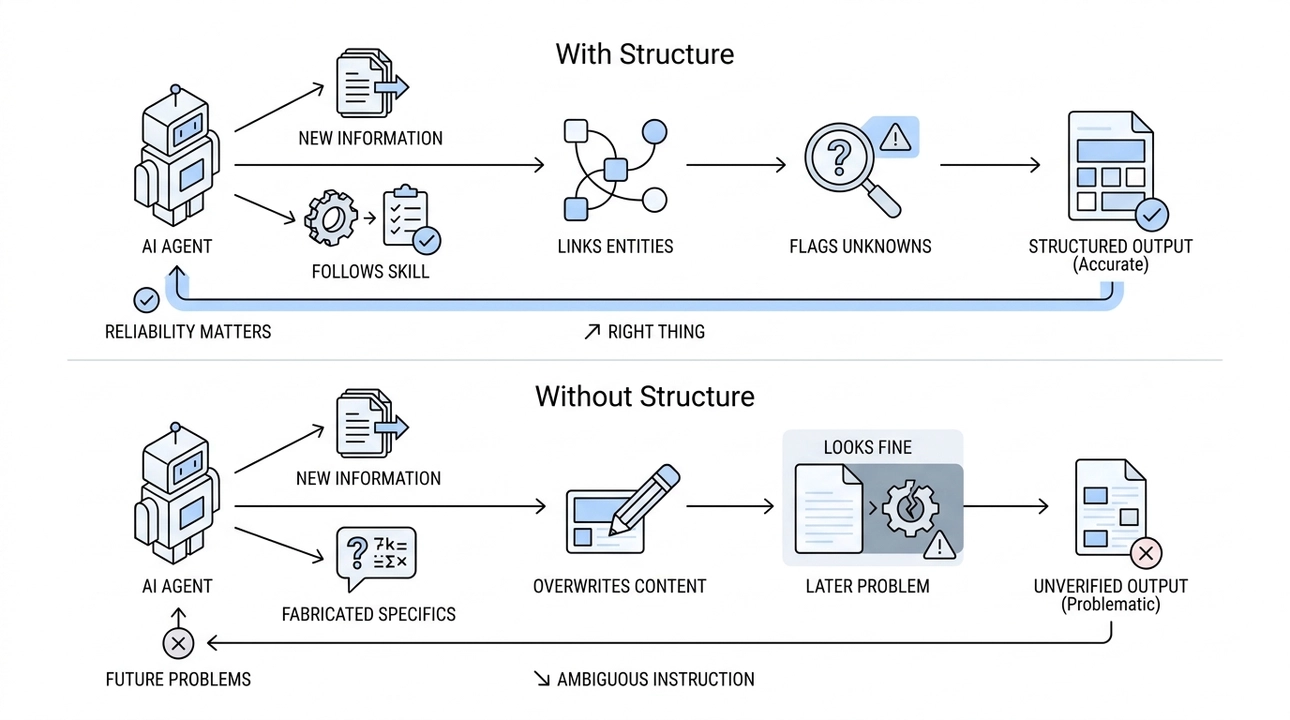
Without the three layers, that same agent might produce something that reads well but contains fabricated specifics, or that quietly overwrites something it was not supposed to touch. The output looks fine. The problem surfaces later.
This is the version of AI reliability that actually matters for clients. Not "will it write a coherent sentence" but "will it do the right thing when the instruction is ambiguous, when the data is partial, when the task overlaps with someone else's work."
Why Client Hesitation Makes Sense, and What Changes It
When we describe this approach to clients, the first reaction is often some version of: "that sounds good, but I am still nervous about what the AI might break." That hesitation is reasonable. The default mental model for AI is a chat interface that generates text with no awareness of context, no memory of what it changed, and no accountability for what it gets wrong.
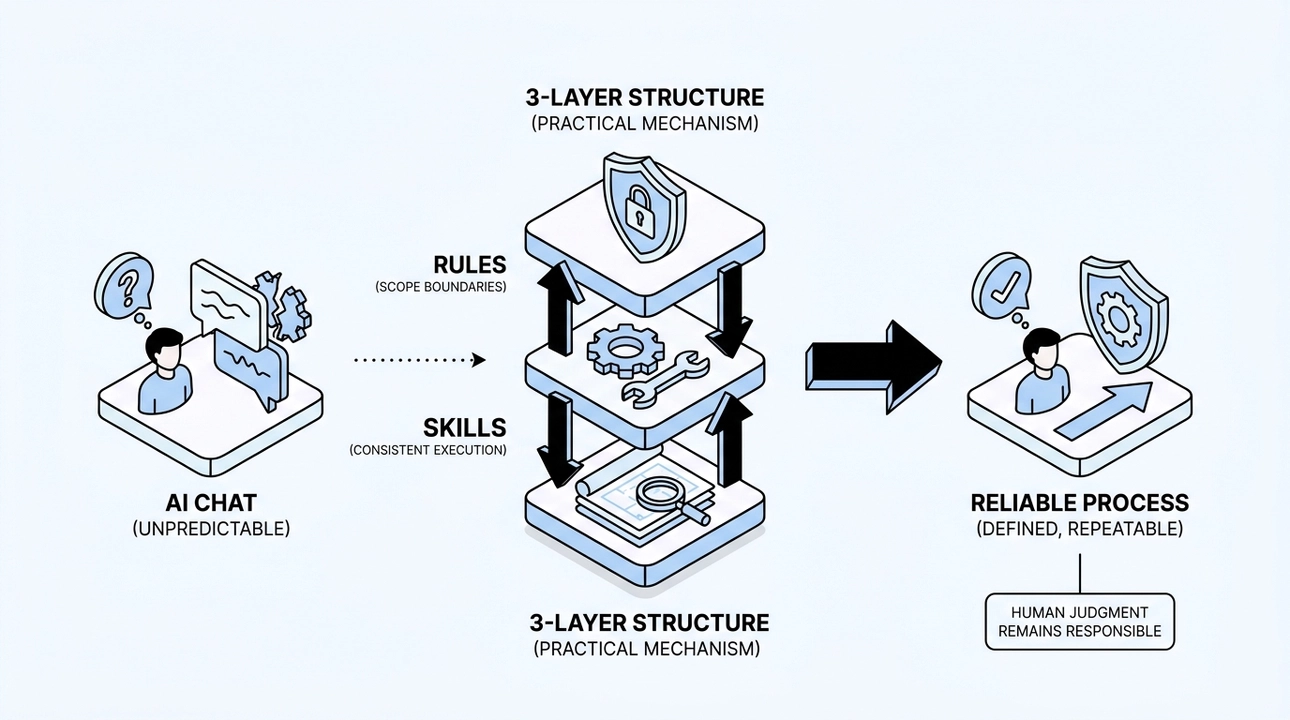
The three-layer structure is the answer to that concern, not as a marketing point but as a practical mechanism. Rules prevent the agent from acting outside its scope. Skills ensure it handles each task type the same way every time. Documentation keeps it grounded in what is actually true about the project.
Together, they shift the AI from a capable but unpredictable tool to something closer to a reliable process. The boundaries are defined in advance. The output is repeatable. Errors do not require a post-mortem to detect; they are blocked by the structure before they happen.
This is also why skills are not a replacement for human expertise. They encode a process that someone with expertise already designed. The AI executes that process consistently. The human stays responsible for the judgment calls that should not be automated.
If the analogy of a new employee holds, then rules, skills, and documentation are the onboarding that makes the hire actually work. Without them, even the most capable person will eventually step on something they did not know was fragile. With them, they can move quickly and safely from the first week.
That is what we are building toward with AI-ready sites: not a system where AI does whatever seems right, but one where it knows exactly what right means for this specific project, and operates accordingly.
9. How AI Writes Code Without Breaking Your Project

You ask an AI agent to fix a button. It fixes the button, then rewrites half the page while it's at it. This is the thing that scares most teams about letting AI touch production code, and honestly, the fear is legitimate. AI doesn't have the same instinct a senior developer has for "this is not my problem to solve right now." Without the right structure around it, it optimizes for completing the task as it understood it, not for protecting the work that already exists.
That fear doesn't go away by getting a smarter model. It goes away by building the process that contains the model. That's what an AI Ready Project does, and it's what we've built into how Moonion itself runs.
Two Modes, One Clear Boundary
The single most important structural decision we made was giving the AI agent two distinct operating modes, not a single set of rules with different permissions, but two genuinely separate contexts that don't bleed into each other.
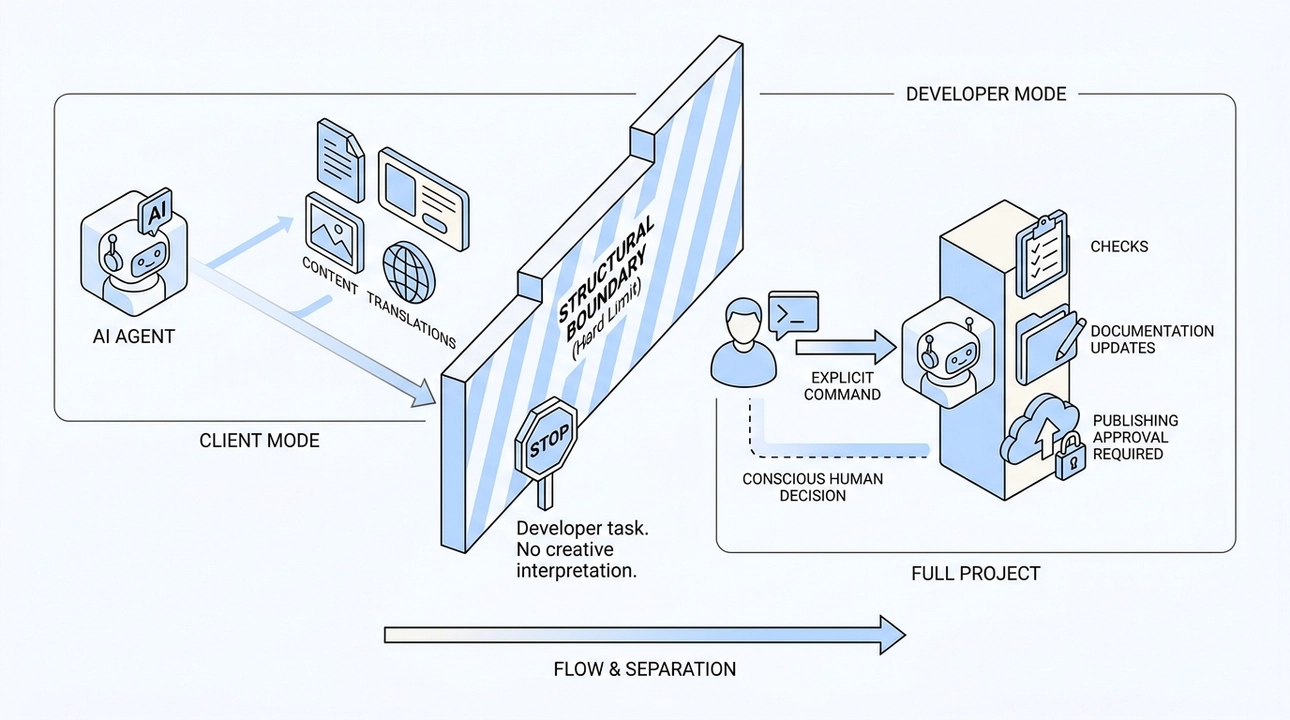
Client Mode is the default. In this mode, the agent can touch content: text, product cards, images, translations, page visibility. That's it. If a request actually requires changes to data structure, components, or publishing configuration, the agent doesn't attempt a workaround. It stops and says plainly: "This is a developer task." No judgment call, no creative interpretation of the scope. The boundary is structural.
Developer Mode is activated by an explicit command from a person. It opens the full project, but it comes with stricter requirements: a complete set of checks, mandatory documentation updates, and no publishing without explicit approval. The point is that switching modes is a conscious human decision, not something the model decides on its own because it seemed easier.
This distinction matters more than it might look. Even if a task is worded in a way where the fastest path would be a small code edit, the client-mode agent won't take it. The separation isn't a polite suggestion embedded in a prompt. It's a hard limit.
Checks That Actually Mean Something
The other load-bearing piece is automated quality checks, and these are two-tiered now.
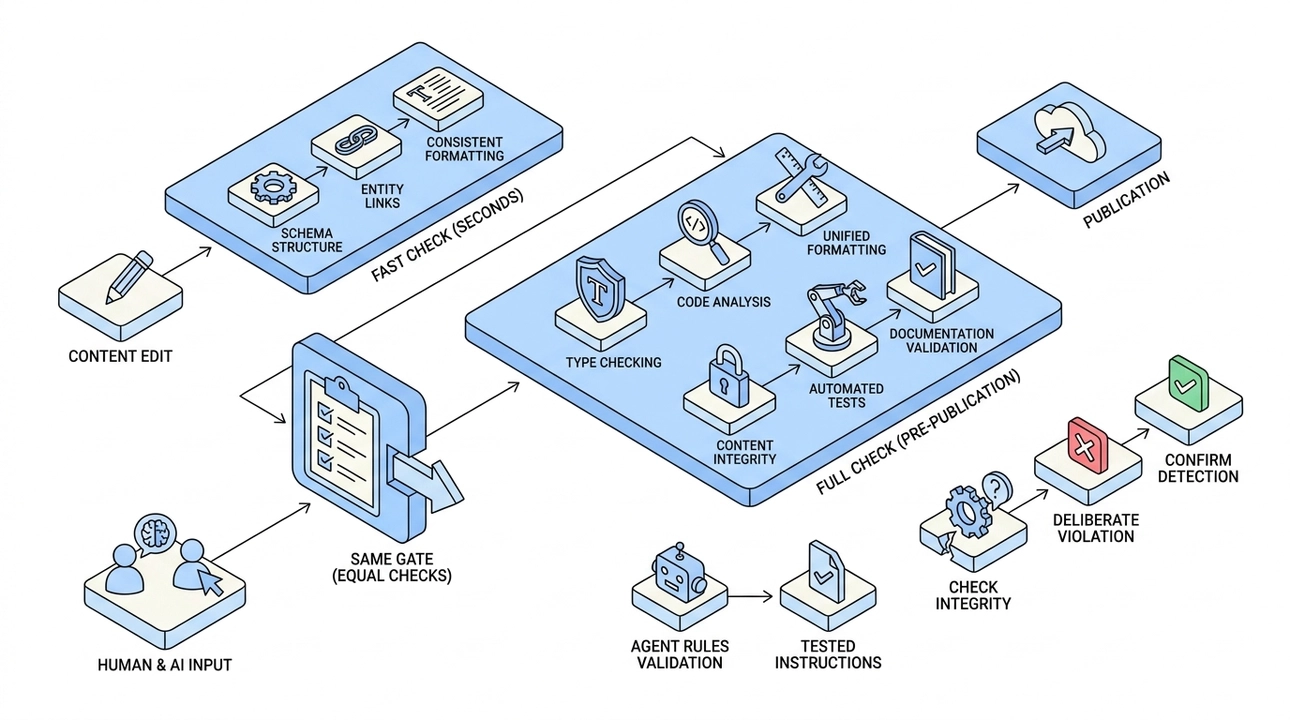
A fast check runs after every content edit. It takes seconds. It verifies that the schema structure is intact, that links between entities aren't broken, and that formatting is consistent. It's lightweight by design because it runs constantly.
The full check runs before any publication. It covers type checking, code analysis, unified formatting, documentation validation, content integrity, automated tests, and a complete site build. This is exactly what CI runs on the server. If anything fails, the change isn't considered done. There's no "we'll fix it after merge."
What matters here is that this check applies equally to AI-generated changes and human-written ones. There are no exceptions for the agent. Code that came from AI goes through the same gate as code a developer wrote. That's the only way "AI was involved" stops meaning "quality might be lower."
There's a detail in this that usually surprises people: the checks also validate the agent's own rules and skills. If an instruction references something that no longer exists in the project, or if a required section is missing from an agent skill, the build fails. The agent's operating instructions stop being a document that quietly goes stale. They become a tested, verified part of the project.
And one more thing that doesn't get talked about enough: the checks themselves can be broken. If a check always passes, it isn't proving anything. So every check has its own tests, and when we add a new rule, we deliberately trigger a violation first to confirm the check actually catches it. A green light has to be earned, not assumed.
Blocks, Not One Big Build
Risk in development often comes from having too much in flight at once. The project is somewhere in the middle of a large refactor, nothing is fully done, and it's hard to say what state anything is in. We solve this by cutting the project into blocks, where each block has explicit acceptance criteria and the next one doesn't start until the previous one is closed.
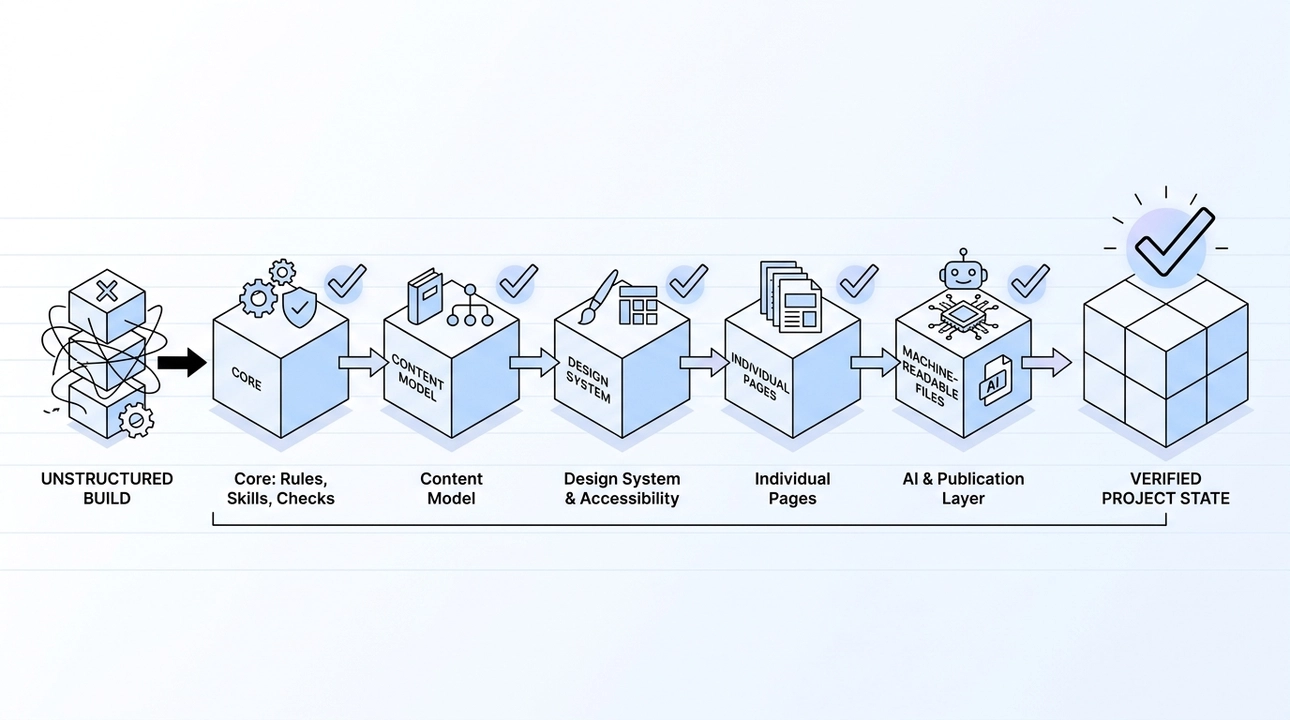
The sequence on Moonion's own site followed this logic. First the core: rules, skills, documentation, and the check system. Then the content model. Then the design system and accessibility. Then individual pages. Then machine-readable files for AI and the publication layer. Each step was small, reviewable, and finished before the next began.
The business value of this is straightforward. At any point, the project is in a verified state. There's no ambiguity about what's done and what isn't. You can look at the history of the Moonion site and see exactly this pattern: not a single commit called "AI built the site," but a sequence of specific, traceable steps. A separate skill for content, a separate pass for LLM summaries of projects and partners, metadata, sitemap timestamps, structured data, individual technical fixes. Each one small, each one checkable.
Memory Across Sessions
There's a characteristic of AI agents that's easy to overlook: every new session starts from scratch. The model doesn't carry memory of previous conversations by default. This means without something to orient it, an agent can spend time figuring out where the project is, make assumptions that conflict with earlier decisions, or repeat work that was already settled.

We addressed this with a dedicated memory system designed specifically for AI agents. It lives alongside the code and tracks what needs to be done, what depends on what, what's currently blocked and why, and the reasoning behind key decisions. When the agent starts a session, it reads this system first. It knows the current state of the project before it touches anything.
This is useful for humans too, but it was designed for the agent. For a product that supports AI agents and that will run for years, this kind of memory isn't overhead. It's how you avoid making the same mistake twice and how you keep a long-running project coherent across dozens of sessions with the same agent.
When Something Breaks
Even with all of this in place, things can break. That happens with human developers too. What matters is how the project recovers.
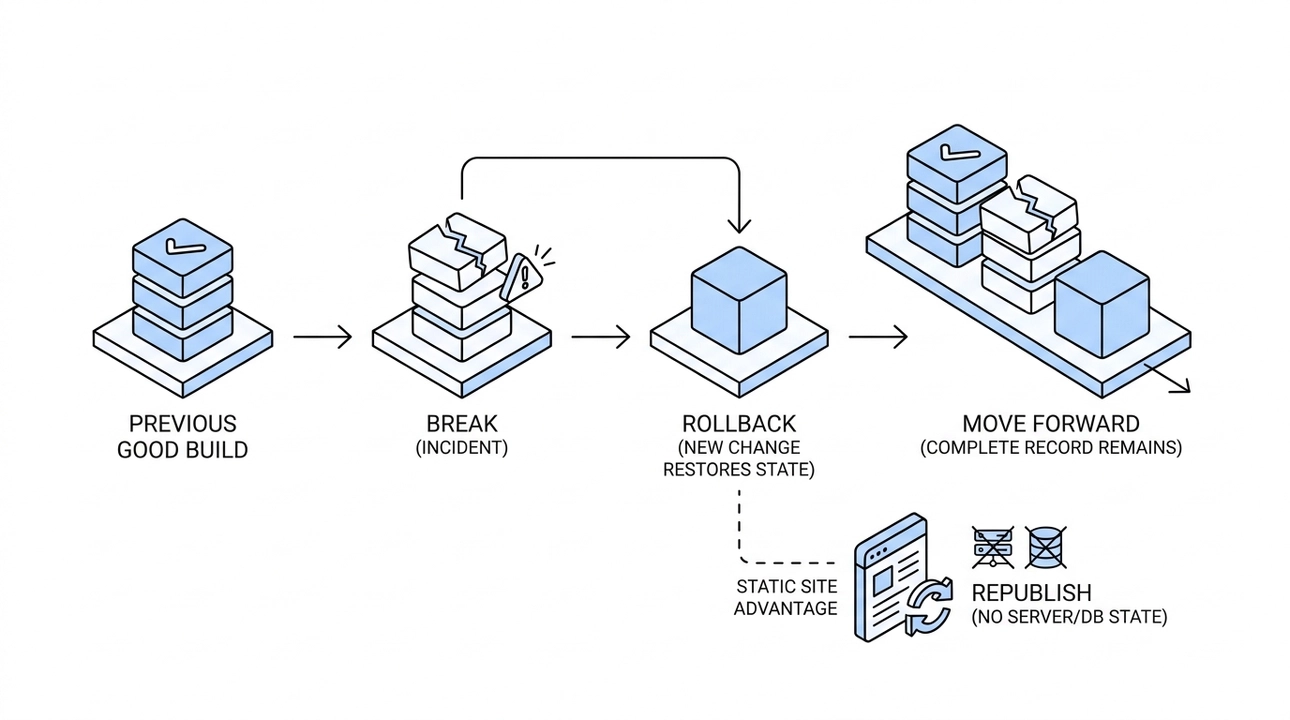
Our approach to rollback is to treat it as a new change that restores a previous state. Nothing in the history gets rewritten. You can see what existed before, what broke, and how it was fixed. The record is complete.
The fact that our site is statically generated makes this even more practical. Restoring a working version means republishing it. There's no server state to untangle, no database to reconcile. The previous good build goes back out, and the project moves forward from there.
What This Means in Practice
When AI is embedded inside an engineering process rather than dropped on top of one, the outcomes are different. Small, bounded changes instead of large opaque rewrites. Checks that apply to everyone, including the agent. Blocks that close cleanly before the next one opens. Memory that keeps the agent oriented. Rollback that preserves the record.
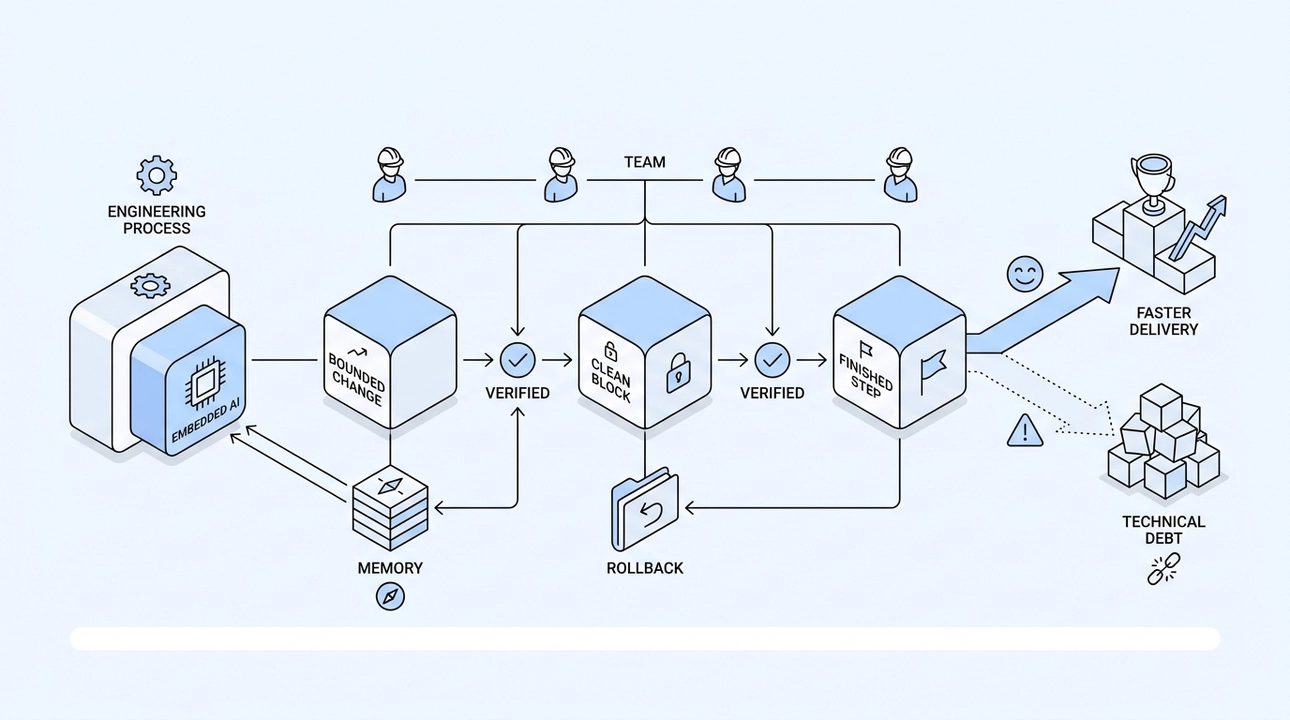
The Moonion site is the clearest example we have of this working. It wasn't built in one AI-driven session. It was built step by step, with every step checked and every block verified before moving on.
The result is a product where AI participation means faster delivery, not accumulated technical debt. That's the actual difference between an AI agent that accelerates a team and one that quietly creates problems for the next developer to inherit.
10. Why AI Must Never Fabricate Facts: How We Keep Content Grounded in Reality

Large language models have a well-documented weakness. They write smoothly and convincingly even when they do not actually know the answer. Instead of saying "I don't know," the model fills the gap with something plausible. The text sounds confident. The fact is invented. That behavior has a name: hallucination. And for anyone building a product or running a business online, it is not an edge case. It is a direct operational risk.
This is post ten in our AI Ready series. We have spent nine posts covering architecture decisions, agent rules, static site security, and content workflows. This one is about something more fundamental: the boundary between what AI should generate and what it must never be allowed to invent.
The Problem With "Plausible"
Plausible is not the same as accurate. That distinction matters enormously when AI is involved in writing content for your site or product.
Think about an e-commerce store. If an AI agent generates a product description and it fills in a price it does not actually have on record, that price is wrong. If it pulls a delivery estimate from nowhere because the prompt did not specify one, that estimate is fabricated. If it writes a spec sheet using characteristics that sound right for the category but were never confirmed by a supplier, those specs are fiction.
On a B2B site, the risks shift slightly but the stakes stay high. AI that promises features your product does not have, or overstates case study results that were never measured, does not just create a legal headache. It corrodes trust with exactly the kind of buyer you most want to reach.
One clean-sounding hallucination in a published page can cost you a client relationship. The fact that the AI generated it in good faith, statistically completing the most likely next token, is not a useful defense.
How We Approach It at Moonion
Our principle is simple enough to say in one sentence: AI structures and formats the content, but the facts come from verified sources, not from the model itself.
In practice, that means every piece of information that ends up in a published page has a traceable origin. Prices come from actual pricing data. Dates come from real records. Specifications come from supplier documentation or confirmed product decisions. Case study numbers come from measurements the team actually took. The AI's job is to take those facts and turn them into clear, readable prose. It is a formatting and structuring layer, not a knowledge layer.
This is not a theoretical principle. It is the rule our AI files follow on our own site. If an entity does not have a confirmed description, the block is simply omitted. It is not filled with an educated guess. Leaving a gap is better than publishing a fabrication.
We apply the same logic to numerical claims across client projects: certificates, license details, warranty terms, supplier specifications, and figures cited in case studies. If the fact originated outside our system, it gets transferred exactly as it exists in the source. It is not paraphrased for readability. It is not cleaned up for style. The moment you start "improving" an external fact for flow, you introduce the risk of changing it.
A Concrete Example: The Expert Site Project
One project makes this principle especially clear. We built a personal site for a subject-matter expert with a significant body of published academic work and a range of formal recognitions.
That kind of project is exactly where hallucination risk is highest. Publication records, co-authorship sequences, journal names, award citations: these are the specific details that AI models are most likely to subtly distort. A model might expand initials into full names because that feels more readable. It might reorder authors because alphabetical order seems cleaner. It might soften a formal journal title because it sounds awkward in a sentence. Each of those micro-edits introduces an error.
Our rule on that project was strict. Publication data transferred exactly as it existed in the source. Author order stayed as recorded. Initials remained initials. Journal names and publisher details did not get edited for aesthetics. Any claim about an award or recognition that lacked a verifiable reference simply did not appear on the site.
We also did not rely on human proofreading alone for that kind of record-keeping. Two dozen publications cannot be reliably cross-checked by reading through them carefully. The margin for a misplaced identifier or a transposed name is too high. Mechanical verification, not careful reading, is what actually catches that kind of error at scale.
When the Facts Are Missing, Ask. Do Not Guess.
There is a related workflow problem that costs teams more time than they usually recognize. When an AI agent encounters a gap in its input, the default behavior for many systems is to fill it in or work around it. That produces plausible content built on invented facts, and it also produces a long back-and-forth while the team tries to figure out what the agent actually made up.
We handle it differently. When our agent does not have the information it needs to complete a task accurately, it does not guess, and it does not ask questions one at a time across ten messages. It collects everything it is missing, formats those gaps as a single numbered list, and shows exactly what format each answer should take.
That shift changes the entire feel of working with the system. You answer once, briefly, and you can see clearly what the agent was missing. More importantly, you know exactly what facts the system did not have, which means you know what was not fabricated. That transparency is not a minor usability detail. It is part of how the system stays trustworthy over time.
What This Means for Your Business
There is a version of AI-assisted content work that moves fast and looks polished but quietly undermines everything it is supposed to build. Clients receive pages that describe capabilities the product does not have. Search engines index specs that no one verified. AI chatbots trained on or citing your site repeat figures that were generated, not measured.
The alternative is not slower or more expensive. It requires a clear division of responsibility. Facts belong to humans and to verified sources. Structure, clarity, and speed belong to AI. When those roles stay separate, the content your site produces is something that people can actually rely on, and so is your reputation.
That is what AI Ready means in practice. Not AI that generates everything. AI that handles what it is genuinely good at, while the things that matter most to trust stay in human hands.
11. Your Site Is a Knowledge Base: The Content Model That Makes AI Integration Actually Work

Most websites are not knowledge bases. They are collections of pages that happen to share a domain. Content is scattered: some facts live in a database, some are hardcoded in templates, some exist in three slightly different versions across three different pages. When someone updates a team member's name, they update it in four places and miss a fifth. When a price changes, two translated pages get the fix and one stays wrong for months. This is not a content model. It is managed chaos.
When we rebuilt Moonion's site, we treated this problem as a first principle, not an afterthought. The result is what we now call the "site as a connected knowledge base" model, and it changes how content is created, maintained, updated, and read, whether the reader is a human visitor, a search engine crawler, or an AI agent.
Everything Starts With Simple Text Files
The foundation is deliberately plain. All content on the Moonion site lives in simple text files. No proprietary database, no binary blobs, no content locked inside application code. Just structured text that a person can open in any editor, that a version control system can track line by line, and that an AI agent can parse without needing a special API or a database connection.
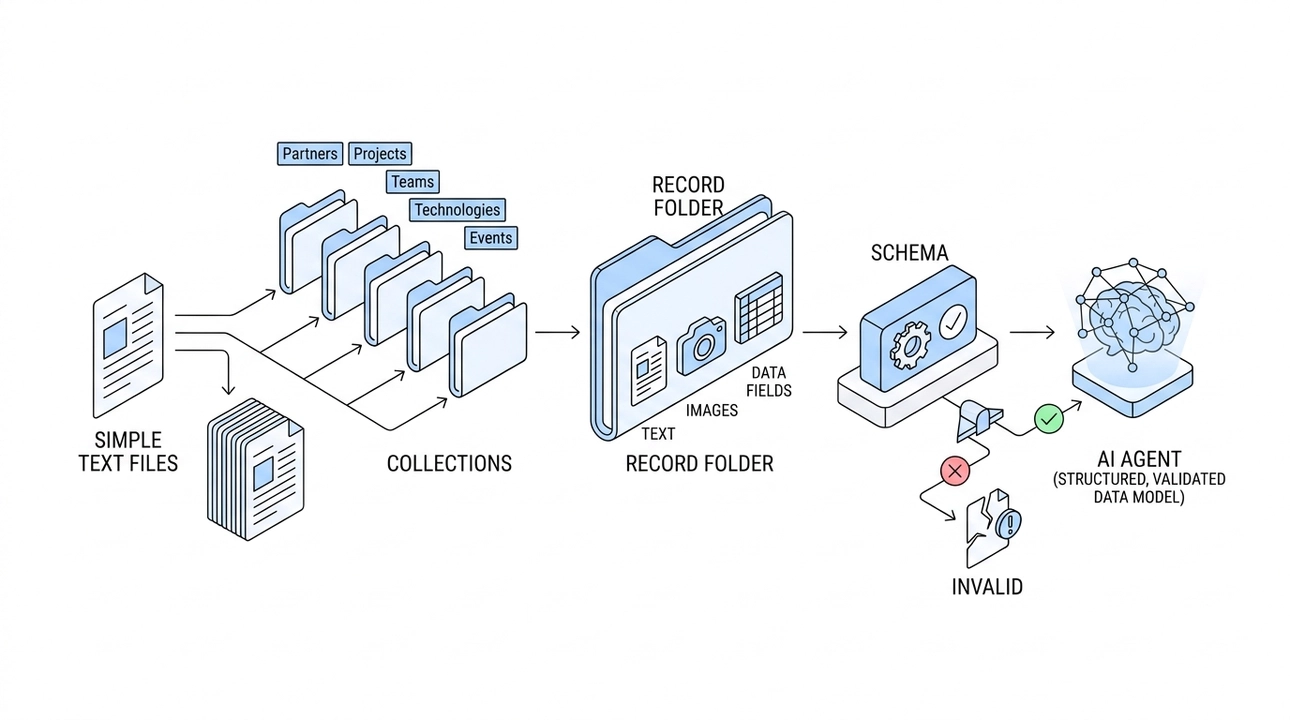
The power is not in the files themselves. It is in the structure around them.
Content is organized into collections, which are sets of similar records. The shape of those collections is designed specifically for each site. For Moonion, which is a portfolio site, the collections are: partners, projects, teams, technologies, and events. Each collection is built for a specific type of entity, and every record in that collection follows the same shape.
Each record lives in its own folder. The text, images, and data fields for that entity all live together in one place. Everything about a single project, partner, or team member is in one folder, not spread across a database table, a media library, and a template file that only a developer can find.
On top of this sits a schema, which is a set of rules defining what a valid record looks like. The schema checks that required fields are filled in, that dates are formatted correctly, that images have alt descriptions, and that references point to records that actually exist. If a project references a technology that has no record in the technologies collection, the validation fails. If an image is missing its alt text, that is an error, not a warning. The schema is the quality gate that keeps the knowledge base coherent.
This matters for AI. An agent working with this content is not parsing arbitrary HTML or guessing at what a page is about. It is reading a structured, validated data model. It knows what fields exist, what they mean, and how they connect to other records.
Connections Are Stored, Not Copied
This is the principle that separates a knowledge base from a document collection.
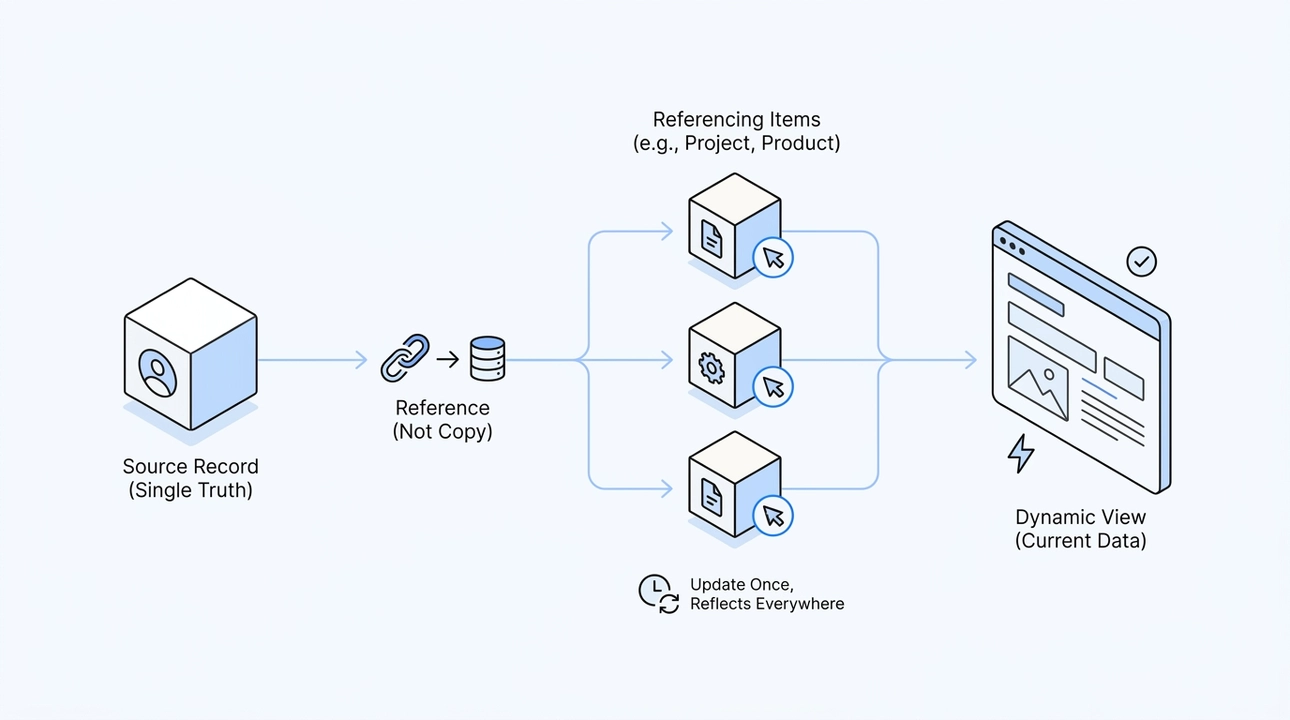
When a project is connected to a partner, we store a reference to that partner's record. We do not copy the partner's data into the project record. The project says "this belongs to Partner A," and when the page renders, it pulls Partner A's current data at that moment.
What this means in practice: update the partner once, and the change is correct everywhere that partner appears. There is no synchronization step, no risk of one page showing old data while another shows new data, no developer task required to propagate the change. The connection is the data.
The same principle applies at every level. In the Moonion portfolio, a project is connected to its partner, its team, the technologies used, and any related events. The partner page automatically surfaces the projects associated with that partner. The technology page shows the stack context across all projects that reference it. The site becomes navigable as a network, not just as a list of pages, and that navigation emerges from the data model, not from manually maintained link lists.
We are also applying this same model to an e-commerce project currently in development. There, the collections are products, categories, brands, attributes, services, and articles. A product is connected to its brand, its categories, and its attributes. Update the brand record once, and every product that references it reflects that update automatically. The principle is the same; only the domain changes.
Multilingual sites benefit especially clearly from this model. Shared facts, such as price, availability, product specifications, and images, are stored once in the primary record. Translations contain only the text that actually needs translating: titles, descriptions, captions. A price cannot diverge between language versions because there is only one price field, and it lives outside the translation layer. A factual error in a translation becomes structurally harder to introduce because the translation does not hold the facts.
AI as the Interface, With Honest Limits
Clients who come to us typically expect an admin panel. They are used to a form where they fill in fields and click save. When we tell them everything lives in text files, the reaction is usually skepticism. Files feel like a developer tool, not a business tool.
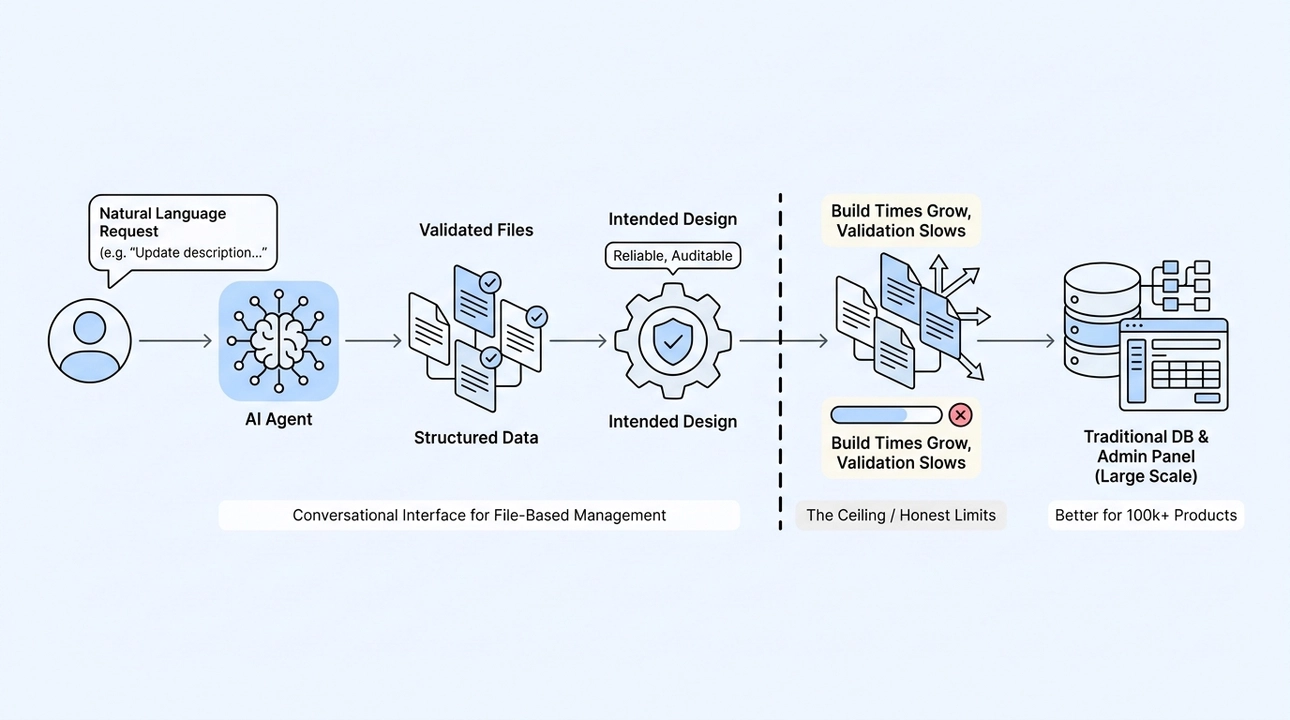
This is where the AI agent changes the picture. The client does not interact with files directly. They talk to an AI agent in natural language: "Update the description for project X," or "Change the availability status on this product." The agent understands the request, locates the correct record in the file structure, makes the change, and the schema validation catches anything that would break consistency. The client gets an interface that feels conversational. The system underneath stays structured and auditable.
This is not a workaround. It is the intended design. The file-based model is what makes the agent reliable, because the agent is working with a clear, validated data model rather than trying to interpret a database schema it cannot see or modify HTML it might accidentally break.
That said, this model has a real ceiling, and we are direct about it. For a site with a hundred thousand products, the approach starts to strain. Build times grow as the static generator has to resolve connections across a very large number of records. Validation across that many relationships becomes slow. The development experience, which is already the main cost of this approach, degrades further. For projects of that scale, a traditional database with a proper admin interface is almost certainly the right tool.
The file-based knowledge base model is well-suited to projects where the content set is manageable: portfolio sites, marketing sites, small to mid-size product catalogs, documentation sites. If you are in that range, the simplicity and reliability are genuine advantages.
A Structure That Stays Useful Over Time
One practical benefit that clients do not always think about upfront is what happens when the business outgrows the current setup.
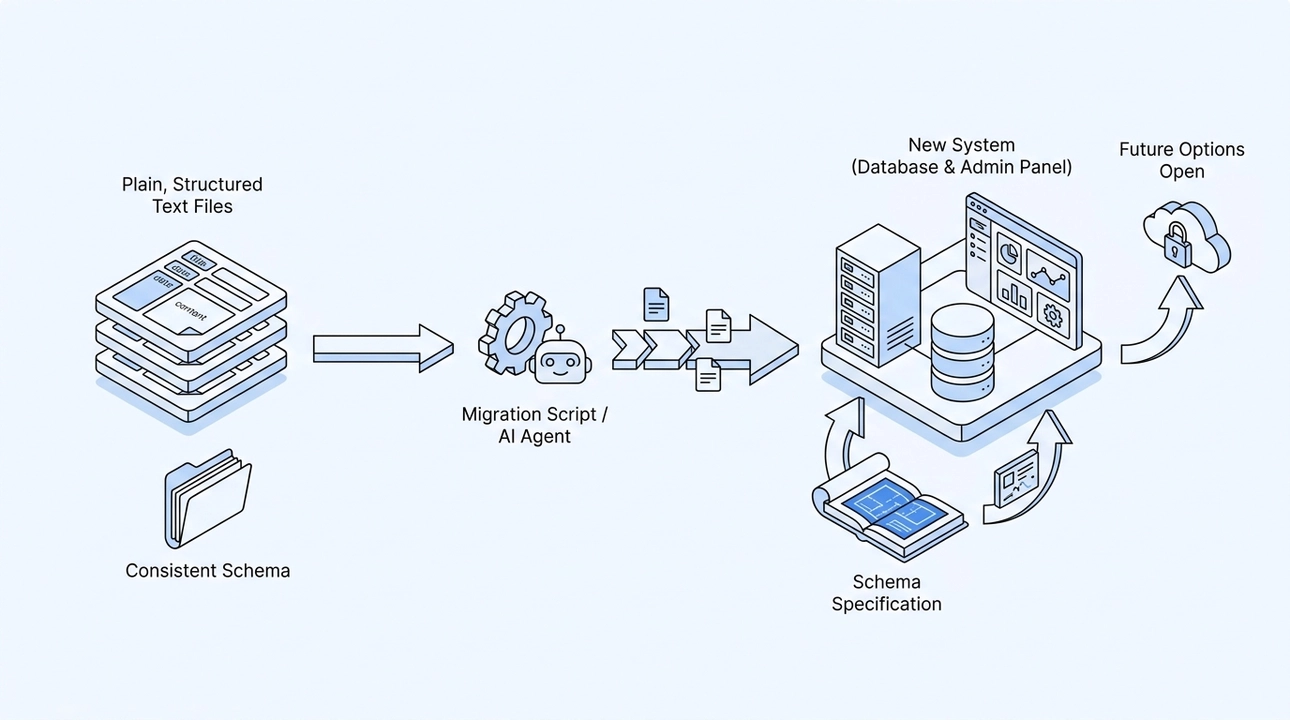
Because all content lives in plain, structured text files with a consistent schema, migrating to a different system later is a tractable problem. The data is not locked inside a proprietary database format or buried in serialized application state. It is in files with known structure. Writing a migration script, or having an AI agent do it, is straightforward compared to extracting content from a system that was never designed to export it cleanly.
If that hypothetical e-commerce project grows to the point where it genuinely needs a database backend and a traditional admin panel, the migration path is clear. The file structure documents exactly what fields exist, what their types are, and how records relate to each other. That specification becomes the schema for the new system. The content moves without guesswork.
This is the long-term value of treating structure seriously from the start. A well-defined content model does not just make the current site easier to manage. It keeps future options open.
What This Actually Changes
A website built as a connected knowledge base works differently from a collection of pages in ways that accumulate over time. Visitors navigate by context rather than just by links. Potential clients see real connected evidence of work, not isolated service descriptions. Search engines find a coherent set of documents that reference each other meaningfully. AI chat interfaces, when they access the site, receive a structured set of facts with explicit relationships rather than a pile of loose text.
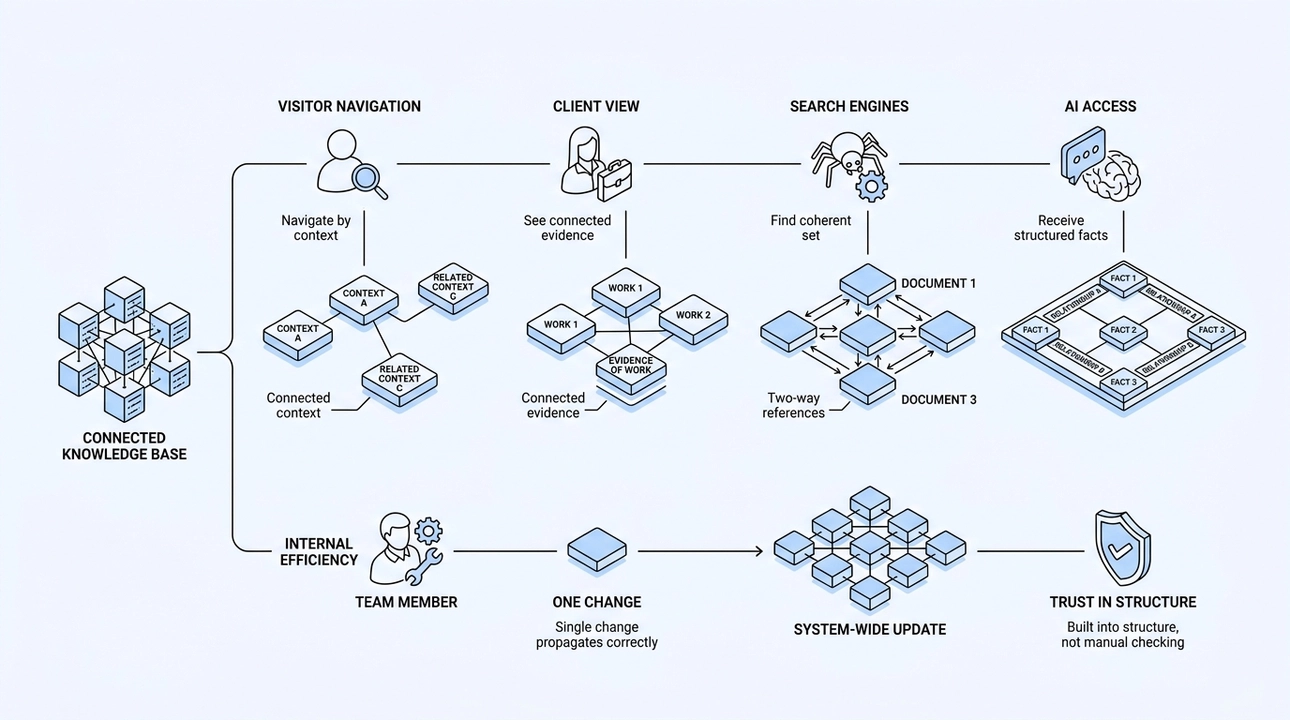
And internally, the team makes one change and trusts that it is correct everywhere. That trust is not based on careful manual checking. It is built into the structure itself.
That is what a knowledge base does. It turns individual records into a system that stays consistent as it grows, and stays readable to every audience that needs to use it.
12. How to Write Case Studies That Humans, Search Engines, and AI Can Actually Use

Most case studies are written to impress, not to inform. You can usually tell within the first two sentences: "innovative approach," "unique solution," "full immersion in the client's vision." The words sound confident, but they communicate nothing. Nothing verifiable, nothing specific, nothing a reader, a search engine, or an AI chat can actually do anything with.
A case study is supposed to be the strongest proof of your expertise. In practice, it often becomes its weakest representation, because it was written as marketing rather than evidence.
What a Strong Case Study Actually Answers
The difference between a promotional case study and a useful one comes down to whether it answers a clear set of questions. Not impressions, not adjectives. Actual questions.
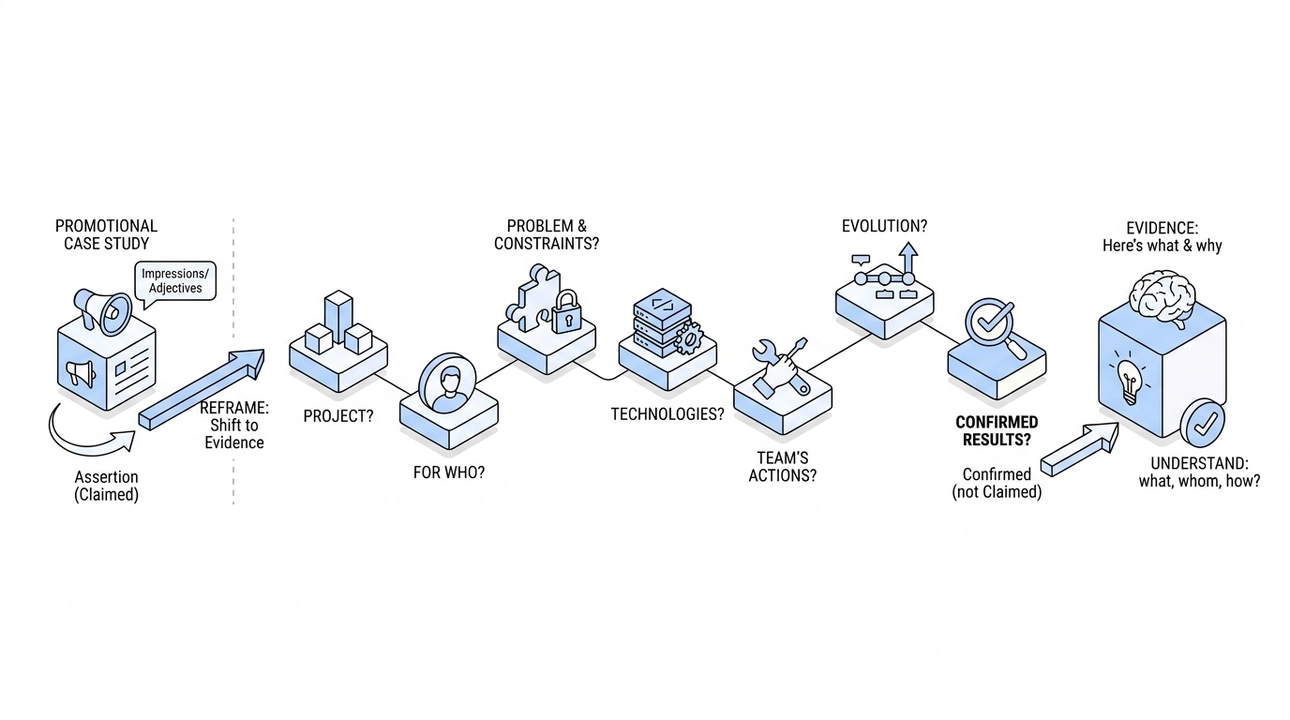
What was the project? Who was it built for? What problem were they trying to solve, and what constraints mattered? What technologies were used? What exactly did the team do? How did the product evolve over time? And finally, what results can be confirmed?
That last part is key: confirmed, not claimed. "We delivered an outstanding product" tells you nothing. "The client needed to handle X under constraints Y, so we built Z using these specific tools, and the product went through these stages" tells you something you can evaluate.
The shift is from assertion to evidence. From "we are great at this" to "here is what we did and why." That reframe changes how every reader, human or automated, processes the information.
When we started sharpening our own project pages at Moonion, this was the core question we kept asking: can someone read this and actually understand what we built, for whom, and how? If the answer was no, the page needed work, regardless of how polished it looked.
Why AI Makes This Non-Negotiable
A human reader can extract meaning from a vague, flowery paragraph. They fill in gaps with assumptions, read between lines, and generally give you the benefit of the doubt. An AI language model does not do that.
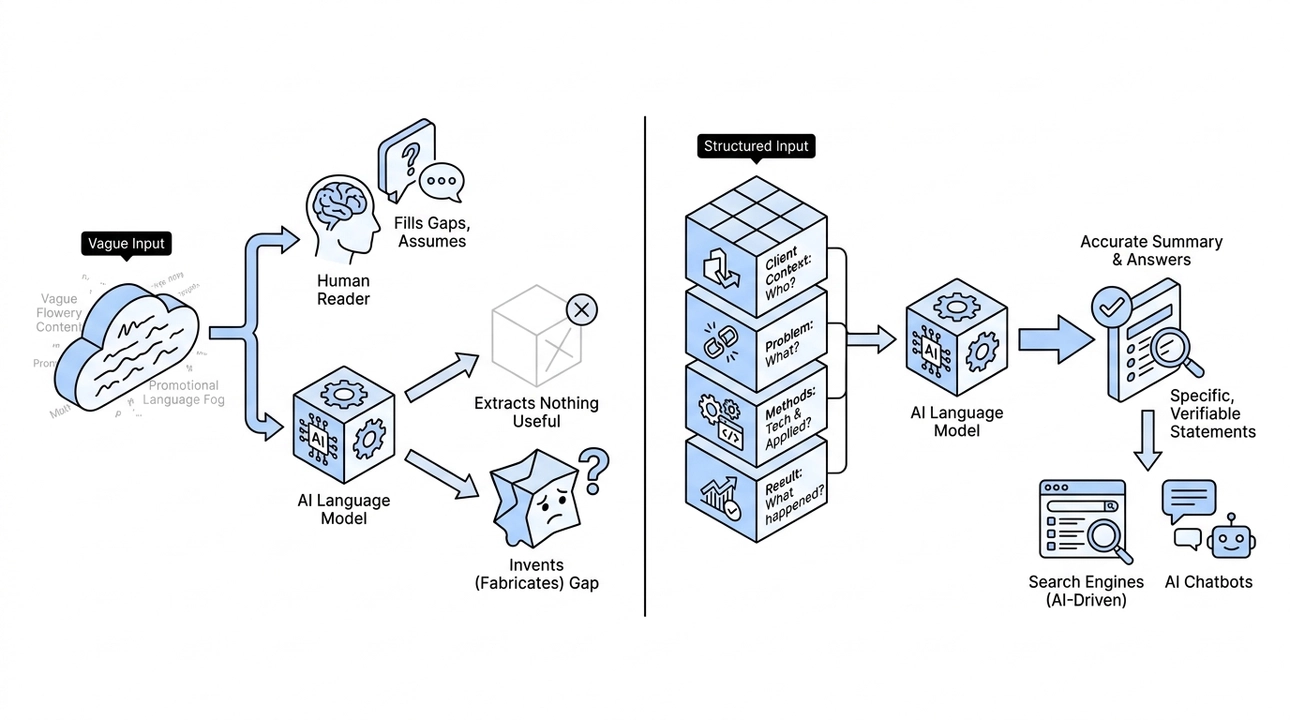
When an AI chat tries to summarize your case study or use it to answer a user's question about your capabilities, it needs clean, discrete facts to work with. Who was the client context? What was the problem? What technologies and methods were applied? What happened as a result? If those answers are buried in promotional language or simply absent, the model has two options: extract nothing useful, or invent something to fill the gap.
We have been very deliberate about the second risk across this entire series. AI should not fabricate. But if you give it a fog of marketing copy, you are essentially inviting fabrication, because there is nothing solid to cite. A structured case study removes that invitation. It gives the model specific, verifiable statements it can safely use.
This is not a niche concern for companies thinking about AI chatbots. Search engines are increasingly AI-driven. The way your project pages get summarized, surfaced, and recommended depends on whether the content is structured enough to be parsed accurately. Vague content does not just fail to impress, it actively disappears.
How We Approached This at Moonion
We did not overhaul our portfolio in one pass. We worked through it gradually, which, honestly, is the more sustainable way to do it. The steps were sequential and deliberate: rewrite the core case study text to answer the key questions directly, refine section descriptions for clarity, add a product evolution timeline so the history of the work is visible, sharpen the partner context so the reader understands who we were working with and why, then tighten the meta description to match.
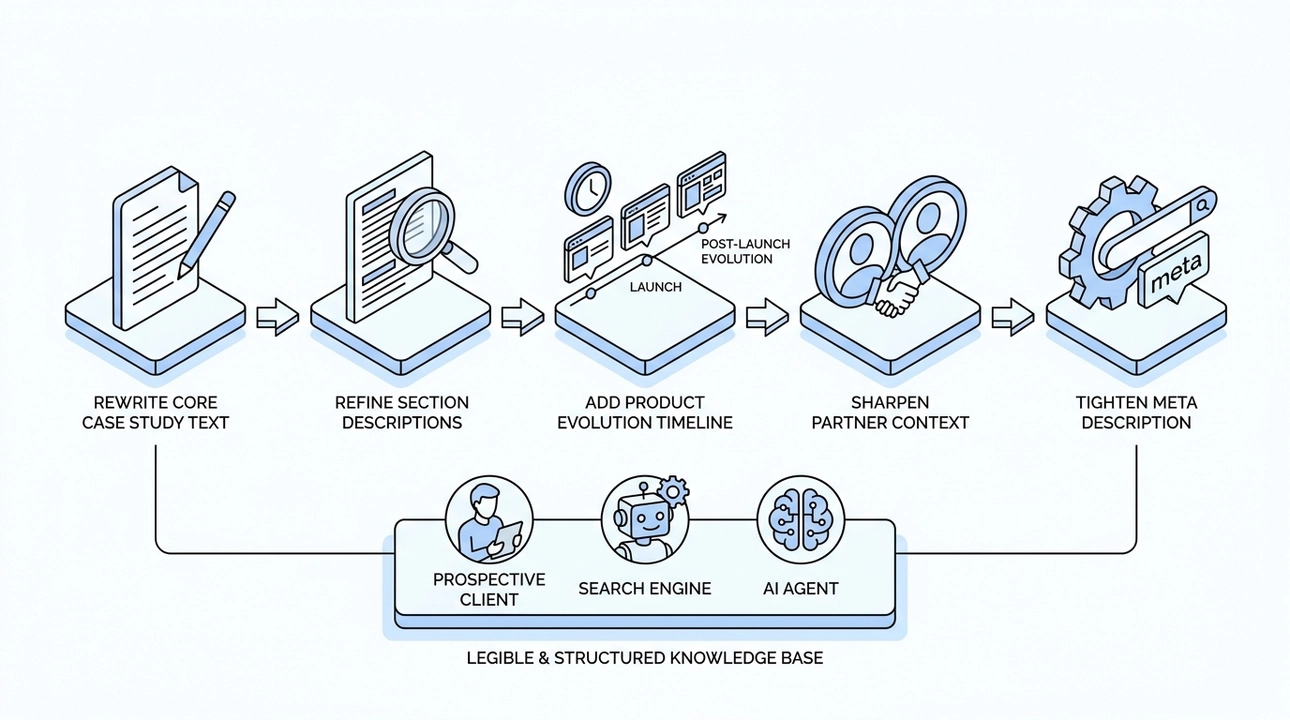
Each of those steps sounds small in isolation. Together, they transform what a portfolio is. It stops being a gallery of screenshots and becomes a structured record of decisions, constraints, technologies, and outcomes. A knowledge base of experience rather than a collection of images.
The goal was not to make the pages prettier. It was to make them legible: to a prospective client reading carefully, to a search engine parsing the structure, and to an AI agent trying to represent our work accurately.
One practical detail worth noting: the product evolution section is often the most overlooked part of a case study. People document what they built at launch and forget to show what changed after. But that evolution is part of the evidence. It shows that the work held up, that the team adapted, that the product was maintained and developed over time. Leaving it out makes a case study feel incomplete, because it is.
The Same Principle Works Beyond Portfolios
Case studies are the clearest application of this principle, but the logic extends anywhere you are trying to communicate facts about something specific.
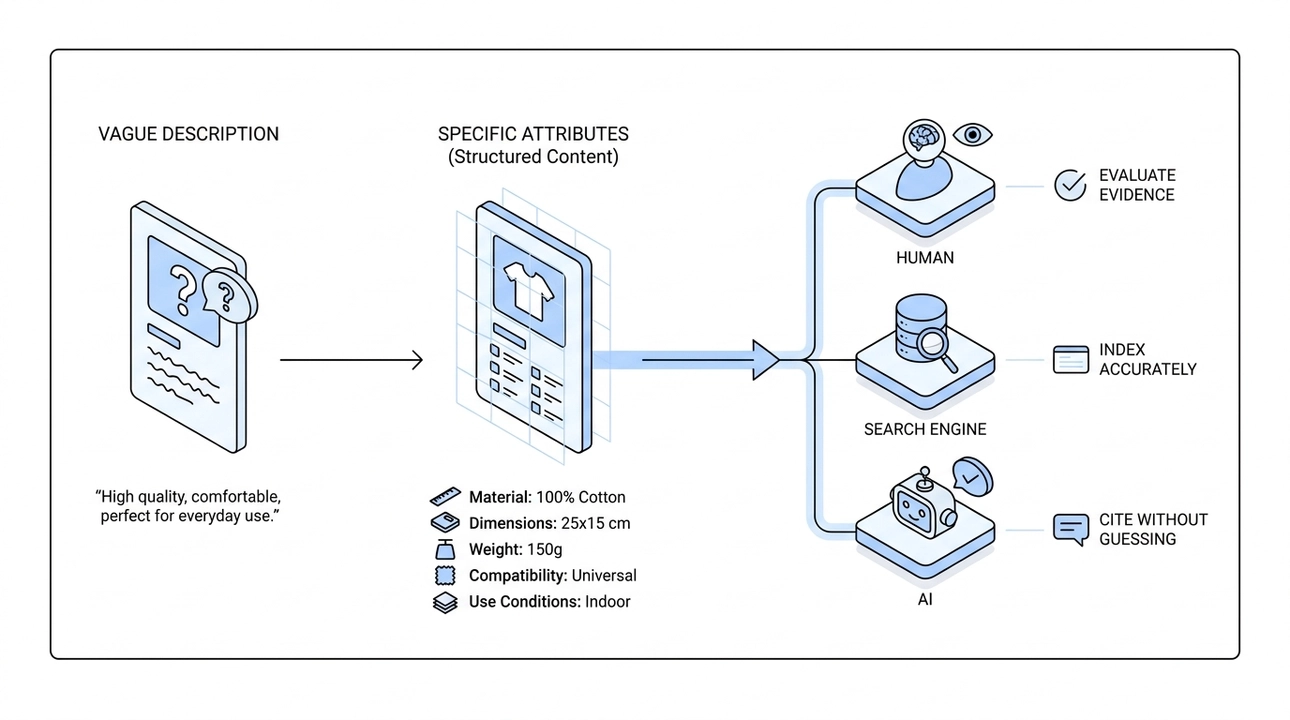
E-commerce product cards are a direct parallel. A card that says "high quality, comfortable, perfect for everyday use" is the product-page equivalent of a promotional case study. A card that lists specific materials, dimensions, weight, compatibility, and use conditions actually sells, because it answers the questions a buyer is asking. Specific attributes outperform vague descriptions, not because they sound better, but because they are more useful.
The underlying idea is the same: structured, factual content serves everyone in the chain. The human gets evidence they can evaluate. The search engine gets content it can index accurately. The AI gets facts it can cite without guessing.
What This Means in Practice
If you are looking at your own case studies or project pages right now, the test is straightforward. Can someone read the page and answer these questions without making assumptions?
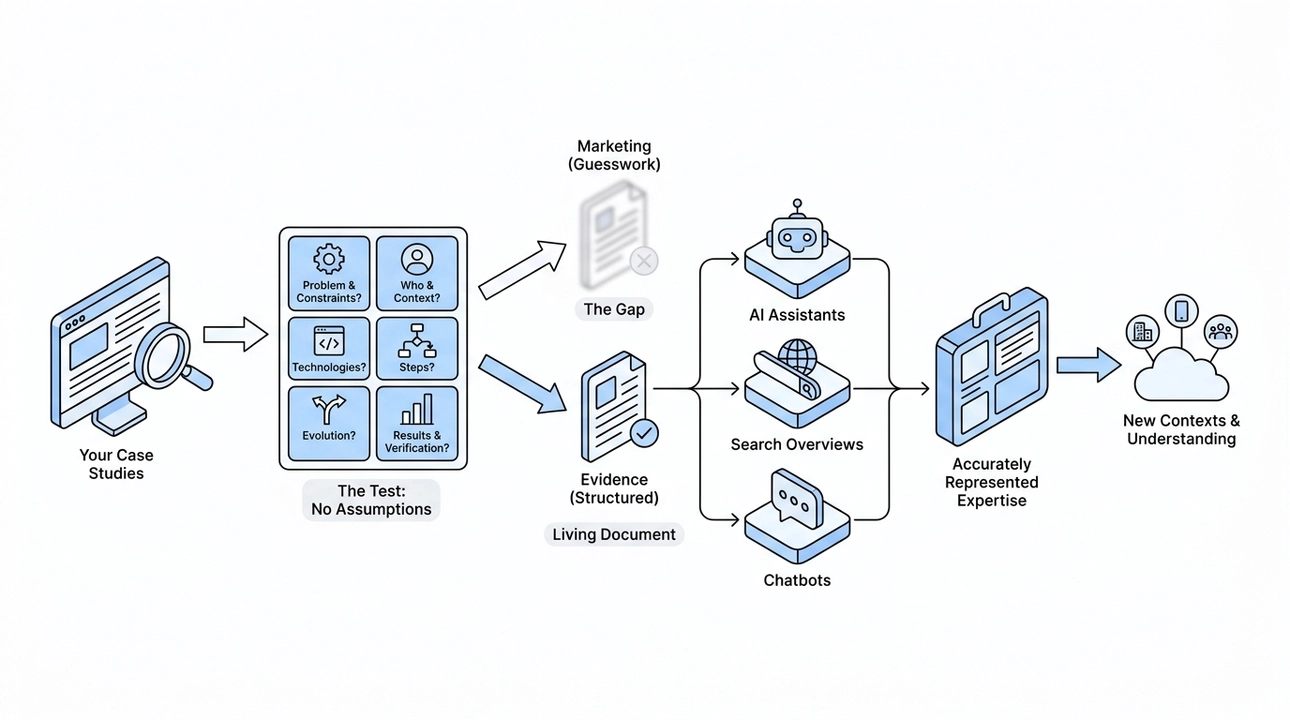
- What was the actual problem, and what constraints shaped the solution?
- Who was this built for, and what was their context?
- What specific technologies or methods were used?
- What did the team do, step by step?
- How did the product or project evolve after the initial delivery?
- What results are there, and how can they be verified?
If any of those answers require the reader to guess or take your word for it, the page is closer to marketing than evidence.
That gap matters more now than it did a few years ago. When AI assistants, search overviews, and chatbots are increasingly mediating how people find and evaluate services, the quality of your structured content determines whether your experience gets represented accurately or gets replaced by someone else's better-organized page.
Case studies are not just for impressing potential clients in a first conversation. They are living documents that carry your expertise into contexts you will never be in the room for. The more precise and structured they are, the better they work in all of those contexts.
We built our portfolio to be read by people. Now we are building it to be understood by everything that reads on their behalf too.
13. SEO Is Not Dead in the Age of AI Search. It's More Important Than Ever.

There is a myth spreading fast right now, and we hear it constantly from founders and builders: now that people ask ChatGPT their questions and read AI-generated answers inside Google, classic SEO no longer matters. The logic sounds almost reasonable. If the AI is writing the answer, why does it matter whether your page ranks?
The logic is wrong. AI search does not replace the need for solid SEO. It amplifies it, and the reason is arithmetic. A page of search results has room for ten links and everything below the fold. An AI answer cites a handful of sources, sometimes one. Changing the interface does not remove the competition for visibility, it narrows it. Ranking on the first page used to be the goal. It is now closer to the entry requirement for being eligible to appear in the answer at all.
Why AI Search Runs on the Same Rails as Traditional Search
AI systems do not pull information from thin air. They depend on the same web infrastructure that traditional search relies on: crawlable pages, clear structure, reliable content, and machine-readable signals. If your page is difficult to crawl, if its content is buried behind broken code, or if it sends no clear signals about what it actually is, then it is invisible to Google, to Bing, and to the AI systems drawing from those indexes.
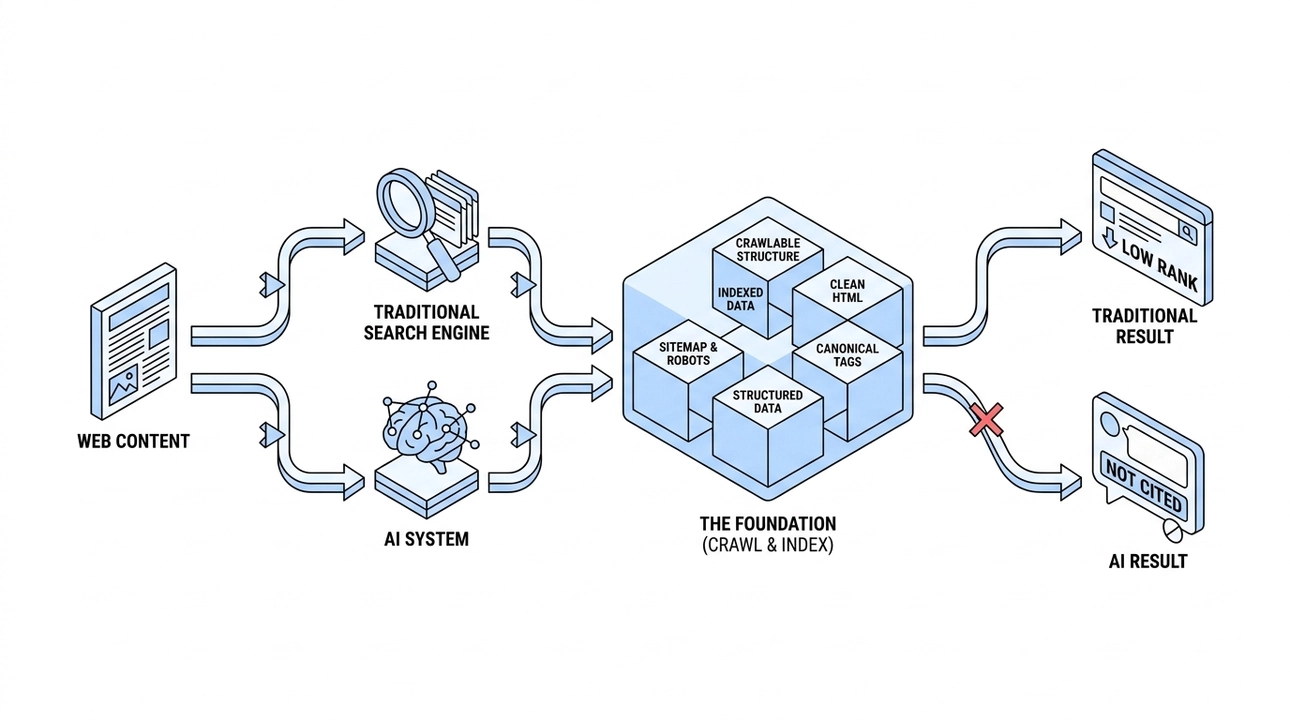
The underlying problem is the same. Only the consequences are slightly different. With traditional search, poor structure can hurt rankings. With AI search, it can also reduce the chances that your content is understood, retrieved, and cited accurately.
The foundation has not changed. Pages need to be easily crawlable. They need to be properly indexed. Titles, descriptions, canonical tags, sitemaps, and clean HTML need to be in order. These are not optional refinements for when you have spare time. They are the minimum requirement for existing on the modern web.
When we rebuilt Moonion’s website, this was part of the migration plan from the beginning: preserve existing URLs, configure redirects properly, remove the outdated keywords meta tag that search engines stopped reading years ago, add canonical links, social preview data, structured data, a sitemap, a robots file, and a clean 404 page. Each of those decisions was deliberate, not decorative.
Metadata Is a Language, Not a Decoration
The shift in thinking that matters most here is treating metadata as a communication layer, not a formatting task. Metadata is not just about how a page looks in search results or social previews. Together with structured data, canonical signals, headings, and the content itself, it helps machines understand what a page represents and how it relates to the rest of the site.
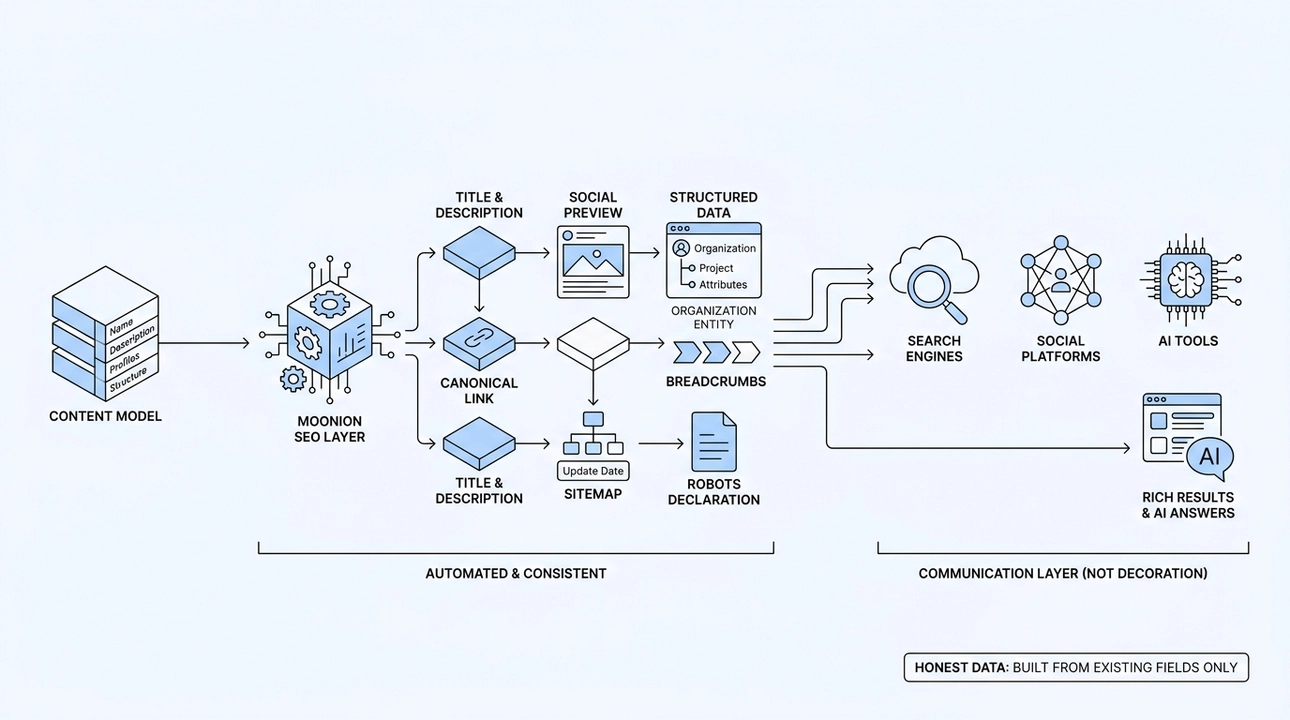
The difference is between saying "here is some text, figure it out" and saying "this is an organization, here is its name, here are its profiles, this is a project, here is its description, here is where it sits in the structure of the site." That specificity is what structured data provides.
On Moonion’s website, the SEO layer generates this automatically on every page. Each page gets a predictable title and description, a canonical link, social preview data with an image for clean previews in messengers and social platforms, structured data that describes the entity on the page, breadcrumbs, a sitemap entry with an accurate last-modified date, and the correct robots directives. None of this is assembled by hand for each page. It is derived from the same content model that builds the pages themselves.
That matters because consistency is what makes it trustworthy. If structured data is generated manually, it drifts. Fields get forgotten, descriptions go stale, breadcrumbs break after a site restructure. When the data is generated from the model, updating the content updates the metadata automatically.
One principle runs through all of this, the same one that runs through the entire AI Ready series: structured data is built only from fields that actually exist. If a project has no description, the system does not invent one. If a piece of content has not been verified, it does not get added. Metadata describes the object honestly. It does not manufacture one.
This matters especially for e-commerce. Structured data can describe a product, its category, its price, availability, shipping, return policy, and reviews. That is exactly the kind of machine-readable information search engines can use for rich results, and that AI systems can use to better understand the product and its attributes. But only if the data is real and verified. If it does not match what is actually on the page, search engines may ignore the markup, remove rich-result eligibility, or treat the data as unreliable. There is no shortcut here.
Multilingual Sites, Accessibility, and the Signals You Cannot Afford to Skip
Two areas tend to get deferred, and both carry real consequences.
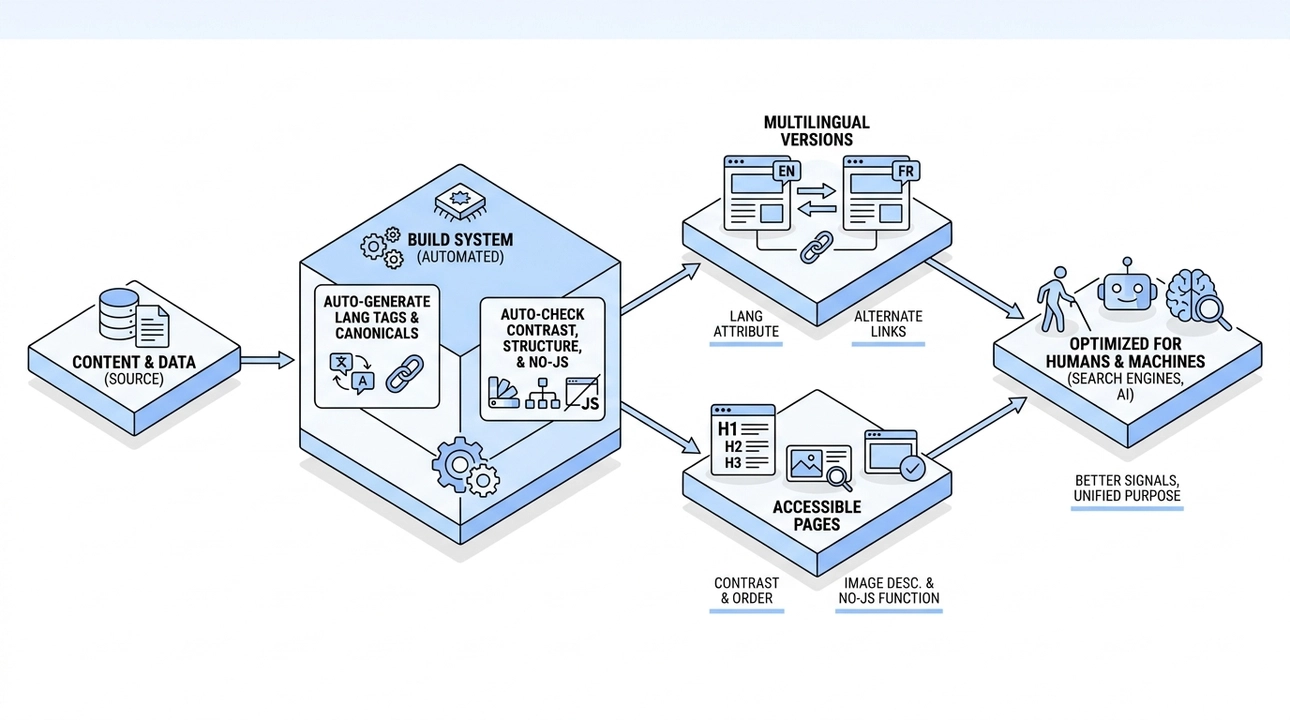
The first is multilingual handling. When a site has multiple language versions, each page needs to declare its own language and list its equivalents in other languages. Without those signals, search engines have less information about which language or regional version should be shown to a particular user. Language versions are not an afterthought. They need to be part of the content model.
The principle here is the same one that governs the rest of the metadata: whatever describes a page should be derived from the content model, not maintained alongside it. Canonical addresses and sitemap entries on our own site already work exactly that way. When a project needs language versions, they belong in that same model, so that adding a translation declares it correctly by construction instead of adding one more manual step somebody has to remember.
The second area is accessibility. Text contrast, heading order, image descriptions, and page functionality without JavaScript are typically framed as requirements for users with visual impairments. They are. But a crawler or an AI system reading that page has to work with the same properties: a sane heading order, real text instead of text baked into an image, a page that means something before the scripts run.
A page that depends entirely on scripts, has a confusing heading structure, or provides no textual context for important images creates unnecessary barriers to understanding for people, crawlers, and other machines.
We run automated checks for contrast in both light and dark themes and for structural integrity at build time. Not because accessibility is a nice-to-have. Accessibility and machine readability are not the same thing, but they often reward the same engineering discipline: semantic HTML, meaningful headings, descriptive text, predictable structure, and content that does not depend entirely on client-side behavior.
What This Actually Looks Like in Practice
A week after launching the rebuilt Moonion website, before indexation had even completed, project pages were already surfacing on the first pages of results for their own queries, such as "wahgo" and "enchant ticketing". Taken alone that is a modest result: a site ought to rank for the names of the things it built. What made it worth noting was the speed. New URLs, a new structure, no accumulated authority on any of them, and the pages were still discovered, parsed, and indexed within days. That is what a clean technical foundation actually buys: no lag between publishing something and having it understood.
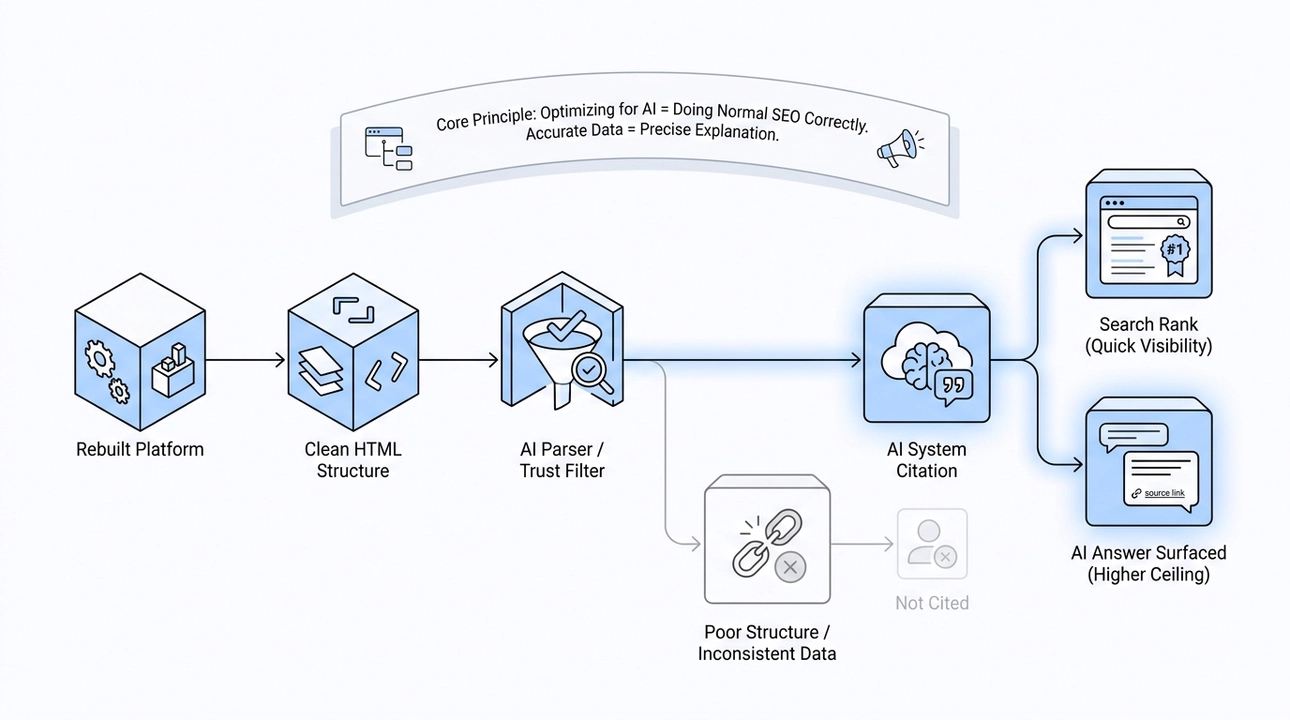
The path to visibility in AI-generated answers runs through exactly that foundation. AI systems are more likely to use sources they can reliably read, parse, and understand. Clean HTML, accurate structured data, correct canonicalization, and verified content make that job easier.
There is no credible AI search strategy that bypasses these fundamentals. There is just the work of making your site technically legible, which has always been what good SEO required. The stakes are higher now because the ceiling is higher: a well-structured page does not just rank, it gets surfaced inside AI answers to the specific questions your customers are asking.
For a business this is not a technical line item. Structured data is an extension of your content model, which means the accuracy of your metadata is capped by the accuracy of what you have actually written down about yourself. Get that part right and the same work pays three times over: in search results, in link previews, and in what an AI assistant says to someone who asked about your industry rather than about you. Everything covered here is the floor. The layer that sits on top of it, built specifically for AI systems to read, is the subject of the next article in this series.
14. llms.txt and the AI Layer Your Site Is Missing: How to Get Represented Accurately in AI Chat

The first time many people encounter your company today, it is not on your website. They type a question into ChatGPT, Claude, or Gemini, and they get an answer. Whether that answer accurately describes you, your projects, your team, and what you actually build, that part is largely up to you.
Most businesses have not thought about this yet. They assume that having a good website is enough, that AI systems will figure it out. Sometimes they do. More often, they approximate, stitch together fragments, or fill gaps with confident-sounding guesses. That is not a content problem. That is an architecture problem, and it has a practical solution.
At Moonion, we have built a dedicated layer on our site specifically for AI systems to read. The results were noticeable within a week of going live, well before full indexing. Here is exactly how we built it and why the design decisions matter.
What llms.txt and llms-full.txt Actually Are
The idea behind llms.txt is simple: instead of making an AI system parse a fully rendered web page complete with navigation menus, buttons, styling, and promotional copy, you give it a clean, structured text file that contains the essential facts about your site.
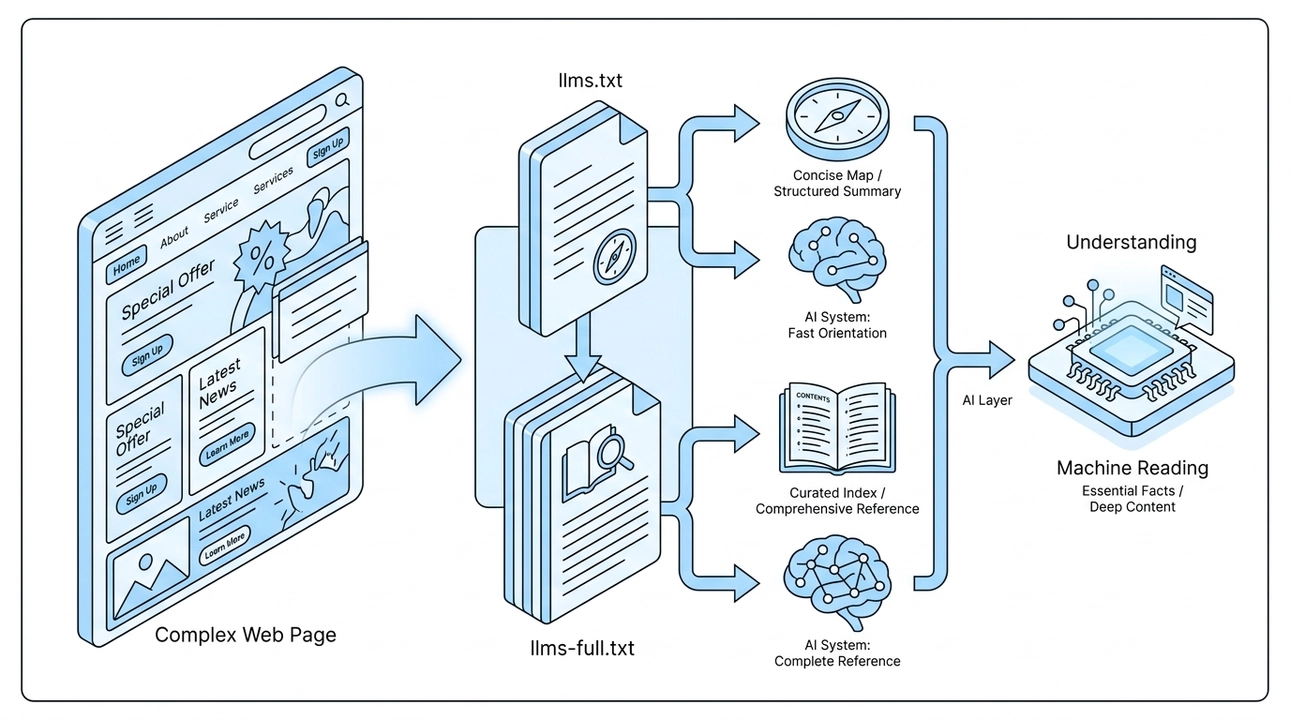
Think of it as a concise entry point. A clear map. When an AI system wants to understand who Moonion is, what we build, and who we work with, it can go directly to llms.txt and get a structured summary without having to reverse-engineer the design of a webpage.
llms-full.txt goes deeper. It is a comprehensive index of everything published on the site: all projects, all partners, each one with a direct link and a brief description. It is not a sitemap in the traditional sense. It is more like a curated table of contents written for machine readers, where every entry is meaningful and nothing is filler.
Together, these two files form what we call the AI layer of the site. One file for fast orientation, one for complete reference.
How We Structure the Project Briefs
The real substance lives in the individual entity briefs referenced from llms-full.txt. For each project or partner, a brief can include the main page URL, a description, the case study text, related partners, categories, technologies, team members, key events, and the text content from each section of that page.
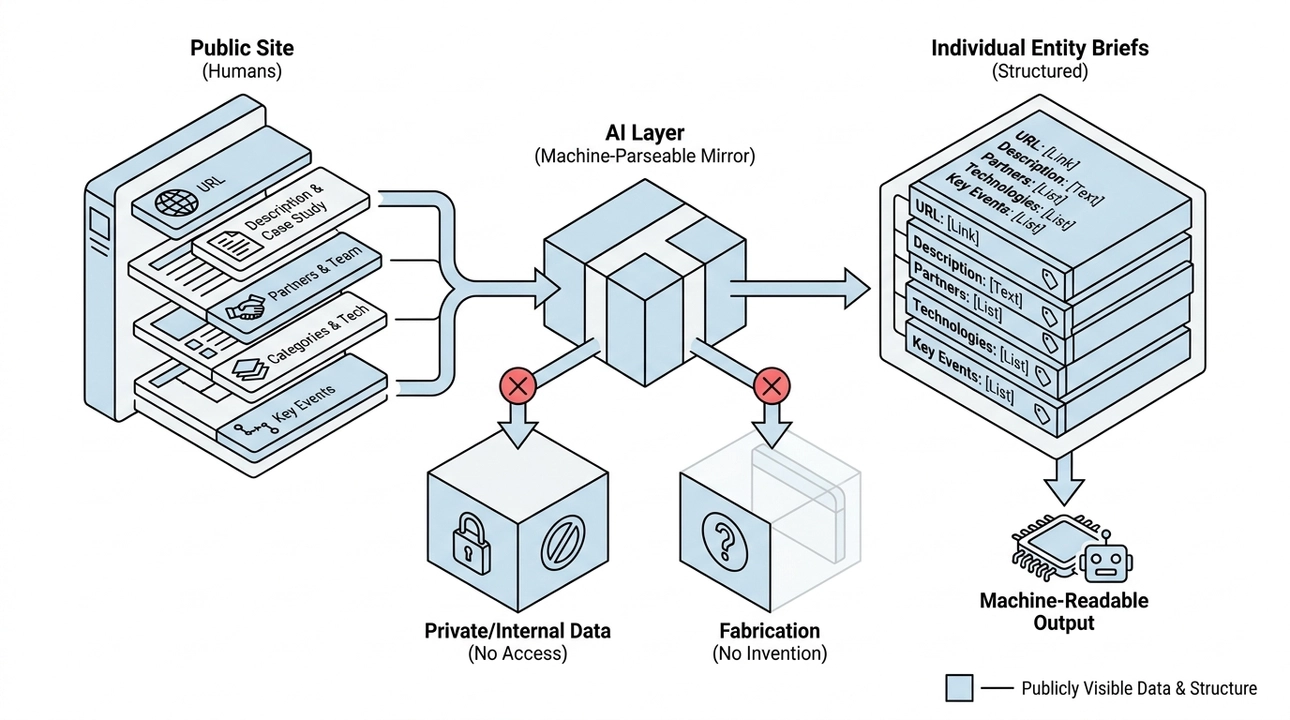
In other words, exactly what is already publicly visible on the page, just presented in a format that is easier for a machine to parse without ambiguity.
Two rules govern everything inside these files, and we treat them as hard constraints, not guidelines.
First: no private data. These files contain only what is already published and public. No internal notes, no administrative data, no information that lives behind any kind of access control. The AI layer is a clean mirror of the public site, nothing more.
Second: no fabrication. Every brief is assembled from the same real records and relationships that power the actual pages. If a field has no data, that block is simply omitted. We do not invent a description to fill a gap. We do not round up a partial fact to make the output look more complete. No data means no block, full stop.
These are the same principles we have carried through this entire content series: one source of truth for humans and for AI, and facts over approximations. The AI layer is just that principle applied at the infrastructure level.
Scaling This Across a Larger Site
For a portfolio site like Moonion's, a single index file and a set of entity briefs is enough. The structure is manageable and the content set is bounded.
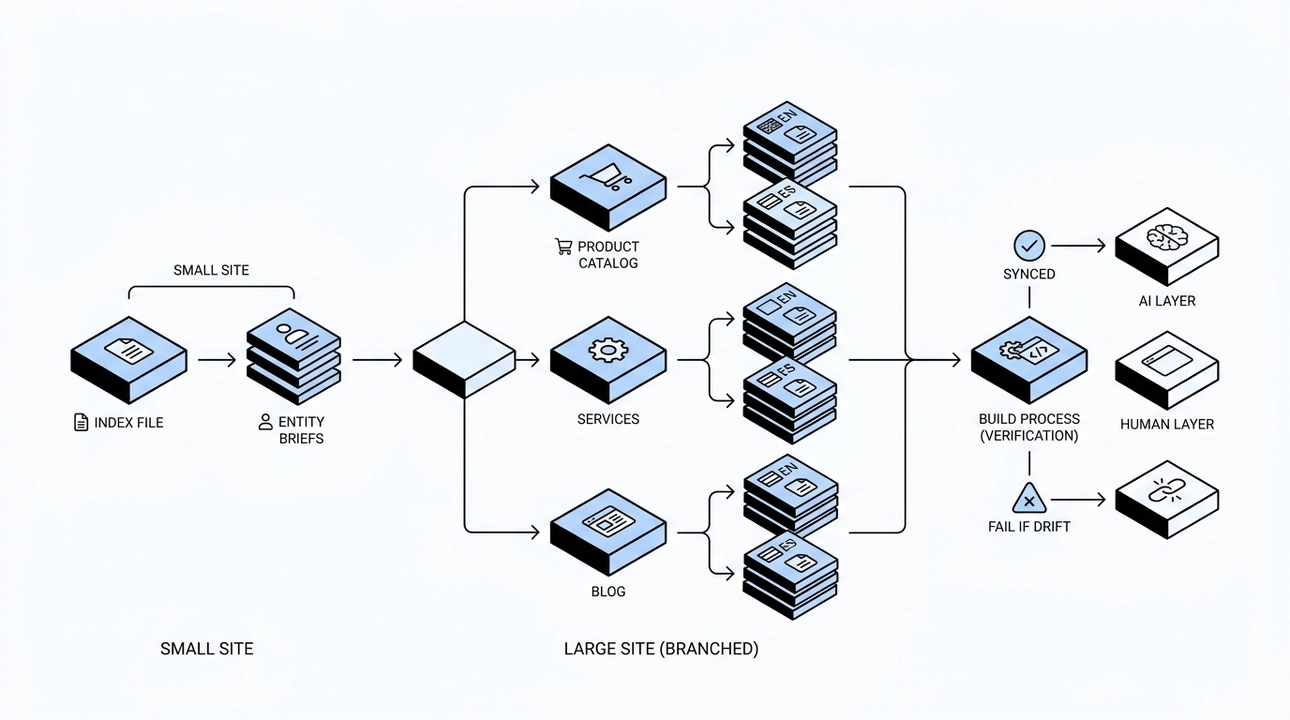
When the volume grows, the layer needs to branch. In a store we are currently building, the AI files are organized separately for the product catalog, for services, and for the blog. On top of that, each section has its own files per language. This means an AI system does not need to download the entire site to answer a question about one section. It can retrieve only the relevant part, which is faster, cleaner, and reduces the chance of cross-contamination between unrelated content areas.
The key design principle here is the same one that guides the rest of our architecture: structure the content so that the reader, whether human or machine, gets exactly what they need without having to infer or guess.
There is one more rule that emerged as the content volume grew: these files are verified automatically as part of the build process. The machine-readable version of the site cannot quietly drift away from the human-readable version. If the AI layer stops matching the actual content, the build fails. This is not optional discipline. It is enforced by the tooling, which means it actually holds.
What Happened When We Tested It
We did not ship this and hope for the best. We asked ChatGPT and Claude about Moonion directly, and we checked whether the answers matched reality.
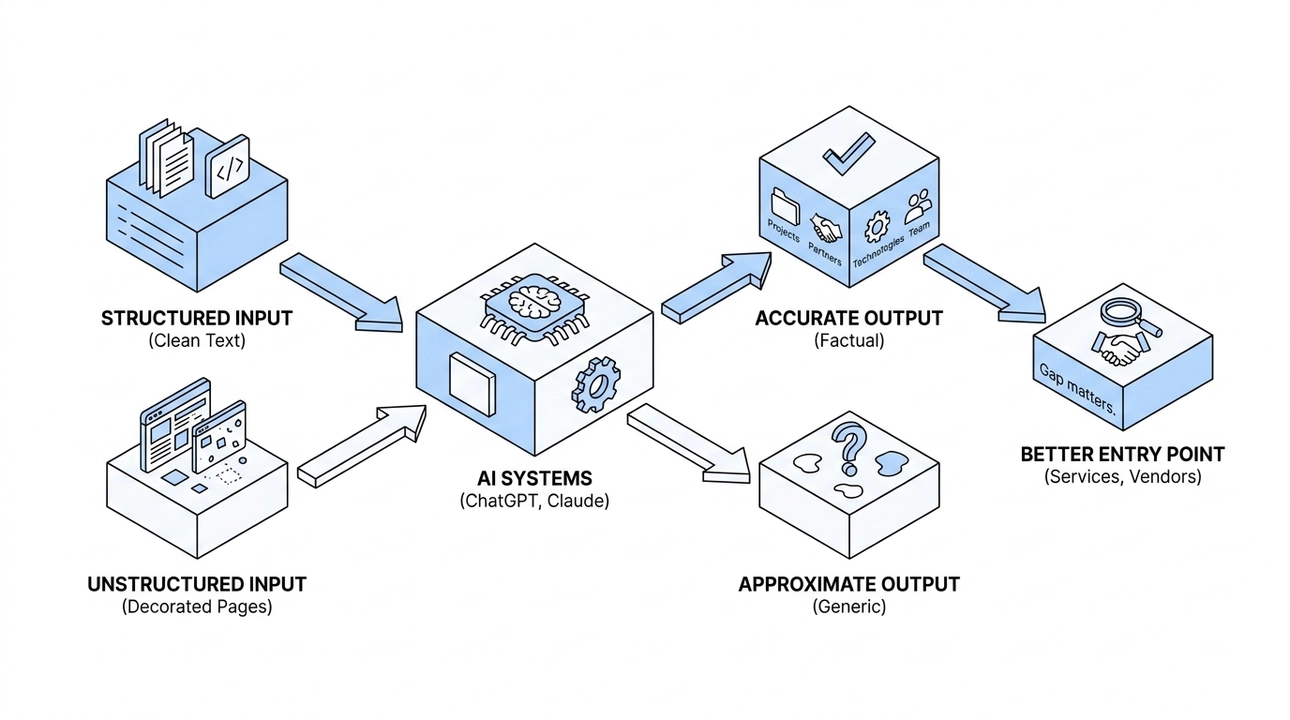
They did. Projects named correctly. Partners referenced accurately. Technologies and team details in the right place. All of this within a week of launching the AI layer, before the site had gone through a full indexing cycle.
I have run the same test on my own personal site, asking AI systems about me by name. The quality of the information I get back is noticeably better with properly structured files and clean text representation on the page than it was before. That is not surprising in retrospect, because the preconditions were there. But seeing it work is motivating in a specific way. It made me want to talk about it, because I know most companies are not doing this yet.
The AI systems genuinely find it easier to read clean text files than to parse decorated web pages. When you give them structured, factual input, they reproduce it accurately. When you leave it to chance, they approximate. That gap matters more every month as AI chat becomes a more common entry point for people looking for services, vendors, and collaborators.
Why This Is Worth Doing Now
This is not a large engineering project. For a portfolio or small business site, it is a few structured files and the discipline to keep them honest. The payoff is that you stop leaving your AI reputation to chance.
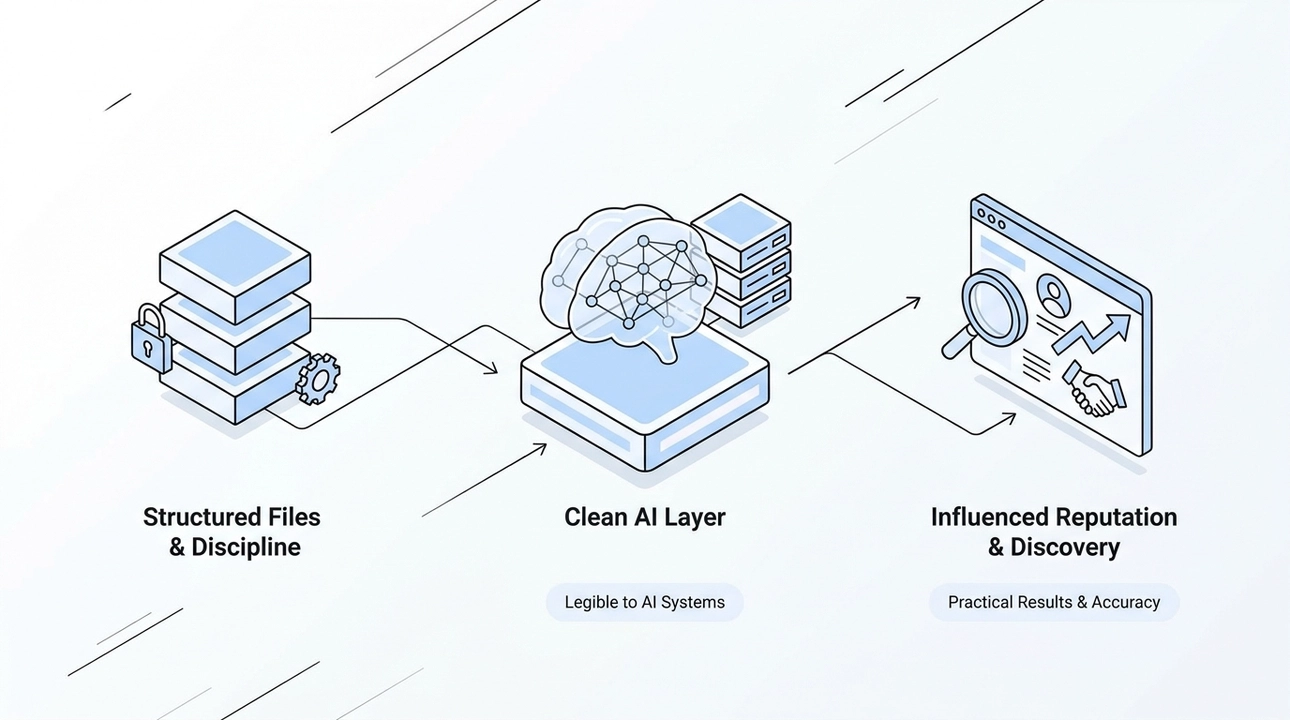
More people are discovering businesses through AI chat interfaces. That number is growing. When someone asks Claude which companies build blockchain-integrated platforms, or which teams specialize in high-load systems, the answer they get depends on what those AI systems have learned and how clearly that information was structured. You can influence that. You can give AI systems a clean, honest, accurate description of who you are and what you do, and you can verify that it stays accurate automatically.
That is what the AI layer is. Not a trick, not an optimization hack, not a speculative bet on some future technology. It is a straightforward practice: make your site legible to the systems that are already mediating discovery for your potential clients.
We built it because it was the right architectural decision. The results confirmed it was also a practical one.
15. How to Build an AI-Ready E-Commerce Store: The Data Model That Actually Works

An online store is, at its core, a large connected database presented to people. Products, categories, attributes, images, availability, pricing, shipping, returns, FAQs, reviews: every piece is structured data wearing a human-facing costume. Most stores treat it like content. That distinction is exactly where things break down, especially when AI enters the picture.
We have been building a demonstration catalog, a real working store on which we are testing everything described in this post against actual data volume. It is not yet published, but the data model is live and the workflows are running. We also have a first client for whom we are implementing this approach right now. So when we say this is not a hypothesis, we mean it literally.
The reason e-commerce demands extra care is that the cost of an error is higher here than almost anywhere else. A wrong fact on a blog post is an embarrassment. A wrong fact on a product card is a return, a complaint, or a lost customer. When AI is involved in generating or surfacing that content, the risk compounds. A model that "helpfully" fills in a missing specification, rewrites availability status, or approximates a price is not helping. It is creating liability.
The answer is not to avoid AI. The answer is to build a structure that makes it impossible for AI to guess at the things that matter most.
Start with the data model, not the copy
The most common mistake we see is teams reaching for AI-assisted copywriting before they have settled on how their data is actually organized. Copy is the last layer. The model is the foundation.
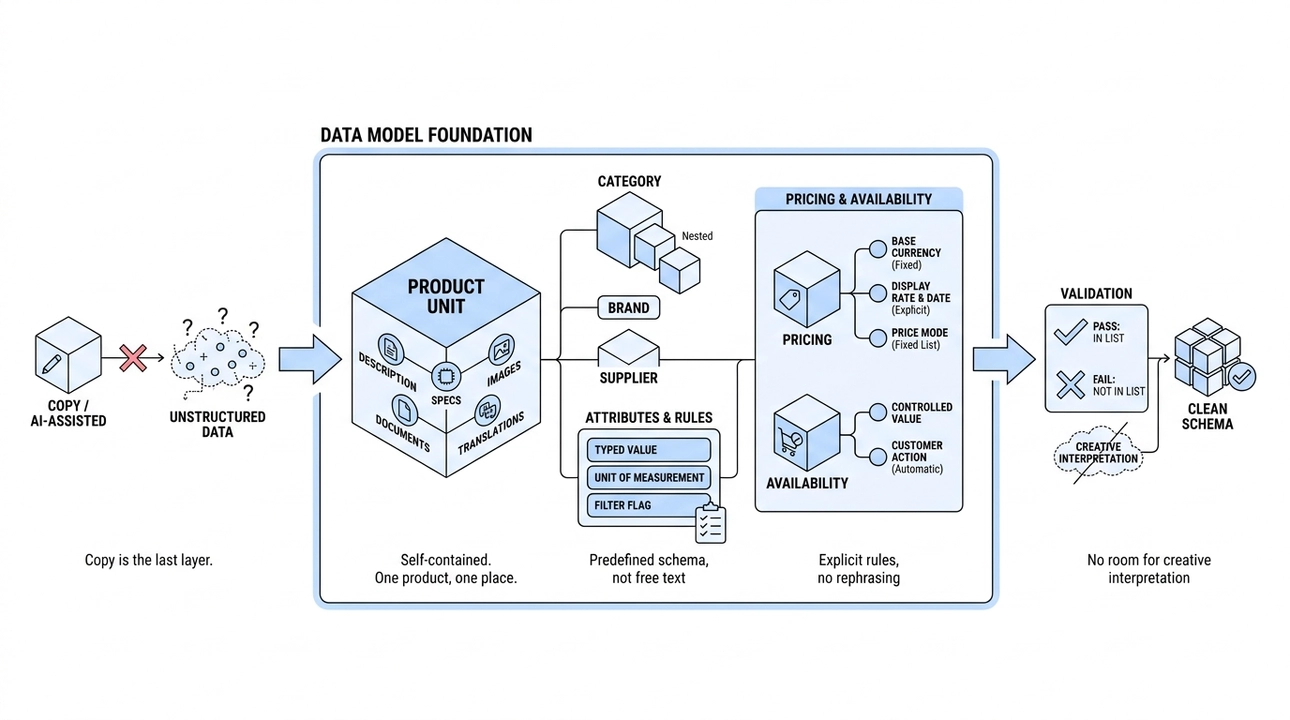
A product should not be a row in a database or a blob of HTML. It should be a self-contained unit where everything related to that product lives together: the description, the specifications, the images, the documents, and the translations. One product, one place. That discipline alone prevents a surprising number of errors because it is hard to accidentally corrupt something when everything about it is co-located and clearly bounded.
From there, relationships and rules do the heavy lifting. A product belongs to a category. It has a brand and a supplier. Its attributes are not drawn from free text but from a predefined set with typed values, units of measurement, and a flag for whether each attribute participates in filtering. Categories are nested, and products in a child category automatically appear in the parent. None of this requires clever AI. It requires deliberate schema design upfront.
Pricing and availability deserve special attention because they are the most sensitive fields in any store. These are not paragraphs that a model can rephrase. They are fields with explicit rules. The base currency of the catalog is fixed. Display rates and their last-updated date are declared explicitly. Price mode is chosen from a fixed list: fixed, starting from, ask for quote, hidden. Availability maps to a controlled set of values, and the correct customer-facing action, whether that is "add to cart," "notify me," or "request a quote," is determined by that value automatically.
The rule is simple: if a value is not on the list, it does not pass validation. There is no room for creative interpretation, and that is exactly the point.
How supplier data flows in without breaking anything
In theory, catalogs are filled manually by a content team. In practice, stores live on supplier files. A new Excel or CSV arrives, covering hundreds or thousands of SKUs, and someone has to reconcile it with what already exists. This is precisely the scenario where a general-purpose AI assistant is most dangerous: it will confidently map columns, guess at missing values, and write things into your database that are wrong in ways you will not catch until a customer does.
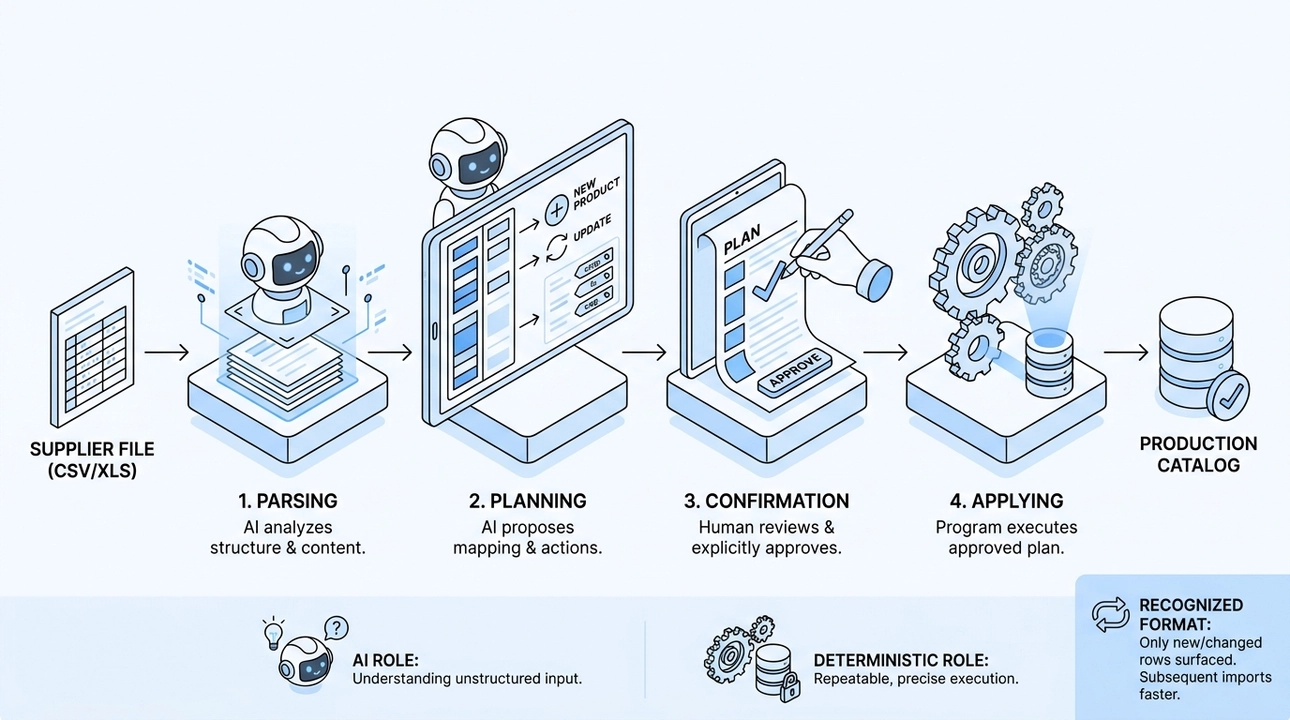
We handle this with a four-step process that keeps AI in a limited, well-defined role.
1. Parsing. The agent opens the supplier file and describes what it sees: where the headers are, what each column contains, how values are formatted, whether the structure matches a previously seen file from the same supplier.
2. Planning. The agent proposes a mapping: which columns become which attributes, which rows are new products versus updates to existing ones, what categories and brands are implied. The full plan is presented to a human before anything is written.
3. Confirmation. The human reviews the plan, corrects it if needed, and explicitly approves it. Nothing is applied without that approval. Nothing.
4. Applying. A deterministic program executes the approved plan. Not the model. A program. It does not re-interpret the file or make new judgments. It does exactly what was confirmed, and nothing else.
The principle here is the same one that runs through our entire content series: AI is good at understanding ambiguous, unstructured input, like a supplier's idiosyncratic spreadsheet. It is not suited to making autonomous writes to a production catalog. The understanding step benefits from a model's flexibility. The writing step requires determinism and repeatability.
One practical benefit of this approach is that a recognized supplier format only needs to be parsed once. On the second import, the system identifies the structure, and only new or changed rows are surfaced for review. The first import takes time. Every subsequent one takes minutes.
One source of facts, multiple languages
Multilingual stores introduce a specific failure mode that structured data prevents cleanly. When each language version of a product is managed as a separate document, factual drift becomes almost inevitable. Someone updates the price in the English version and forgets the French one. A spec changes in the original and the translation goes stale. Customers in different markets see different facts about the same product.
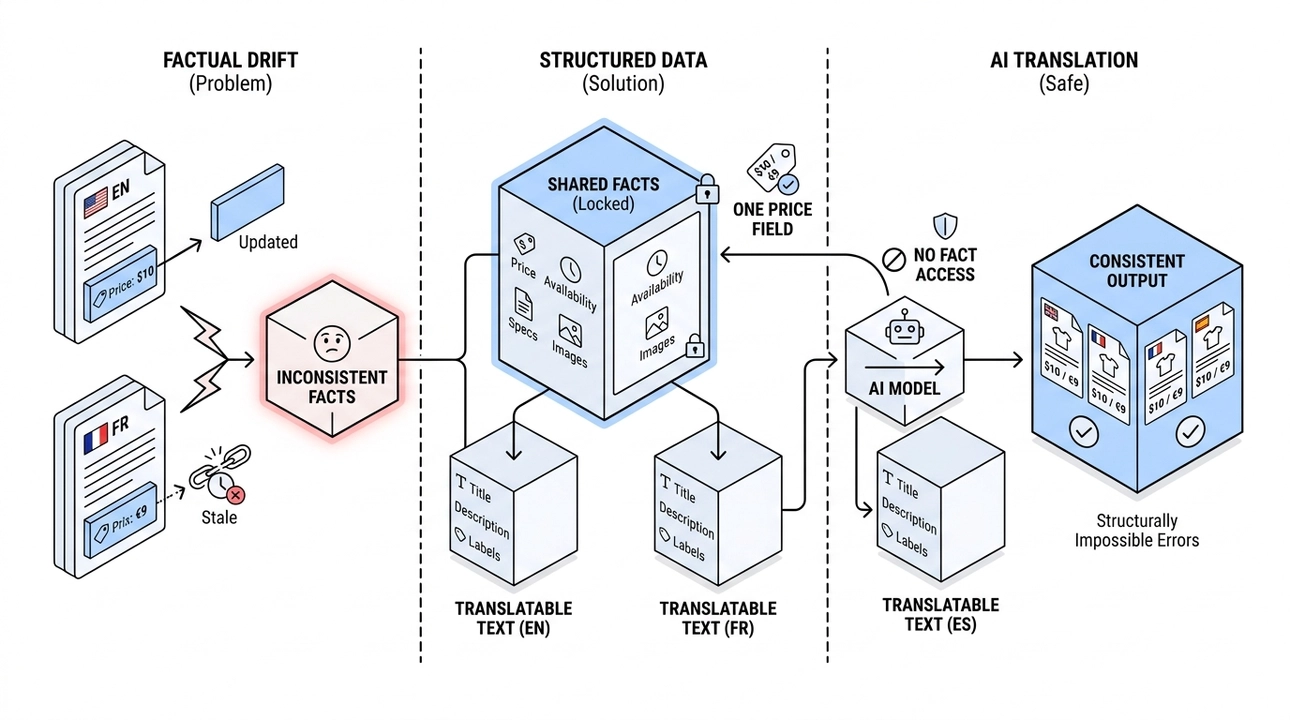
The fix is a strict separation between shared facts and translatable text. Price, availability, specifications, and images are stored once. They are not part of any translation. Translatable content, meaning titles, descriptions, and labels, exists per language, but it contains only text. When a price changes, it changes everywhere simultaneously because there is only one price field. Factual inconsistency across languages becomes structurally impossible, not a matter of process discipline.
This is also where AI genuinely helps and does so without risk. Translating product descriptions, generating multilingual FAQ entries, adapting category copy for a new market: these are all tasks where the model is working with text, not with facts. The facts are already locked. The model cannot get them wrong because it never touches them.
Why this structure determines your AI visibility
Consumers are increasingly asking AI systems to do what they used to do by scrolling: "Find me something like this," "Compare these two options," "What is the cheapest available version of this." For a store to appear in those answers, its product data needs to be machine-readable and accurate.
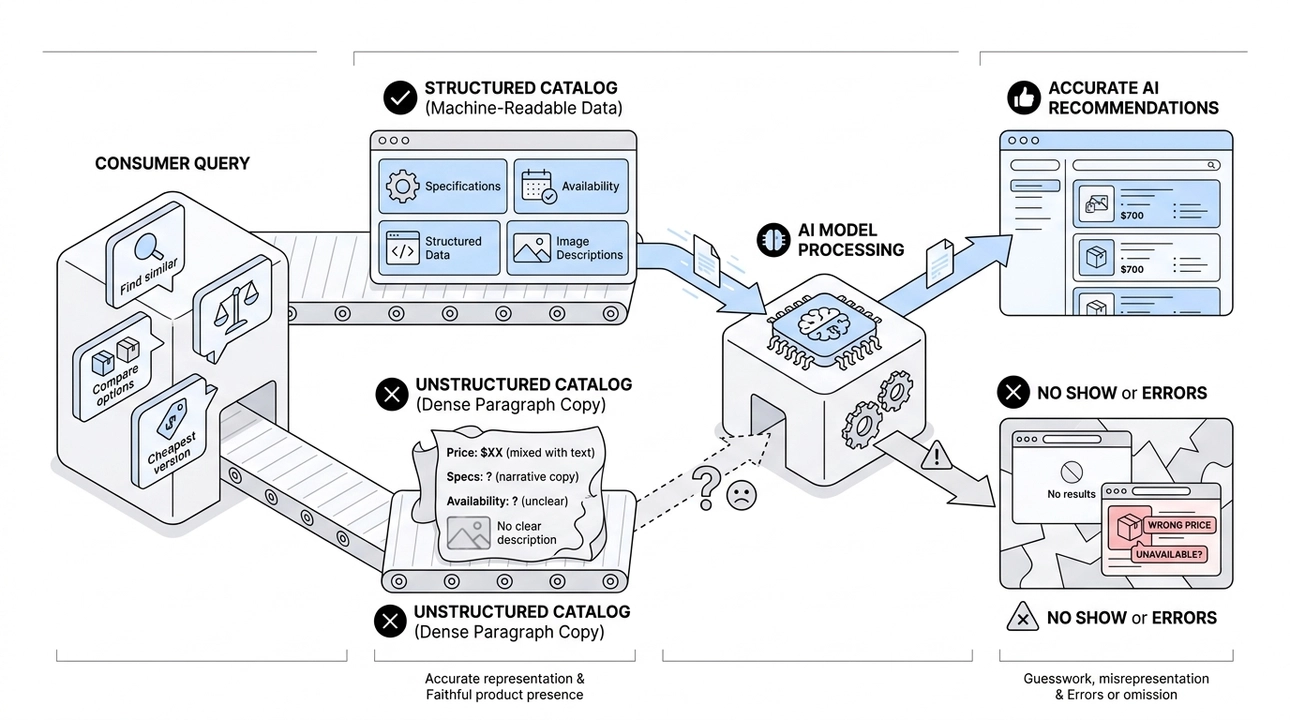
A model that encounters a well-structured product page with clear specifications, explicit availability, accurate structured data, and complete image descriptions can represent that product faithfully. A model that encounters a dense paragraph where price, availability, and specs are mixed into narrative copy has to guess, and it will sometimes guess wrong. Stores with clean, structured catalogs will show up in AI recommendations. Stores without them will not, or worse, will show up with errors attached.
This is not a prediction about what AI might eventually require. It is a description of how these systems work right now.
What AI does and what it does not do
The division of labor we apply to our e-commerce work is the same one we have described throughout this series, grounded more tightly here because the stakes are higher.
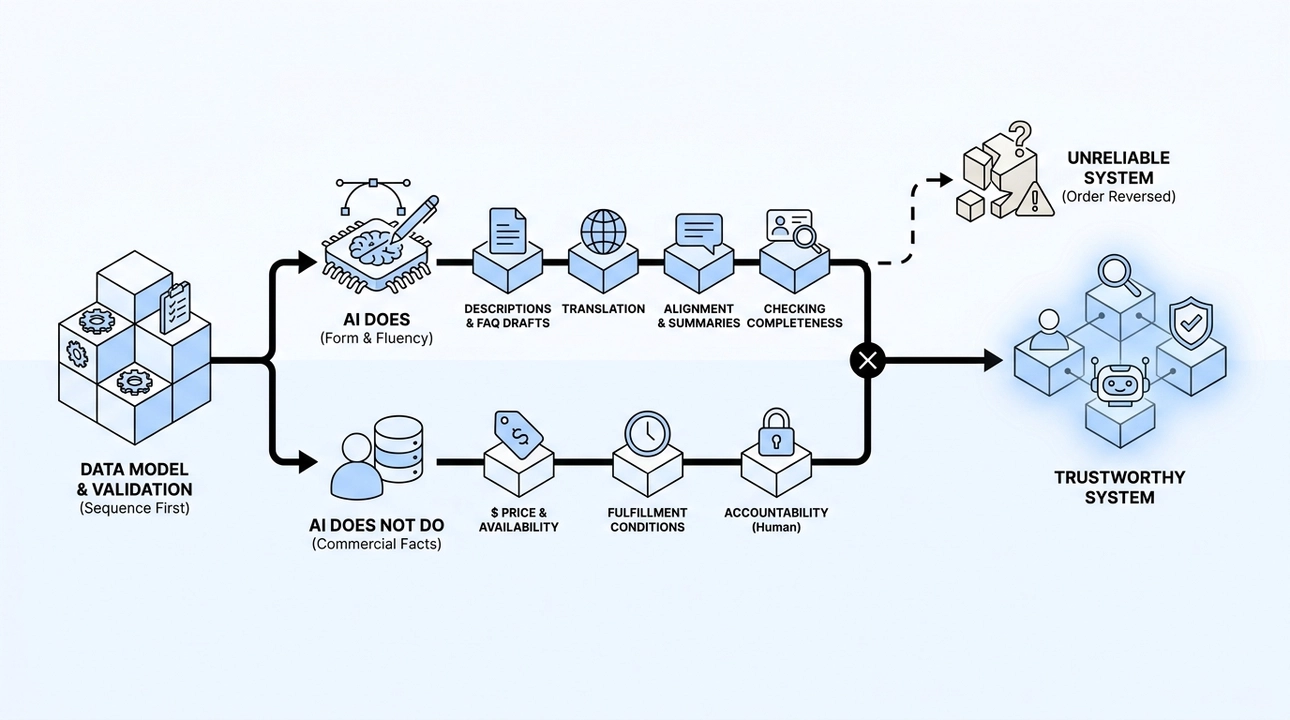
AI helps with form: writing clear product descriptions, drafting FAQ entries from real customer questions, bringing category naming into alignment, translating text, generating summaries for AI-facing layers of the site, checking card completeness (are dimensions included, is there a composition field, does every image have a description). These are exactly the tasks where a model's fluency adds value and where an error is recoverable.
AI does not determine commercial facts. Price, availability, and fulfillment conditions come from your source of record, whether that is a supplier file, an ERP, or a manually maintained field. A human is accountable for their accuracy. The model works downstream of those facts, never upstream of them.
The sequence matters as much as the roles. Data model first. Validation rules second. Reliable data sources third. Then AI assists with the layer that benefits from language and judgment. Reverse that order and the whole system becomes unreliable in ways that are hard to trace and expensive to fix.
For any e-commerce business, an AI-ready catalog is not a technical nicety. It is the difference between a system that a customer, a search engine, and an AI assistant can all trust, and one that quietly misleads each of them in different ways. We are building that system right now. The path is clear, and the trade-offs are manageable. The harder part is deciding to start with the model instead of the copy.